

Markdown Superscript and Subscript: Portable Workarounds
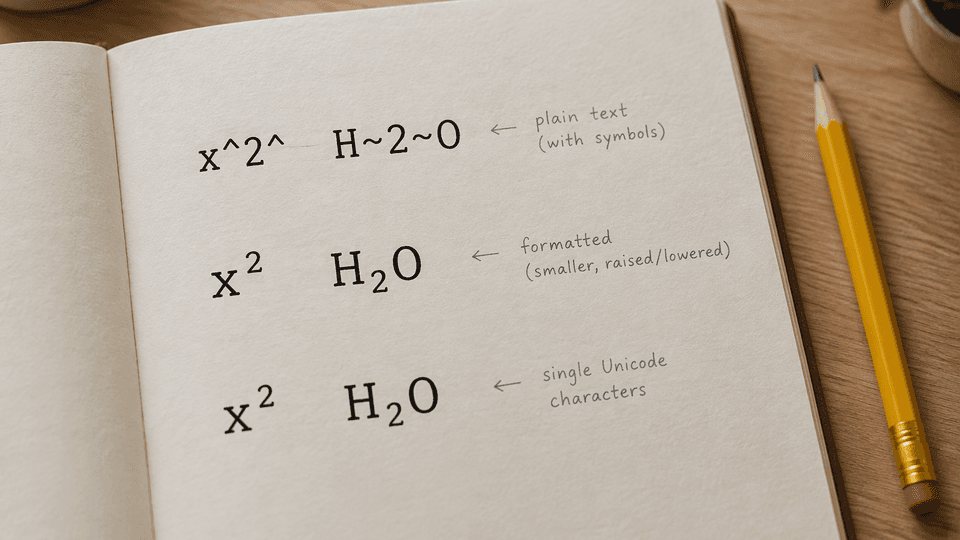
You need x squared in a README, or water, H<sub>2</sub>O, in a project note, and the caret you typed just renders as a visible ^. That happens because core Markdown has no native superscript or subscript syntax. You still have three portable options: caret and tilde extension syntax where your renderer supports it, HTML sup and sub tags that survive most renderers, or Unicode characters for short, one-off text. This guide shows each option, where it works, and how to pick one that keeps a shared local file portable.
Why core Markdown has no superscript or subscript
The core Markdown spec covers headings, emphasis, lists, code, links, and images, but not raised or lowered text. A 2025 complete guide on the topic states it plainly: standard Markdown lacks native support for superscript and subscript, and platforms fill the gap with extensions or HTML (markdowntools).
You can see the gap in practice. A Jekyll user tried superscript^2^ with kramdown-parser-gfm and the carets stayed in the output as literal text; the thread also points out that the GitHub Flavored Markdown spec does not include superscript at all (Jekyll Talk). The same thread settles on HTML tags as the working answer. The Doks documentation takes the same position for its parser: use HTML elements for subscript and superscript (Doks extended syntax).
That gap is a design trade, not an oversight. A small core is what makes a Markdown file open the same way in dozens of tools. When you write raised or lowered text, the question is not "what is the syntax" but "which renderer will show this file," and that is exactly how you should choose below.
Option 1: caret and tilde extension syntax
Some Markdown processors extend the core with paired markers:
x^2^     superscript in Pandoc-style Markdown
H~2~O    subscript in the same family
If your rendering chain is one of the processors that accepts these forms, they are the cleanest to read in the raw file. The catch is uneven support. The kramdown result above is one example of a parser that ignores them, and parser support varies by tool and configuration (Jekyll Talk).
Use this option only when you control the pipeline end to end, for example a Pandoc-based build where you can test the output once and trust it afterward. In a file that travels, treat caret and tilde as the least portable of the three options.
Option 2: HTML sup and sub tags
x<sup>2</sup>
H<sub>2</sub>O
CO<sub>2</sub> emissions per mile
Many Markdown renderers pass inline HTML through, and the HTML elements for raised and lowered text are <sup> and <sub>. The markdowntools guide calls the HTML approach the most reliable cross-platform method, and it shows the same pattern working across GitHub, GitLab, Obsidian, and Jupyter (markdowntools). Docs such as TIC's Markdown essentials recommend the sup and sub tags for superscript and subscript text as well (TIC docs).
One safety note before you rely on raw HTML in a shared file: sanitizing renderers strip HTML they do not allow, and comment fields are the most common place for that to happen. Test the exact target renderer once with the snippet above. If the tags survive, they will keep surviving. If a renderer strips them, the file degrades to readable literal text like H<sub>2</sub>O, which is annoying but not broken.
Option 3: Unicode characters
For short, static text you can use characters that carry the position in the glyph itself:
| Meaning | Unicode | Characters used |
|---|---|---|
| x squared | x² | superscript two |
| water | H₂O | subscript two |
| carbon dioxide | CO₂ | subscript two |
| 10 to the minus 3 | 10⁻³ | superscript minus and three |
Superscript digits run from ⁰ through ⁹, and subscript digits run from ₀ through ₉, so numeric exponents and chemical formulas convert cleanly (markdowntools).
Three caveats keep this a niche option. First, letter coverage is incomplete: there is no full superscript or subscript alphabet, so a and most capital letters have no usable glyph. Second, fonts differ, and a missing glyph shows as a box or a fallback shape on some systems. Third, the characters replace the underlying letters and digits, so they are the hardest of the three options to find and revert later, and screen readers may read them inconsistently. Reach for Unicode when you need one or two glyphs in a file that will never be regenerated programmatically.
Which renderers support what
| Option | Works in | Fails in |
|---|---|---|
Caret and tilde (x^2^, H~2~O) | Pandoc-style processors and similar extensions | GitHub Flavored Markdown, kramdown GFM, plain CommonMark renderers |
HTML <sup> and <sub> | Renderers that pass inline HTML, including GitHub and GitLab Markdown | Sanitizing renderers and many comment fields |
| Unicode (x², H₂O) | Any renderer that displays plain text | Fonts without the glyph |
Where Fylune fits
Fylune is a local-first document workspace for ordinary Markdown, MDX, and image files. Your files stay in the project folder as regular text, so the HTML and Unicode options remain readable in the raw file no matter which tool opens it next. Documented rich rendering in Fylune covers Mermaid diagrams, mind maps, KaTeX formulas, tables, task lists, media, and safe MDX blocks, so a document with raised text and real math lives side by side in one file (Fylune product overview).
For text-level jobs like chemical formulas, ordinals, and citation markers, the <sup> and <sub> workarounds above are the right size. For actual mathematics such as x² + y² = r², use a math renderer instead of faking exponents; Fylune renders KaTeX formulas inside the document experience.
Choosing a portable option for shared local files
Work through four questions in order:
- Who else renders this file? If you cannot control the renderer, use HTML
<sup>and<sub>and confirm once that the target renders them. - Do you own the pipeline? For a Pandoc build or a similar processor you control, caret and tilde keep the raw file cleanest.
- How many glyphs do you need? One or two static glyphs, never regenerated: Unicode is the smallest change.
- Is it real math? Use KaTeX or MathJax rather than stacking sup tags for a multi-line equation.
Reversibility matters as much as rendering. HTML tags and caret syntax are easy to find and replace later because they preserve the original characters. Unicode substitutes the characters themselves, so a decision to move from x² back to editable x^2^ means retyping the exponent. In files that multiple people and AI agents edit, prefer the option that stays reversible.
Quick reference
| Job | Extension syntax | HTML | Unicode |
|---|---|---|---|
| x squared | x^2^ | x<sup>2</sup> | x² |
| water | H~2~O | H<sub>2</sub>O | H₂O |
| exponent like 10 to the minus 3 | 10^-3^ | 10<sup>-3</sup> | 10⁻³ |
| chemical formula | CO~2~ | CO<sub>2</sub> | CO₂ |
The most portable default is HTML sup and sub: it renders across the widest set of Markdown tools, degrades to readable literal text where it is stripped, and keeps the original characters editable. Start there, then switch to extension syntax or Unicode only when a specific renderer or a specific glyph gives you a reason.
Related reading
- Markdown Bold, Italic, and Strikethrough: Inline Emphasis Syntax, for the emphasis family that does have core syntax.
- Markdown Underline and Highlight: Workarounds for Missing Syntax, the other missing-syntax pair with parallel workarounds.
- Markdown Code Blocks: Fences, Inline Code, and Language Hints, the code fallback when you want formulas shown as code.
Sources
- markdowntools, "Markdown Subscript and Superscript: Complete Guide for Scientific and Mathematical Notation" (2025): https://blog.markdowntools.com/posts/markdown-subscript-superscript-complete-guide
- Jekyll Talk, "kramdown-parser-gfm SuperScript and Subscript support": https://talk.jekyllrb.com/t/kramdown-parser-gfm-superscript-and-subscript-support/9087
- Doks, Markdown extended syntax reference: https://getdoks.org/docs/reference/markdown-extended-syntax/
- TIC docs, Markdown essentials: https://docs.tic.io/essentials/markdown
- Fylune product overview, rendered Markdown and KaTeX support: https://www.fylune.com
If you keep your writing in ordinary local files, try these superscript and subscript options in Fylune and watch how the same file behaves in your other tools. Fylune is available for macOS at https://www.fylune.com/download.