

How to Write Equations in Markdown: Inline and Display Math
Markdown has no equation syntax of its own. You write a formula in LaTeX notation, wrap it in dollar signs, and a math renderer such as KaTeX or MathJax typesets it. The two forms you need:
- Inline math:
$E = mc^2$sits inside a sentence. - Display math:
$$...$$on its own lines becomes a centered block.
The catch is that the same dollars render on some platforms and stay as literal text on others. This guide covers the syntax, the LaTeX fragments you type most, why formulas fail to render, and which tools typeset math today, including how Fylune renders KaTeX formulas in local Markdown files.
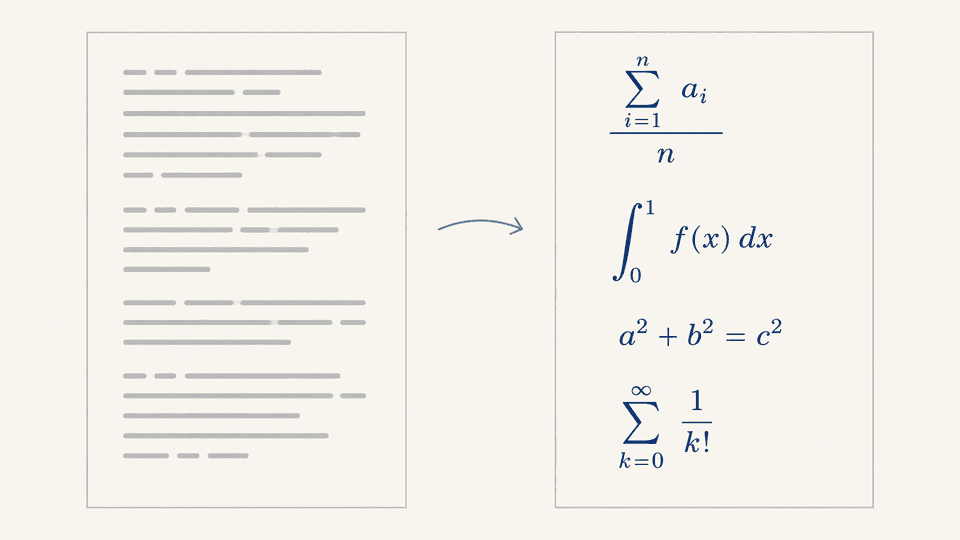
Inline math: single dollar signs
Write the formula between two dollar signs, tight against the content, on one line:
The identity $\sin^2\theta + \cos^2\theta = 1$ holds for every angle $\theta$.
A renderer turns that into typeset math inside the sentence. Rules that matter:
- The opening and closing dollars must be on the same line, in the same paragraph.
- Do not put a space immediately after the opening dollar or before the closing one; some renderers treat that spacing as literal text.
- If no math renderer is present, the dollars print as characters. That is the most common failure, and it is not a typo in your formula.
Display equations: double dollar signs
Put $$ on its own line, the equation on the next line, and closing $$ on a line after:
$$
\frac{d}{dx}\left(e^x\right) = e^x
$$
For multi-line derivations, use aligned inside the block:
$$
\begin{aligned}
(a+b)^2 &= a^2 + 2ab + b^2 \
(a-b)^2 &= a^2 - 2ab + b^2
\end{aligned}
$$
Reserve display math for formulas a reader should notice, multi-line derivations, and anything with fractions or sums tall enough to break line spacing when used inline.
The LaTeX fragments you will type most
| Goal | Write | Renders as |
|---|---|---|
| Fraction | \frac{a}{b} | a stacked over b |
| Subscript | x_i, a_{i,j} | x with i below the line |
| Superscript | x^2, e^{i\pi} | x raised to a power |
| Summation | \sum_{i=1}^{n} x_i | sigma with bounds |
| Square root | \sqrt{b^2-4ac} | radical over the expression |
| Greek letters | \alpha \beta \theta | alpha, beta, theta |
| Multiplication | a \times b | times sign |
| Inequalities | \leq \geq \neq | less or equal, greater or equal, not equal |
Everything inside the dollars is LaTeX math mode, not Markdown. Asterisks, underscores, and backticks have no meaning there, so you do not escape them.
Why your formula shows as raw text
Four causes, in order of frequency:
- No renderer. The CommonMark specification has no math support. GitHub maintainers state the pattern plainly: "Markdown does not support equation on its own. For equation to be displayed, a third party is required," with GitHub using MathJax to render equations. If the surface you paste into has no math pipeline, the dollars stay literal no matter how correct the syntax is.
- Escaped dollars. A backslash, as in
\$, prints a literal dollar sign and never starts math. If your content passed through a converter, check for backslashes before the dollars. - Dollar collisions. Two prices on one line, like
$5 and $10, look exactly like inline math with5 and ` as the formula body. Some syntax highlighters and renderers interpret them that way; the VS Code team tracks a case of dollar amounts being highlighted as math in Markdown files. Fix it by escaping the first dollar (`\$5) or by moving amounts to separate lines. - Stray spacing. A space right after the opening dollar, or a wrapped line inside the pair, can stop the renderer. Keep the pair tight and on one line.
Quick diagnostic: if the dollars appear in the output, the problem is the renderer; if the dollars disappear but the formula looks garbled, the problem is LaTeX syntax inside the pair.
Which tools typeset math today
| Tool | Syntax support | Engine | Notes |
|---|---|---|---|
| GitHub (README, issues, comments) | $...$ and $$...$$ | MathJax | Typesets in most Markdown surfaces on github.com |
| VS Code built-in preview | $...$ and $$...$$ | KaTeX | The editor also highlights dollar-sign edge cases |
| Obsidian | $...$ and $$...$$ | MathJax | Reading view typesets the formulas |
| Fylune | $...$ and $$...$$ | KaTeX | Renders inside the document experience on local files |
| Plain CommonMark renderers | none | none | Dollars stay literal |
One caveat: support can differ per surface on the same tool. GitHub renders math in Markdown files and comments, but a plain .md viewer elsewhere will not. Check the exact surface you publish to, not just the brand name.
Fylune: equations in local Markdown files
Fylune is a local-first document workspace for ordinary Markdown and MDX files, and KaTeX formula rendering is part of its rich Markdown support:
- Open a Markdown file inside your project folder.
- Type inline math with
$...$, or a display block with$$...$$. - The preview typesets the formulas with KaTeX inside the document experience.
- Save. The file is still plain Markdown: Git, other editors, and AI agents that share the folder read the same dollar signs.
Core local editing, including opening, editing, and searching these files, is free and needs no account. If you want to test this workflow on your own files, download the app at fylune.com/download.
Quick reference card
| Task | Write this |
|---|---|
| Inline math | $a^2 + b^2 = c^2$ |
| Display math | $$ ... $$ on its own lines |
| Aligned multi-line derivation | \begin{aligned} ... \end{aligned} inside $$ |
| Literal dollar sign | \$ |
| Fraction | \frac{p}{q} |
| Summation with bounds | \sum_{i=1}^{n} |
FAQ
How do you write equations in Markdown?
Wrap LaTeX in dollar signs: single $...$ for inline math, double $$...$$ on their own lines for display math, then view the file in a renderer such as KaTeX or MathJax.
Does Markdown support math natively?
No. The CommonMark specification has no math syntax. Math rendering always comes from a renderer add-on.
Why do prices like "10" break my document?
A dollar pair can be read as inline math. Escape one dollar as \$, or keep the amounts on separate lines.
Related reading
- Mermaid Editor Guide: diagrams that sit beside equations in the same document.
- Markdown Code Blocks: when you want raw math as code instead of typeset.
- Markdown Line Breaks: spacing rules that matter around display math.
Sources
- Markdown Math Rendering Across Platforms: wrapping a formula in dollar signs typesets on some platforms and stays literal on others.
- Quarto discussion: Markdown does not support equations on its own; a renderer such as MathJax is required, and GitHub uses MathJax.
- Stack Overflow: community answer on showing math equations in GitHub Markdown.
- VS Code issue 136535: dollar amount incorrectly highlighted as a math equation in Markdown.
- Fylune product overview (
docs/product-overview.md): KaTeX formulas render inside the document experience; core local editing is free and requires no account.