
California DMV REG 101 Ownership and Error Statement: Fill Online Free
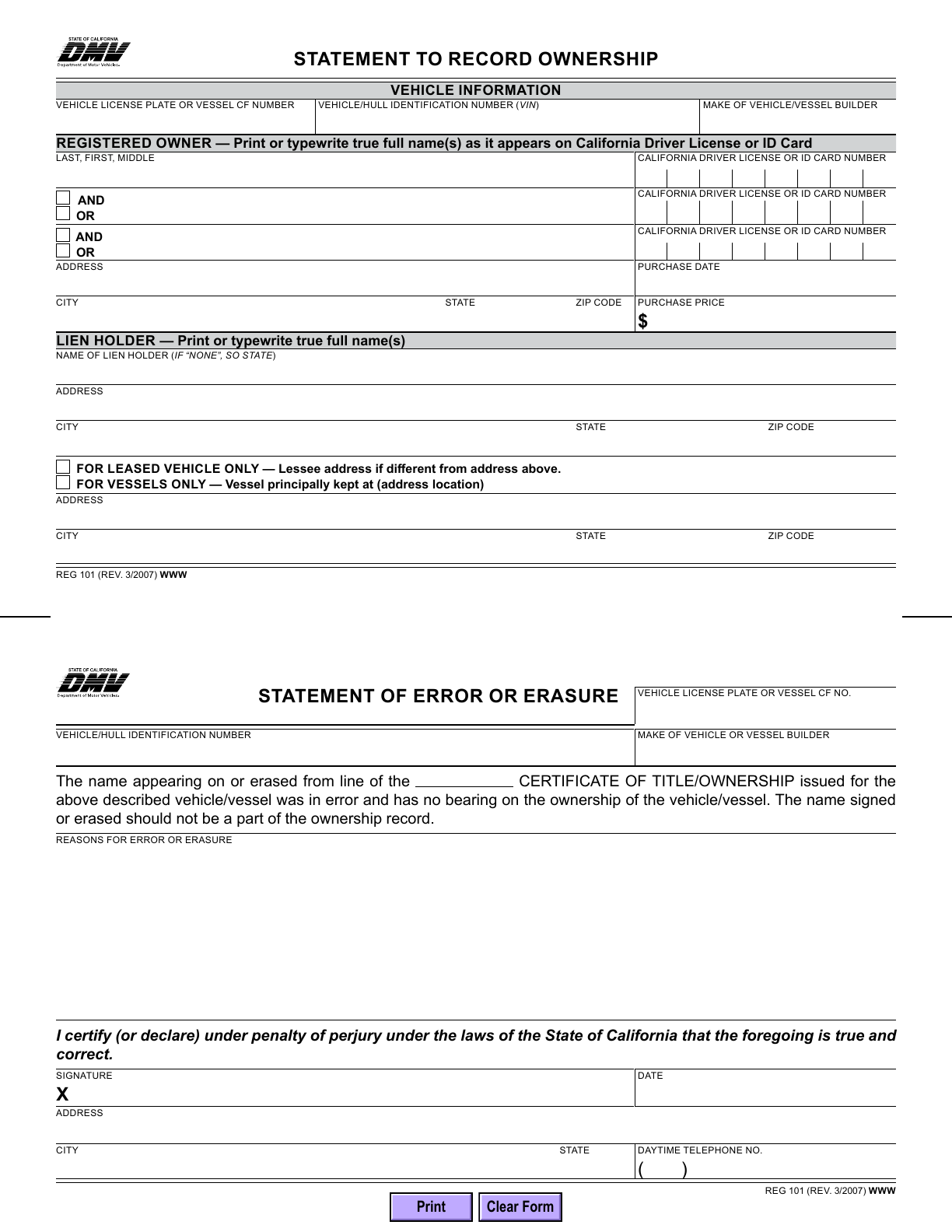
REG 101 combines California DMV’s Statement to Record Ownership with its Statement of Error or Erasure. Fill the part needed for your title transaction, check owner and lienholder details, then download a copy to review and sign where required.
What is REG 101 used for?
REG 101 has two purposes: clarifying recorded ownership information and explaining a name entered or erased in error on a title. These are separate statements on the same page.
Who should complete it?
An applicant may need the ownership statement when title owner spaces are full or incorrect. A person who made a title error completes the error statement. Leased-vehicle applications may need REG 101 for separate address details.
When is REG 101 not a substitute?
Do not use it as a generic bill of sale or missing-title application. An error statement does not automatically undo a transaction or establish ownership. Odometer mistakes can require different documentation; ask DMV before altering an odometer entry.
Current form status
- Current edition
- 2007-03-01
- Verified
- 2026-09-13
- Pages
- 1
How to fill REG 101 online
- 1
Identify the statement you need
Use your DMV transaction instructions to choose the ownership section, the error section or both. Do not manufacture an explanation for an entry you cannot verify.
- 2
Fill from the title and supporting records
Check the vehicle identifiers, complete names, address details and co-owner choices. Read the completed PDF at a comfortable zoom.
- 3
Review, download and complete signing
Inspect the full page, sign the applicable statement outside this editor and assemble the documents DMV requests for the transaction.
Fill REG 101 with Faye
Faye asks whether you need the ownership statement, the error or erasure statement, or both, and helps enter only the relevant details. Answers fill supported fields after each reply, with corrections and undo. Faye asks you to choose AND or OR; it does not determine ownership, supply a signature or submit your statement.
Field guidance
Vehicle and registered owners
Enter the plate/CF number, VIN/HIN, make and owner names as shown on the relevant records. The owner fields include separate California driver license or ID numbers.
AND or OR for each co-owner
Match the title/application. Select only one of AND or OR for each added owner. The original PDF uses separate controls, so review the result and ensure both are not selected.
Purchase and lienholder details
Keep purchase date and price separate from address fields. Enter the lienholder information; the form instructs you to write None when there is no lienholder.
Separate address or vessel location
Choose the relevant leased-vehicle or vessel option and complete its address. These fields are not an additional lienholder address.
Error or erasure statement
Identify the affected title line and explain the actual mistake. Complete the declarant’s contact details and date, keeping the signature separate from typed text.
Information and documents to have ready
- The title or application containing the ownership information or error
- Accurate vehicle identifiers, owner identities and lienholder details
- The other documents requested for your title correction or transfer; REG 101 is supporting paperwork, not the entire application
Who signs the error statement?
The individual who made the error or erasure completes that statement. Its signature certifies the declaration under penalty of perjury. Typing contact details does not sign it. Download for a handwritten signature when submitting on paper; confirm any electronic-signature requirements directly with DMV.
Submit with the DMV transaction
Attach the applicable statement to the title/application documents for the correction or transfer. Confirm the current DMV submission route and any fees for that transaction. Fylune does not send the downloaded form to DMV or confirm acceptance.
Common REG 101 mistakes
- Selecting both AND and OR for the same co-owner
- Leaving lienholder information out or placing it in the separate-location fields
- Using the wrong statement for the problem on the title
- Having someone who did not make the error provide the error declaration
- Assuming that typed names, downloading or cloud saving signs or submits the form
REG 101 questions
Can I fill REG 101 online free?
Yes. Manual filling is free and needs no sign-in. DMV also provides its blank PDF free.
Is REG 101 one form or two?
The verified one-page PDF contains two separate statements: ownership information at the top and error or erasure below. Complete the part your transaction requires.
Why must I check AND and OR carefully?
These choices describe how co-owner names are joined. The original PDF controls are independent; ensure only the intended choice remains selected for each co-owner before downloading.
Does Fylune correct the DMV ownership record?
No. Fylune helps you prepare a PDF. DMV must receive and process the required transaction documents to change its records.
Form edition and verification history
Revision month printed on the official REG 101. DMV does not specify a revision day.
Official source, one-page layout, ownership controls, field mapping and blank preview verified; original PDF fingerprint recorded.
Independent form preparation
Fylune is not California DMV, has no government endorsement and does not provide legal advice. This page cannot settle an ownership dispute. Follow current DMV instructions and obtain professional advice when the ownership situation is unclear.