
California DMV REG 256 Statement of Facts: Fill Online Free
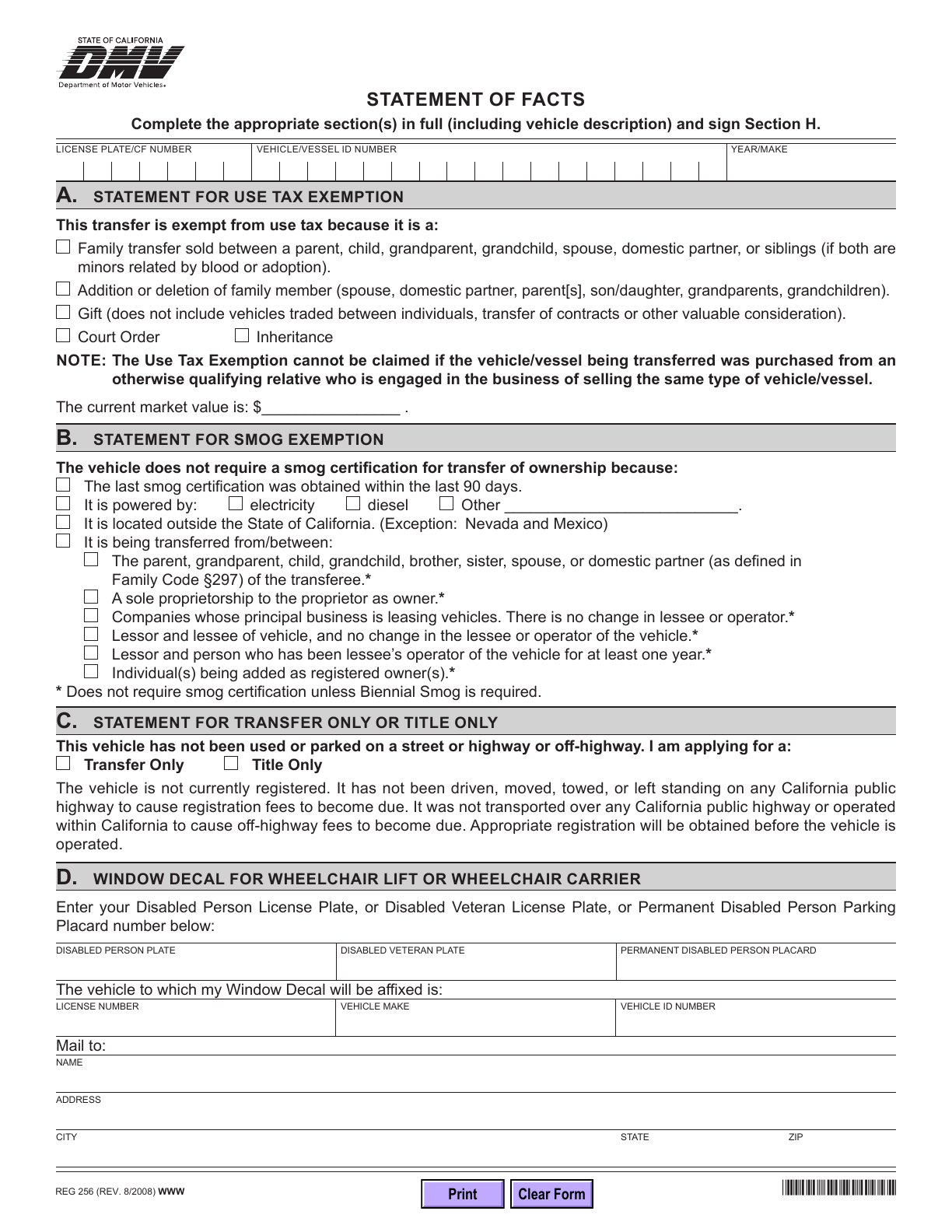
REG 256 is California DMV’s Statement of Facts for explaining circumstances that support a vehicle or vessel transaction. Fill the relevant sections of the official two-page PDF, review both pages, then download your copy for signing.
What is REG 256?
This supporting statement covers several DMV situations rather than a single application. Its sections address exemptions, transfer-only or title-only requests, wheelchair decals, vehicle changes, name statements and other facts.
Who should use this form?
Use it when your California vehicle or vessel transaction calls for a Statement of Facts. DMV identifies it among documents used for gifts, family transfers and title name changes; the complete requirements depend on the transaction.
When is another form needed?
REG 256 does not replace a missing title application, a bill of sale or the seller’s release-of-liability notice. Do not select an exemption simply because it appears on this older printed edition: confirm that the current DMV rules apply to your circumstances.
Current form status
- Current edition
- 2008-08-01
- Verified
- 2026-09-13
- Pages
- 2
How to fill REG 256 online
- 1
Choose the relevant sections
Read your transaction’s current DMV checklist before entering personal details. Open the official PDF and leave unrelated sections blank.
- 2
Enter information and review both pages
Use your vehicle records and truthful facts. Check checkbox selections, dates and text fit rather than relying on automatic PDF validation.
- 3
Download, sign and assemble
Inspect both pages, complete the signature in a format DMV accepts, and assemble the documents required for your transaction.
Fill REG 256 with Faye
Faye asks which REG 256 sections you need, then helps enter vehicle details, your supplied facts and applicant information. Supported answers fill the PDF after each reply, with corrections and undo. You can skip unknown information and review it yourself. Faye does not decide tax or smog exemptions, sign or submit the form.
Field guidance
Vehicle identification
Match the plate or CF number, VIN or HIN, and year/make to the vehicle records. Check the repeated header on page two.
Sections A and B: exemptions
Read every condition and exception beside the selected reason. Tax and smog exemptions are different; one does not establish the other.
Sections C and D: specific requests
Section C contains a vehicle non-use declaration. Section D asks for disability credential, vehicle and mailing details for the decal request.
Section E: vehicle changes
Provide values, cost, date and before/after details. The form calls for the ownership certificate and, for applicable weight changes, a Public Weighmaster Certificate.
Sections F, G and H
Use the name statement or factual explanation that fits. Review the declaration before signing Section H; printed names and the signature are separate.
How to complete Section G: Statement of Facts
Explain the specific issue DMV asked you to clarify. A writing scaffold is: “The record shows [entry]. The correct information is [fact]. On [date], [what happened].” Use only the parts that fit your situation and facts you can support. This example does not establish an exemption or replace transaction-specific instructions.
What should you prepare?
- Vehicle or vessel records and the facts supporting your selected section
- The title and transaction-specific supporting documents listed by DMV
- Any certificate requested in the section you complete; not every section has the same attachments
Review Section H before signing
You can add your own visible signature in the PDF editor. Fylune and its AI do not sign on your behalf, certify your identity, notarize or submit the form. Follow the recipient’s signature requirements; use a handwritten signature if required. A typed printed name alone does not complete a separate signature line.
Where does the completed statement go?
Include it with the documents for the DMV transaction it supports. Use the official transaction instructions to confirm the office or mail route, fees and any additional requirements. Downloading from Fylune does not submit anything to DMV.
Check these before signing
- Completing unrelated sections or selecting conflicting reasons
- Treating a printed exemption option as proof of eligibility
- Reviewing only the first page and missing the declaration on page two
- Leaving the signature incomplete or assuming a download completes the DMV transaction
REG 256 questions
Can I fill REG 256 online free?
Yes. Manual filling is free without sign-in. The official blank DMV PDF is also free.
Do I need to fill every section of REG 256?
No. Complete the sections that apply to your transaction, identify the vehicle or vessel, and review the applicant declaration in Section H. Section G provides space for facts; it does not replace the separate conditions in the exemption or other transaction sections.
Do I need to fill every section of REG 256?
No. Complete the sections relevant to your transaction and the applicant declaration. Confirm which sections apply using the current DMV instructions.
Is the August 2008 date an error?
No. August 2008 is the revision printed on the verified official PDF. September 13, 2026 is Fylune’s source verification date, not a new DMV edition.
Will this page tell me whether I qualify for an exemption?
No. It provides the official form and editing guidance, not an eligibility decision. Check the current DMV instructions before making a declaration.
Can I add my own signature in Fylune?
You can add your own visible signature in the PDF editor. Fylune and its AI do not sign on your behalf, certify your identity, notarize or submit the form. Follow the recipient’s signature requirements; use a handwritten signature if required. A typed printed name alone does not complete a separate signature line.
Form edition and verification history
Revision month printed on the official REG 256. DMV does not specify a revision day.
Official DMV source, two-page PDF, field mapping and blank first-page preview verified. Original bytes retained with a recorded SHA-256.
Independent editing help, not DMV advice
Fylune is not California DMV and has no government endorsement. This page provides editing help, not legal or tax advice. DMV’s current instructions and its determination of your application take priority.