
MC-030 fill online: California Court Declaration Form
MC-030 is California’s Declaration form for giving a court a written statement under penalty of perjury. Enter your case details and the facts you want to declare in the official PDF, then download, review and sign your copy.
What is form MC-030?
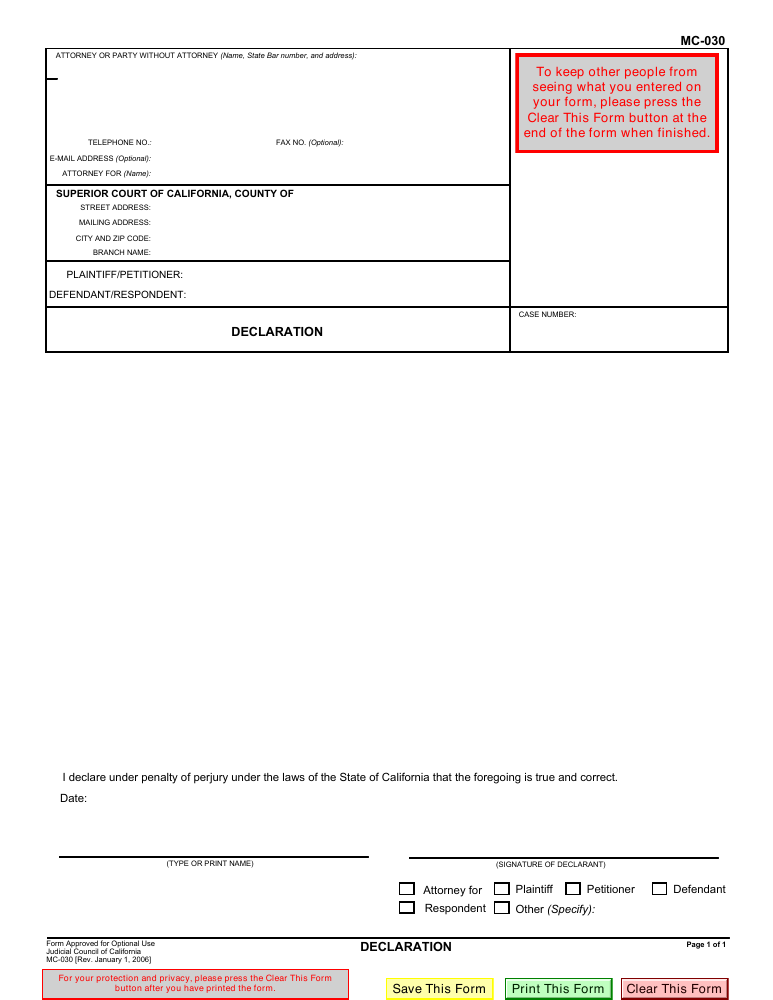
MC-030, Declaration, is issued by the Judicial Council of California. It records a written statement for a court, followed by a declaration that the statement is true under penalty of perjury. It does not itself ask the court to grant every kind of order.
Who should use this declaration?
A party, attorney or witness whose case instructions call for a written declaration may use MC-030 when the court accepts it. Match the form to the instructions for your specific case before entering personal information.
When should you use a different form?
Do not substitute MC-030 for a required petition, response, proof of service or a case-specific declaration. If you need an attachment to another document, check whether MC-031 is appropriate. If you are unsure which form applies, ask your court’s self-help center.
Current form status
- Current edition
- 2006-01-01
- Verified
- 2026-09-13
- Pages
- 1
How to fill MC-030 online
- 1
Open the official PDF
Start with the verified blank form. Manual filling requires no account.
- 2
Fill and review
Enter court and case information and your statement. Check names, dates and text fit.
- 3
Download and sign
Save a copy, inspect it in a PDF reader and follow the court’s signing and filing instructions.
Fill MC-030 with AI: answer a question, see the fields fill
The assistant asks about the person making the declaration, their role, the court and case, and the facts they want to state. It follows up on missing details; you can skip an answer or say you do not know.
As each answer supplies usable information, the assistant fills the relevant fields and highlights the changes. You can correct entries by hand or undo an AI fill. Review every entry: AI can make mistakes and does not sign, file or decide a legal strategy for you.
You can start without signing in, using the available free AI credits. Further AI use requires sufficient credits. Sending a reply shares your answers and relevant fields with Fylune and its AI provider; the form PDF itself is not sent to the model.
Field guidance
Name and address
Use the separate name, State Bar number or address, and address lines. Do not place the entire address in the name field.
Contact and representation
Enter the telephone number and the represented party if applicable. Fax and email are marked optional on the form.
Court and case
Copy the county, court address, branch, party names and case number from your case documents. Leave the court-use-only area alone.
Declaration
State facts you can truthfully declare. Review the exported PDF for clipped text. Check your case instructions before using additional pages.
Date, printed name and role
Review the perjury declaration, add the date and printed name, and choose the applicable role. The printed-name field is separate from the signature line.
How to write the facts in MC-030
Use short, numbered paragraphs in date order. Separate what you personally saw or did from information you received from someone else. A writing scaffold is: “On [date], at [place], I [specific action or observation].” Replace every bracket with your own truthful information; this is a structure, not a statement to copy into a case.
What to prepare before filling
There is no universal attachment checklist for every use of MC-030. Prepare these references; include supporting documents only when relevant and permitted by your case instructions.
- Existing case papers showing the court, party names and case number
- Your name, contact details, role and the facts you intend to declare
- Any records or exhibits supporting those facts, with sensitive information handled according to court rules
- Your case’s filing deadline, signature instructions, and any filing or service requirements
Signature requirements: printed name is not a signature
The official form has separate printed-name and declarant-signature lines. A typed name in the name field does not complete the signature line.
For paper filing, check whether your court requires a handwritten signature on the original. For electronic filing, follow your court’s electronic-signature rules. MC-030 contains a penalty-of-perjury declaration, not a notary acknowledgment; do not assume that this editor provides notarization or that every case follows the same signing procedure.
Where and how to submit MC-030
Submit according to the instructions for the court handling your case, often with the motion, response or other papers the declaration supports. Confirm accepted filing methods, deadlines, fees and service requirements with that court.
Fylune downloads your PDF; it does not file it, serve another party, calculate a deadline or confirm court acceptance. Keep a copy of the signed document and any filing confirmation.
Common mistakes to check before downloading
- Using a declaration in place of a required case-specific form
- Guessing a court address or case number rather than copying the case papers
- Combining multiple address lines into the single name field
- Leaving the date or signature incomplete
- Submitting clipped text, unchecked names or facts you cannot truthfully declare
- Assuming downloading also files or serves the document
MC-030 questions
Can I fill MC-030 online free?
Yes. Manual filling is free and does not require sign-in. The court’s blank PDF is also available free from the official source. Court filing fees, if applicable, are separate.
What should I write in my MC-030 declaration?
Identify the facts relevant to the request your declaration supports. Use dates and specific actions, distinguish personal knowledge from information reported to you, and review each statement for accuracy. Do not fill gaps with guesses. Check the exported page for clipped text and use an appropriate attachment if your court instructions permit it.
What is the difference between MC-030 and MC-031?
MC-030 is a Declaration form for a written statement to a California court. MC-031 is an Attached Declaration that provides extra space and must accompany another form or court paper. Follow your case instructions when choosing between them.
Where is my declaration saved?
The web editor automatically saves your document, filename and form fields to your Fylune cloud account, including a guest account if you have not signed in. These cloud copies are not end-to-end encrypted. Sign up or sign in before clearing your browser session to keep access on other devices. AI assistance sends the answers, fields and resources you submit to the AI provider, not the full edited PDF.
Can I edit the original form wording?
This editor fills the existing fields without redrawing the official form. Its original Save, Print and Clear controls are preserved. Embedded PDF scripts are not executed.
Can I add my own signature in Fylune?
You can add your own visible signature in the PDF editor. Fylune and its AI do not sign on your behalf, certify your identity, notarize or submit the form. Follow the recipient’s signature requirements; use a handwritten signature if required. A typed printed name alone does not complete a separate signature line.
Form edition and verification history
Official form revision printed in the PDF footer and listed by California Courts.
Fylune verified the official form listing and retained the recorded PDF fingerprint. This is a verification date, not a new court edition.
Independent editing tool
Fylune is not a government agency and is not affiliated with or endorsed by the Judicial Council of California. Official blank forms are available free from the court. This page and its AI assistance provide editing help, not legal advice. Your court’s current instructions take priority.