
Markdown Bold, Italic, and Strikethrough: Inline Emphasis Syntax
To apply markdown bold, wrap the text in two asterisks: **text**. Italic uses one asterisk, *text*. Combined bold and italic uses three, ***text***. Strikethrough is not part of the original Markdown spec at all: GitHub Flavored Markdown (GFM) added two tildes, ~~text~~, and many renderers follow that extension.
That is the whole system, and it works in nearly every Markdown application. The problems appear at the edges: underscores that will not turn on inside a word, tildes that render as plain text in a renderer that lacks the GFM extension, and markers that stay literal inside code. This guide covers all four forms, the exact failures, and how to check the result before you export the file.
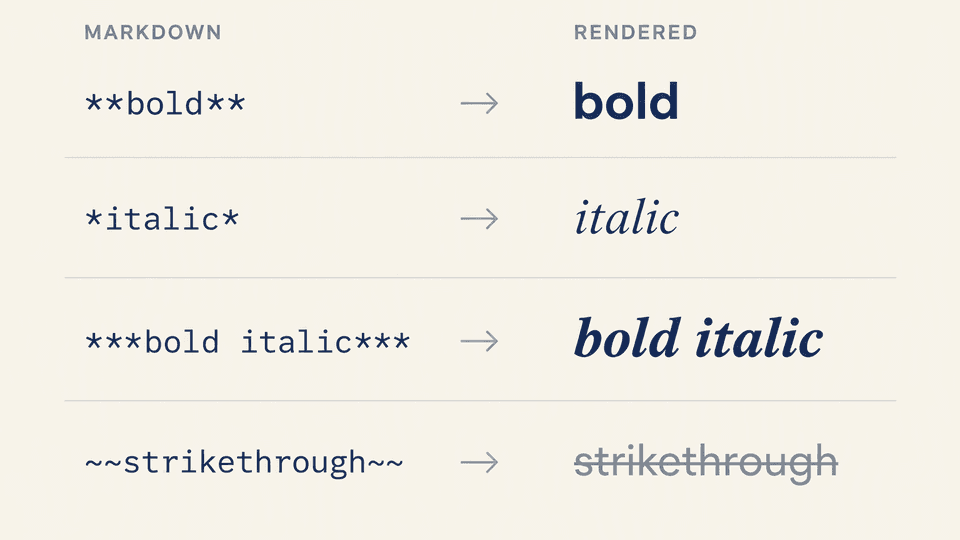
The four emphasis forms at a glance
| Form | Markdown | Rendered as | Notes |
|---|---|---|---|
| Bold | **text** or __text__ | Strong (bold) | Asterisks are the safer default |
| Italic | *text* or _text_ | Emphasis (italic) | Same underscore caveat as bold |
| Bold and italic | ***text*** or ___text___ | Strong plus emphasis | Mixed nesting also works |
| Strikethrough | ~~text~~ | Deleted (line through) | GFM extension, not original Markdown |
The Markdown Guide basic syntax reference, the top result for this query, documents the first three forms as core syntax and lists strikethrough as an extension some renderers do not support. GitHub's own formatting docs list the same four forms with the same markers, including the tilde form for strikethrough (GitHub Docs: basic writing and formatting syntax).
One habit covers almost every edge case in the rest of this article: prefer asterisks over underscores unless you have a specific reason, and verify strikethrough in the renderer you actually publish to.
Bold: **text** versus __text__ and when underscores fail
Add two asterisks or two underscores before and after a word or phrase:
I just love **bold text**.
I just love **bold text**.
Both render as bold in most Markdown applications. The difference shows up when the underscores sit inside a word, with no space on either side:
Love__is__bold
Markdown applications disagree on how to handle underscores in the middle of a word, so Love__is__bold often renders as literal Love__is__bold instead of "Loveisbold". The Markdown Guide best practice is explicit: use asterisks to bold the middle of a word. With asterisks, Love**is**bold renders the emphasis as expected.
Practical rule: write **text** for standalone bold, and switch to asterisks any time the emphasized span touches a word boundary without spaces, such as file names, code-like identifiers, or phrases you are stressing mid-sentence.
Italic: *text* versus _text_ with the same mid-word edge case
Italic works with one asterisk or one underscore:
Italicized text is the *cat's meow*.
Italicized text is the *cat's meow*.
The failure mode is the same one that hits bold. A single underscore inside a word, such as A_cat_meow, is treated as part of the word in many processors and renders with the underscores visible. A*cat*meow renders the italic emphasis instead. This is the same compatibility note the Markdown Guide records for italic as for bold, so the habit of using asterisks covers both forms at once.
Bold and italic combined: ***text*** and mixed nesting
To emphasize text with bold and italics at the same time, add three asterisks or three underscores before and after the phrase:
This text is ***really important***.
This text is **_really important**_.
Both render as bold italic. You can also nest the two forms instead of tripling the markers, which is easier to edit later:
This text is ***really important***.
This text is ***really important***.
All four of those examples render identically, and the triple-asterisk form also works mid-word: This is really***very***important text. The Markdown Guide notes that the order of the underlying <strong> and <em> HTML tags can differ between processors, but the visible result stays the same. The IONOS Markdown guide confirms the same construction: two asterisks for bold, three for bold plus italic (IONOS Digital Guide).
When markers double as list bullets, be careful: a line starting with * is a list item, and *** on its own line is a horizontal rule. Keep triple markers attached to a word so the processor reads them as emphasis.
Strikethrough: ~~text~~ is a GFM extension
Strikethrough has no syntax in the original Markdown design document. GitHub Flavored Markdown added two tildes around the text:
~~outdated requirement~~
Rendered, the phrase appears with a line through it. A span of text can be struck through as a whole, and partial strikes such as ~~This was a mistake~~, but the deadline stands stay readable in normal paragraphs.
Support is broad but not universal. GitHub, GitLab, Discourse, Reddit, and most developer-facing renderers accept the tilde extension. Stricter CommonMark processors and some older chat or CMS renderers print the tildes as literal text. Two checks protect you:
| Renderer context | ~~text~~ support | What to do |
|---|---|---|
| GitHub, GitLab, Reddit, Discourse | Supported | Use tildes directly |
| CommonMark strict processors | Not defined by the core spec | Test first, or use HTML <del> |
| Older CMS or chat renderers | Varies | Render a sample and inspect the output |
Because support is renderer-dependent, the honest workflow is to render a short sample in the destination before shipping a whole document. This is also why strikethrough should not be treated as interchangeable with the other three forms: bold, italic, and combined emphasis are near-universal, while the tilde form depends on an extension.
Emphasis inside code, links, and tables: what renders and what does not
Three nesting situations behave differently from plain text.
Inside inline code, emphasis never renders. Backticks switch the processor into literal mode: **not bold** stays exactly as typed. You cannot combine bold with code, which is the conclusion of the long-running Meta Stack Exchange thread on bold plus code samples. The usual workaround is to format the surrounding prose instead: put the emphasis on a sentence outside the code span, or style the code block context with your own tooling.
Inside fenced code blocks, the same rule applies. The Stack Overflow question about bold text in multi-line Markdown code is a canonical example: every attempt to wrap README code in ** produces literal asterisks, because a fenced block is a code block and nothing inside it is parsed as Markdown. If the goal is "make people read this code", the workable options are highlighting the paragraph around it, adding an HTML comment above the block, or using a renderer that supports block-level alerts such as GitHub's > [!IMPORTANT].
Inside links, emphasis renders, and code can be linked. The Markdown Guide formatting-links pattern works in every common renderer:
I love supporting the [**EFF**](<https://eff.org>).
This is the [*Markdown Guide*](<https://www.markdownguide.org>).
See the section on [` code `](<#code>).
Place the markers outside the brackets, and the linked text renders bold or italic. A linked code span inside brackets is valid too.
Inside tables, emphasis renders normally. In GFM table cells, **bold**, *italic*, and ~~strikethrough~~ all process as inline emphasis. The one pitfall is the pipe character, which must be escaped as \| inside a cell; the emphasis markers themselves are safe. For the full cell, separator, and alignment rules, see how Markdown tables work.
Format faster in Fylune: inline preview on portable local files
Syntax is only half the job. The other half is knowing that the file you are writing renders the way you expect, including the tilde edge cases above. Fylune is a local-first Markdown and MDX workspace: your documents stay as ordinary files in the project folder, core editing is free and works without an account, and Markdown renders inside the document experience alongside tables, task lists, and media. External tools such as Git, Cursor, or a coding agent can edit the same file while you work.
That combination suits emphasis syntax in particular. You write the raw markers, see the rendered paragraph in the preview, and confirm that an underscore-heavy file name or a ~~strikethrough~~ span behaves the way your target renderer will treat it, all without exporting or moving the file anywhere. If you want to try it, download Fylune for macOS.
Related reading from the same syntax series: checkbox and task-list syntax, line breaks, hard breaks, and blank lines, inline, reference, and file links, and the upcoming underline and highlight workarounds for the two styles Markdown does not cover natively.
FAQ
How do you make bold in Markdown?
Add two asterisks before and after the word or phrase: **bold text**. Two underscores (__bold text__) produce the same result in most renderers, but asterisks are the compatibility-safe choice, especially when the emphasized text sits inside a word.
How to do bold and italic?
Add three asterisks around the text: ***bold italic text***. You can also nest the forms, such as **_bold italic text_**, or use three underscores. All of these render as strong plus emphasis in Markdown processors that follow the standard emphasis rules.
Why is my underscore not rendering?
An underscore between letters without spaces, such as some_var_name, is treated as part of the word by many Markdown processors, so no emphasis is applied. Use asterisks instead: some**var**name, or escape the underscores with a backslash if you want them to display as plain characters.
Sources
- Markdown Guide: Basic Syntax - bold, italic, bold-and-italic markers, mid-word underscore compatibility notes
- GitHub Docs: Basic writing and formatting syntax - the four emphasis forms as GitHub implements them
- IONOS Digital Guide: Markdown - two asterisks for bold, three for bold plus italic
- Meta Stack Exchange: How to combine bold and code sample in Markdown - emphasis does not combine with code spans
- Stack Overflow: Bold text within multi-line code in Markdown - fenced code blocks ignore emphasis markers
- Daring Fireball: Markdown Syntax - original spec has no strikethrough syntax
- Keyword metrics: DataForSEO keyword_overview, US, en, collected 2026-10-01T08:02:43Z (
markdown boldvolume 3,600, KD 8)