Markdown Horizontal Rule: Thematic Break Syntax and Fixes
To create a horizontal rule in Markdown, put three or more asterisks, dashes, or underscores on a line by themselves, with a blank line before and after:
***
---
___
Any one of those lines draws a full-width divider between sections. Markdown calls the element a thematic break, and renderers turn it into an HTML <hr> tag. Whether you search for a horizontal rule, a horizontal line, or a markdown divider, the answer is the same element, and all three of the forms above are equivalent.
What a horizontal rule is and when to use one
A thematic break marks a hard boundary between sections, such as the split between an answer and its background notes, or between two alternate examples in the same document. The Markdown Guide's basic syntax reference lists it among the core block elements, and the guide's own source for the horizontal rules lesson uses rules the same way: as a visual separator, not as structure.
Use a rule when a new heading would feel like a false start. A heading names the next section; a rule only says "different topic starts here." Rules appear often in READMEs, changelogs, and meeting notes, where they break a document into visual chapters without adding heading text.
The three syntax forms
Markdown accepts three characters for a rule, and each form has the same three conditions:
- Three or more of the same character.
- The line contains nothing else, except optional spaces between the characters.
- The line sits between blank lines, which the next section explains.
Each of these renders as the same divider:
- * *
- - -
  _ _ _
Spaced forms like * * * count as rules because the spaces do not change the character count. Mixed lines like -*-* are not rules, because a renderer cannot tell which character is meant.
Placement rules: blank lines before and after
A rule needs a blank line before it and a blank line after it. The blank line before separates the dashes from whatever precedes them (a paragraph, a list, or a blockquote). Without it, the renderer attaches your dashes to the previous element, and either no rule appears or the previous element changes meaning. The blank line after separates the rule from the next block.
The two most common failures both come from a missing blank line before the dashes.
Failure mode 1: dashes under a line become a setext heading
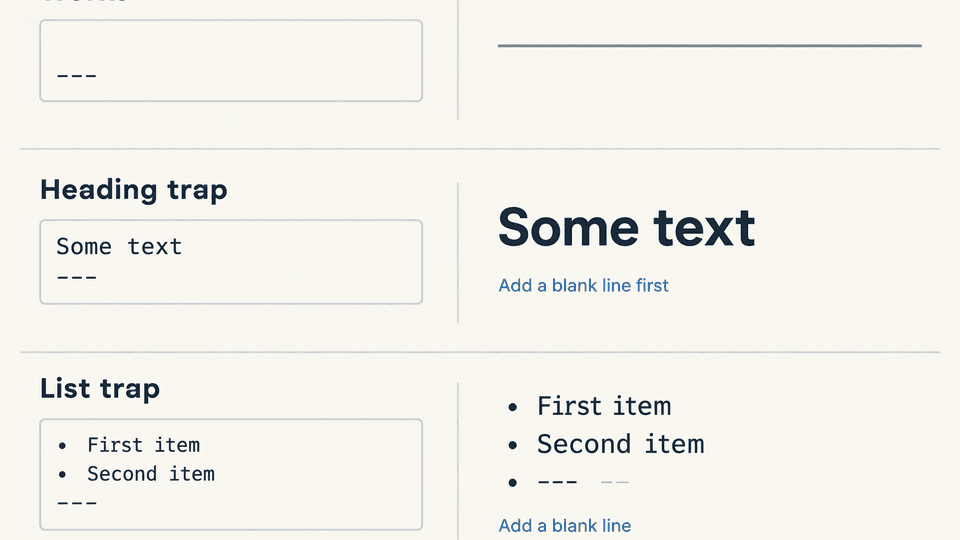
Dashes have a second job in Markdown: a line of dashes directly under a line of text turns that text into a setext heading. If you write a sentence and type --- on the very next line with no blank line between them, you get a level-two heading and no divider:
Some text
---
The renderer reads the pair as one heading, so "Some text" appears large and bold, and the line you meant as a rule disappears. The fix is a blank line between the text and the dashes:
Some text
---
With the blank line, the dashes stop being a heading underline and become a thematic break. Asterisks or underscores under a text line do not trigger the setext trap, so *** and ___ are safe alternatives when you cannot add a blank line.
A rule is also not a line break: a rule draws a divider, while a line break controls where text wraps. If your goal was to end a line of text rather than draw a divider, the line-break guide covers that instead.
Failure mode 2: a rule after a list item joins the list
Dashes have a third job: they start list items. A line of dashes placed directly after a list item is parsed as another list item, and the divider you wanted is absorbed into the list:
- First item
- Second item
---
The renderer sees a third list entry and keeps drawing bullets, so no rule appears. The fix is the same blank line:
- First item
- Second item
---
If your list itself is behaving strangely (wrong numbering, broken nesting, or items merging), the list guide walks through those cases separately.
Two quieter traps
Dashes inside a fenced code block stay literal. Inside a fenced block, --- is plain text, not a rule and not a heading. This is the correct behavior when you are documenting Markdown itself, and it is why code examples on this page display the dashes instead of rendering them. The code block guide covers fence syntax in more depth.
A framework can consume the same syntax differently. One Stack Overflow thread about a Hexo-based site shows --- being handled by the site generator's front matter parser instead of the Markdown renderer, so the intended rule never appears. Static-site generators and blog platforms can intercept dashes at the top of a file or inside templates, so if the syntax works locally but not after your site builds, check the generator's front matter rules before changing your document.
Renderer differences and Fylune rendering
The three accepted forms (***, ---, ___) come from the CommonMark definition, and most renderers implement them identically. Two things still vary:
- Styling, not syntax. The thickness, color, and margins of the divider come from the document theme, not from your Markdown. In themed documents, some authors use rules as "theme breaks" that separate whole topics, and one Stata workshop example documents exactly that pattern. Your syntax is the same; the theme decides how the line looks.
- Tool behavior around the syntax. As the Hexo example shows, tools that preprocess a file (front matter parsers, templates, build scripts) can react to dashes before the Markdown renderer ever sees them.
Fylune renders thematic breaks in plain local Markdown and MDX files, so a --- line on its own draws the divider as you type. The file stays an ordinary local Markdown file: Finder, Git, and AI agents read the same --- line you wrote, and the document keeps working in any other Markdown tool. To preview a rule in place, download Fylune from https://www.fylune.com/download and open the file in the project folder.
Quick reference
| Goal | Syntax | Note |
|---|---|---|
| Draw a divider | ---, ***, or ___ on its own line | Blank line before and after |
| Dashes became a heading | Blank line before --- | Setext heading trap |
| Rule disappeared into a list | Blank line between list and --- | Dashes are also list markers |
| Keep dashes as visible text | Put them inside a fenced code block | Rules and headings do not apply inside fences |
| Change how the divider looks | Edit the document or site theme | Syntax draws the element, theme styles it |
FAQ
How do I add a horizontal rule in Markdown?
Type three or more asterisks, dashes, or underscores on a line by themselves, with a blank line before and after: ***, ---, or ___. All three draw the same full-width divider.
Why did my --- turn into a heading instead of a line?
Because the dashes sat directly under a line of text with no blank line between them. Markdown reads that pair as a setext heading underline. Add a blank line before the dashes, or use *** instead.
Sources
- Markdown Guide, Basic Syntax (horizontal rules)
- Markdown Guide repository, horizontal rules lesson source
- Stack Overflow: horizontal line in Markdown under Hexo
- Stata workshop: theme breaks in Markdown
Related guides
- Markdown Line Breaks: New Lines, Hard Breaks, and Blank Lines
- Markdown Lists: Ordered, Unordered, and Nested Syntax
- Markdown Code Blocks: Fences, Inline Code, and Language Hints