

How to Escape Characters in Markdown: Asterisks, Backticks, and Underscores
You put an asterisk around a word and Markdown renders it in italics when you wanted the character itself. The same happens with underscores, tildes, and backticks. The fix is one rule: type a backslash (``) immediately before the character you want to appear as plain text.
This guide covers the Markdown escape rule, the complete list of escapable Markdown special characters, and the cases where the rule behaves differently: backticks inside code, tildes in strikethrough flavors, dollar signs in math, and symbols that platforms convert into links or mentions. Every example is plain Markdown, so it works in any compliant renderer, including ordinary local files.
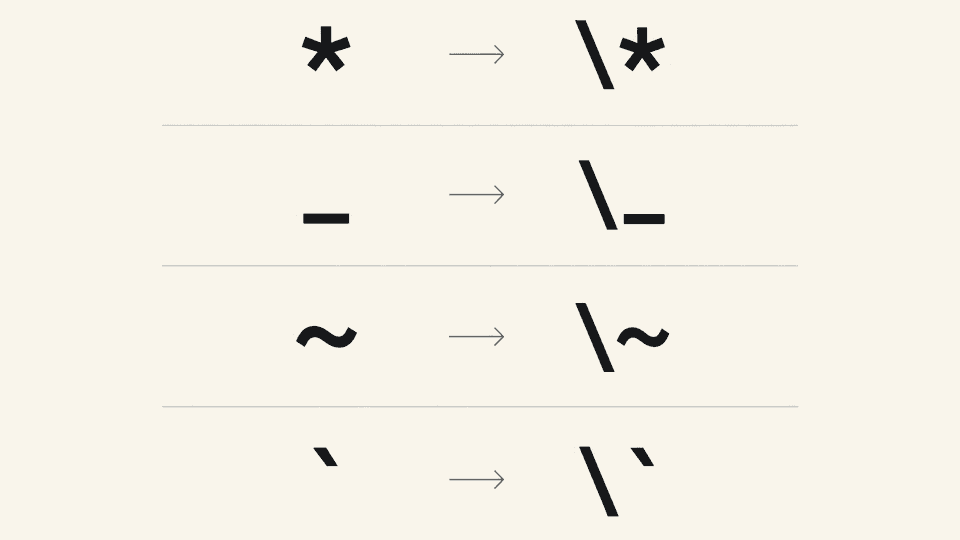
The backslash escape rule
A backslash before a special character tells the renderer to print that character literally instead of applying its formatting. The backslash disappears from the output; it exists only in the source.
| What you type | What renders |
|---|---|
\*plan v2\* | plan v2 |
\_temp\_ | temp |
\# not a heading | # not a heading |
The left column is the source, and the right column is the rendered result. The asterisks and underscores survive as literal Markdown escape characters instead of turning the text italic.
Two details from the CommonMark specification matter in practice:
- A backslash at the end of a line has a separate job: it forces a hard line break. Do not place an escape backslash at the end of a line.
- Escaping a character that is not punctuation does nothing useful.
\aprints as\a, with the backslash visible.
The full list of escapable characters
Per the CommonMark specification, any ASCII punctuation character may be backslash-escaped. The complete set is:
! " # $ % & ' ( ) * + , - . / : ; < = > ? @ [ \ ] ^ _ ` { | } ~
Escaping a letter or a digit is not part of the rule, and backslashes before those characters stay visible in the output.
Not every punctuation character triggers formatting in every renderer. The table below lists the Markdown special characters that change the output somewhere in common use, and how to escape each one:
| Character | What it does unescaped | Escaped example |
|---|---|---|
| `` ` | starts an escape itself | `\ `` prints one backslash |
` | opens inline code | ` |
* | emphasis, alone or doubled (see the inline emphasis guide) | \* |
_ | emphasis, including inside words such as snake_case | \_ |
# | headings | \# |
- | bullet lists and thematic breaks | \- |
+ | bullet lists | \+ |
. | ordered list markers after a number | 5\. item |
! | image syntax when followed by brackets | \! |
[ and ] | link and image labels | \[ and \] |
( and ) | link destinations and bare autolinks | \( and \) |
> | blockquotes | \> |
< | raw HTML and autolinks | \< |
& | HTML entities | \& |
= | setext headings under a text line | \= |
| pipe | separates GFM table cells | backslash immediately before each pipe in a row |
~ | GFM strikethrough in flavors that support it | \~ |
{ and } | brace extensions such as math or attributes in some flavors | \{ and \} |
$ | math delimiters in KaTeX and MathJax flavors | \$ |
Underscores deserve one extra note: they trigger emphasis, not underline. Markdown has no native underline syntax, and the underline and highlight guide covers the portable workarounds.
Backticks and code fences: the exception
Inside inline code and fenced code blocks, the backslash escape rule stops working entirely: everything is literal, and a typed backslash prints as a backslash. The code block guide covers both code forms. That leaves two questions.
Showing a literal backtick. Wrap it in a code span delimited by double backticks, with a space on each side of the backtick: ` renders as a code span containing one backtick.
Showing a block that contains a fence. Use a longer outer fence than the longest backtick run inside. Four backticks outside a three-backtick fence:
```
code shown inside an inner fence
```
The example above is itself written with a four-backtick outer fence, so the three-backtick fence renders as literal text. If the inner code contains four backticks, move the outer fence to five, and so on. This matches the standard practice documented in the Markdown Tools guide: use more backticks for the outer fence than are present in the inner code, and double backticks for inline code that contains backticks.
Tildes, dollar signs, and mention-style symbols
These three cases share a trait: the character is ordinary punctuation in core Markdown but triggers formatting in a specific flavor or platform.
Tilde. In GitHub Flavored Markdown, ~~text~~ renders with a strikethrough, so escape each tilde as \~ when you want the characters to display. In flavors without strikethrough, a tilde needs no escape, and adding one may leave a visible backslash. The Mattermost team treats tilde as a character that should be escapable wherever strikethrough is supported, which is a reminder that tilde behavior is flavor-dependent rather than universal.
Dollar sign. In renderers that support KaTeX or MathJax math, $x$ and $$x$$ delimit formulas, so a literal dollar sign needs \$. Notebook-style environments add a second escaping layer: the Jupyter notebook project documents cases where a double backslash, \\$, is required to display a dollar sign near math. Test the preview rather than guessing which layer applies.
Mentions and autolinks. Platforms that convert @names, #123 issue references, or bare URLs into links often do it after standard Markdown parsing, so a backslash may not suppress the conversion. When a symbol keeps turning into a link or mention despite a backslash, wrapping it in backticks is the dependable way to keep the text literal.
When escaping does not help
Three situations where the backslash is the wrong tool:
- Inside code. Inline code spans and fenced blocks are already literal. Never escape inside them; the backslashes print as text. Code spans are also the reliable fallback for mention-style conversions.
- Before letters and digits.
\aand\3keep the backslash visible, because only ASCII punctuation is escapable. - Before characters that are not special in the current flavor. A tilde in a renderer without strikethrough prints the backslash. Check the rendered preview, and if a stray backslash appears, delete it.
Checking Markdown escapes on local files in Fylune
Fylune edits plain local Markdown and MDX files in your project folder, so the Markdown escape rules above belong to the file itself rather than to a proprietary format: the same file keeps working in Git, in other editors, and with AI agents that read the same folder. Fylune's preview renders rich Markdown, including KaTeX formulas, tables, task lists, and Mermaid diagrams, so the dollar, pipe, and tilde caveats above apply in the preview too.
A practical loop: type the escape, look at the preview, and delete the backslash if the output shows one, because that means the character did not need escaping on that renderer.
If you want to test these escapes against your own local files, Fylune runs on macOS 14 or later and is available from the download page.
Quick reference
- The rule: a backslash immediately before the character.
- The escapable set: all ASCII punctuation; the table above covers the ones that format.
- Backticks: more backticks for the outer delimiter than the longest run inside; code needs no escaping inside code.
- Dollar signs, tildes, and pipes: flavor-dependent, so verify in the preview.
- Mentions and autolinks: use code spans when a backslash is not enough.
- A visible backslash in the output means the escape was unnecessary.
Sources
- CommonMark Specification 0.31.2, Backslash escapes
- GitHub Flavored Markdown Spec
- Markdown Tools: How to Escape Backticks in Markdown for Code Blocks
- Mattermost issue 8228: tilde escaping with strikethrough support
- Jupyter notebook issue 4244: dollar sign escaping in math contexts
- Stack Overflow: How do you escape in Markdown
- Fylune product overview, first-party documentation (local-first files, rich Markdown preview with KaTeX)