
IRS W-9 Taxpayer Identification and Certification: Fill Online Free
Prepare the official March 2024 IRS W-9 online. Fill taxpayer details with optional AI help, review all six pages, and download a copy to sign if required and give to the requester.
What is Form W-9?
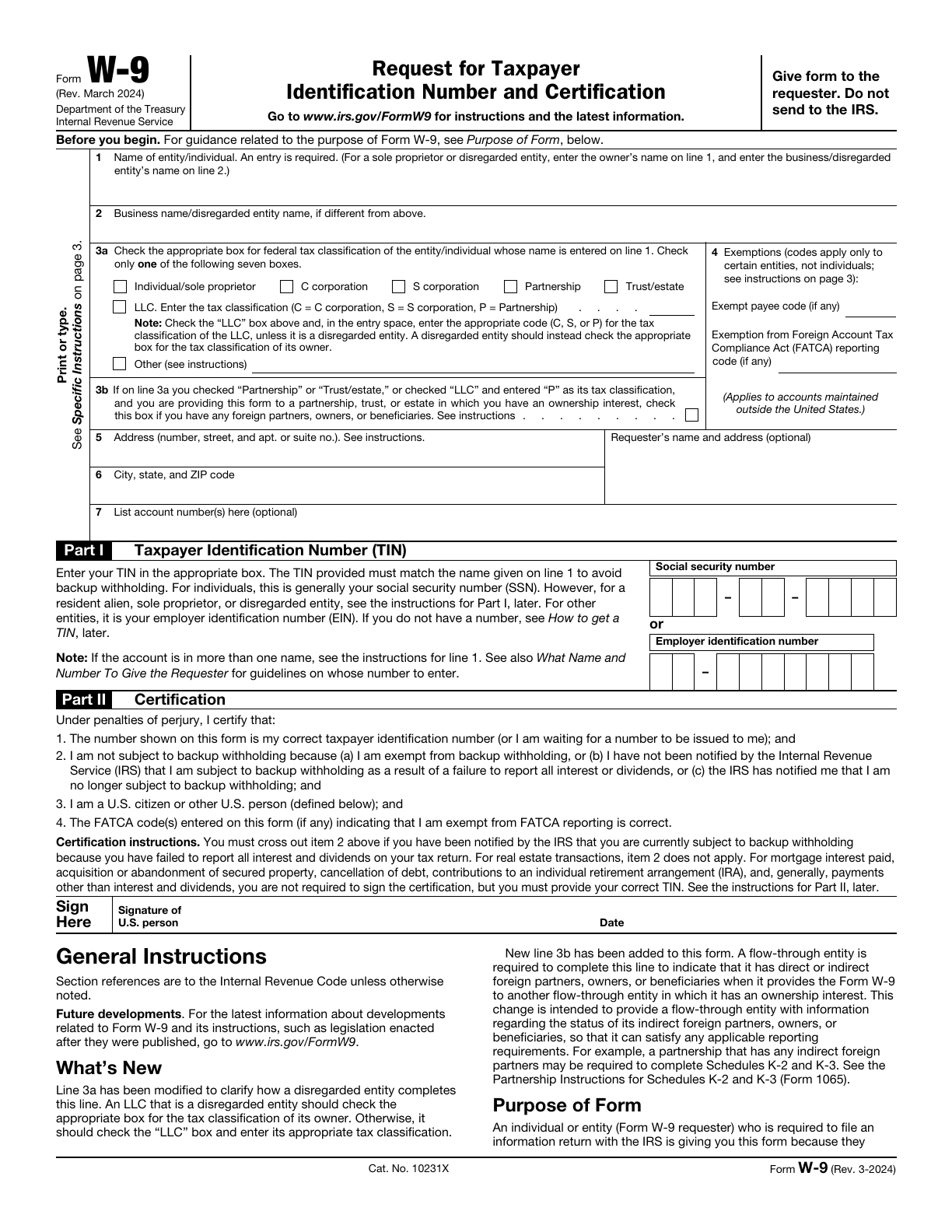
W-9 provides a requester with a taxpayer identification number (TIN) and applicable certifications for information reporting. It is not an income tax return. This template preserves the official six-page PDF, including its instructions.
Who uses W-9?
A U.S. person for federal tax purposes may be asked to provide W-9 by a payer, bank or other requester that must report a payment or transaction. U.S. persons can include resident aliens and qualifying domestic entities; a U.S. address alone does not establish tax status.
When is another form needed?
Foreign persons generally use the appropriate W-8 form or Form 8233 instead. Ask the requester or a qualified adviser if your status or an exception is unclear. W-9 does not apply for a new SSN, ITIN or EIN.
Current form status
- Current edition
- 2024-03-01
- Verified
- 2026-09-23
- Pages
- 6
How to fill W-9 online
- 1
Confirm this is the correct form
Read the requester’s instructions and confirm U.S.-person status before preparing W-9.
- 2
Enter the taxpayer name and classification
Complete lines 1–3 using the tax treatment of the person named on line 1. Review disregarded entity and line 3b rules if relevant.
- 3
Add address and the matching tax ID
Complete the mailing address and use either the applicable SSN/ITIN boxes or the EIN boxes, not both. Optional requester and account fields can stay blank.
- 4
Review, sign if required and deliver
Inspect the downloaded PDF, including Part II and the instructions. Complete any required signature or certification correction, then give the form to the requester.
Prepare W-9 with Faye
Faye asks about applicability, taxpayer identity and classification, address, optional tax ID, and any relevant exemptions or requester details. Confirmed answers fill the PDF as you go; corrections and undo remain available.
LLC ownership, line 3b and SSN/EIN choices receive separate follow-up questions when relevant. You can skip any question and finish manually. Chat can be in English, Spanish or Chinese; the official PDF stays in English, and names, addresses and identifiers are preserved.
Field guidance
Lines 1 and 2: taxpayer and business names
Line 1 must match the tax return. For a sole proprietor or disregarded entity, use the owner name on line 1 and the business or disregarded entity name on line 2.
Line 3a: one federal classification
Choose exactly one box. A non-disregarded LLC enters C, S or P; a disregarded LLC uses its owner’s classification. Do not infer classification from the business name.
Line 3b: foreign ownership statement
This applies to the specified partnership, trust/estate or LLC-P providing W-9 to a partnership, trust or estate in which it owns an interest and having foreign partners, owners or beneficiaries. Review the full instructions before selecting it.
Line 4: exemption codes
Enter only confirmed applicable codes. Individuals generally are not exempt from backup withholding. FATCA exemption codes concern certain accounts maintained outside the United States.
Lines 5–7 and requester details
Use a complete mailing address with apartment or suite. Requester details and account numbers are optional.
Part I: TIN
Use the TIN appropriate to the line 1 name. The PDF separates SSN/ITIN into 3–2–4 digits and EIN into 2–7 digits. Preserve leading zeroes; do not guess an unknown number.
Part II: certification
Read the account-specific signature rules and backup-withholding instructions. Faye cannot sign, cross out a certification or make tax-status determinations.
What to have ready
Have the name used on your tax return, confirmed federal tax classification, mailing address and the appropriate TIN ready. A sole proprietor or disregarded entity needs the owner information specified in the instructions.
Keep any requester instructions and confirmed exemption codes available. W-9 does not require uploading identity documents here; you can skip sensitive answers in AI chat and enter them manually.
Review the certification before signing
The signature and date lines are not editable form fields. Download, review Part II and sign/date where required, following the requester’s accepted process. Typing your name in line 1 is not a signature.
Signature requirements vary by account or payment type. If the IRS has notified you that you are currently subject to backup withholding for underreported interest or dividends, review the instruction to cross out certification item 2. Faye cannot perform that strike-through or certify your status. This workflow does not notarize or provide a certified electronic signature.
Give W-9 to the requester
Give the completed form to the person or organization requesting it; do not send it to the IRS. Use the requester’s accepted secure delivery channel and check its requirements before sending a tax ID. Fylune does not submit the form.
Common W-9 mistakes
Putting a disregarded LLC’s name on line 1 instead of its owner’s name, or choosing LLC without checking federal tax treatment.
Checking multiple boxes on line 3a, mixing SSN and EIN entries, or using a TIN that does not match the line 1 name.
Checking line 3b merely because an entity is an LLC, claiming an exemption without confirmation, or sending W-9 to the IRS.
W-9 questions
Do I send W-9 to the IRS?
No. Give it to the requester using the delivery method it accepts. Fylune does not file it.
Can I fill W-9 without giving Faye my SSN?
Yes. Skip the tax ID in chat and enter the appropriate number manually before delivering the reviewed form. Never substitute a made-up number.
Which box does a single-member LLC use?
Its federal tax treatment matters. A disregarded LLC uses the owner’s classification; an LLC that is not disregarded uses the LLC box with C, S or P. Confirm your treatment rather than selecting from the name alone.
Is an online-filled W-9 signed automatically?
No. Signature and date lines remain for your review and required signing. Follow Part II and the requester’s accepted signing process.
How are my answers stored, and is AI free?
Web documents are saved to your cloud account, including a temporary guest account, and are not end-to-end encrypted. AI assistance uses available account credits and sends your messages, current form fields and selected resources to the AI provider. Manual filling and watermarked downloads are free; watermark-free downloads require the applicable purchase or Premium access. To keep a tax ID out of AI requests, finish the AI conversation before entering it manually and do not send another AI message afterward.
Form edition and verification history
March 2024 revision adds line 3b and clarifies disregarded entity classification. The original includes six pages.
Independent form preparation
Fylune is not affiliated with the IRS and does not provide tax advice or determine eligibility. Review the current official instructions and your requester’s requirements. A completed interview does not establish a valid certification or guarantee acceptance.