

A new client emails you an attachment called Form W-9 and asks you to send it back before your first invoice gets paid. If you have never filled one out, the short answer is this: a W-9 tells the client your name, your business status, and your taxpayer identification number (TIN), and you return it to the client, not to the IRS. This guide is for U.S. persons for federal tax purposes. A foreign person generally needs the applicable W-8 form or Form 8233 instead. This walkthrough covers how to fill out a W-9 as an individual or sole proprietor in the United States, line by line, and how to get it back to your client without exposing your TIN to more people than necessary.
Your client asked for a W-9: what the form actually is
Form W-9 is titled "Request for Taxpayer Identification Number and Certification." Its purpose, per the IRS, is to provide your correct TIN to a person who is required to file an information return with the IRS. That covers income paid to you, real estate transactions, mortgage interest, cancellation of debt, and several other situations. In the freelancer case, your client wants your TIN so it can identify you if the payments it makes to you end up on an information return, such as a Form 1099-NEC.
The important mental model: the W-9 is a request from a business that needs your taxpayer details for its own records and reporting. You complete the form and return it to that requester. Return the W-9 to your requester; do not send it to the IRS as part of this client-onboarding process.
Get the current form
Download Form W-9 from the IRS page About Form W-9. The current revision is Rev. March 2024, and the revision appears in the top-left corner of the official PDF as "Form W-9 (Rev. March 2024)". The same IRS page lists all prior revisions if a client's process ever asks for an older edition.
Skip the stale third-party copies that circulate in email threads and file-sharing folders. Outdated copies can differ from the current layout, including how the tax classification lines are arranged, and a client's compliance team may reject an old revision. The official PDF also carries the payee instructions on its own pages, so the authoritative W-9 form instructions travel with the form itself.
Line by line: the fields you actually complete
Here is the map for a first-time U.S. individual or sole proprietor:
| Field | What you enter | For most freelancers |
|---|---|---|
| Line 1 | Name of entity/individual; an entry is required | Your legal name |
| Line 2 | Business or DBA name, if different | Leave blank unless you have one |
| Line 3a | Federal tax classification | "Individual/sole proprietor" |
| Line 3b | Conditional foreign-interest checkbox | Blank for this individual example |
| Line 4 | Exemption codes | Blank; codes apply to certain entities, not individuals |
| Lines 5-6 | Mailing address | Where you can receive mail |
| Line 7 | Account number(s) | Optional; enter a client-assigned account or vendor number only if your client asks for one |
| Part I | Taxpayer Identification Number | Your matching TIN; see Part I below |
| Part II | Certification, signature, date | Per the form's instructions and your client's process |
Line 1: the name matching the TIN you provide
Enter the name exactly as it appears on your income tax return, the name connected to the TIN you provide in Part I. The form states that an entry is required here, so do not leave Line 1 blank. If you operate as a sole proprietor, the owner's name goes on Line 1. Name variations matter: a mismatch between Line 1 and the TIN can cause the IRS name-TIN matching process to flag the form, which can lead to notices or backup withholding downstream.
Line 2: business name or DBA, only if different
Use Line 2 for a business, trade, or "doing business as" name that differs from Line 1. If you freelance under your own legal name, leave it blank.
Line 3: federal tax classification
Line 3a is a set of checkboxes for your U.S. federal tax classification. If you are an individual freelancer or sole proprietor with no LLC, you check "Individual/sole proprietor". That is the box for the person filling out a W-9 as an individual.
If an LLC actually exists in your situation, the entry changes: you check the "LLC" box on Line 3a and enter its tax classification in the entry space, C for C corporation, S for S corporation, or P for partnership. A disregarded LLC, which the current form's instructions define as an entity with a single owner that is not treated as separate from its owner, does neither; it checks the box for the tax classification of its owner instead.
Line 3b is a separate checkbox that applies only when all three of these conditions hold at once: you are a partnership (including an LLC classified as a partnership), trust, or estate; you are providing this form to another partnership, trust, or estate in which you have an ownership interest; and you have any foreign partners, owners, or beneficiaries. For the individual example this article covers, Line 3b stays blank.
Lines 5 and 6: your mailing address
Lines 5 and 6 are your street address and city, state, and ZIP code. The requester uses this address when it sends you applicable information reporting documents, such as a paper copy of a 1099. Use an address where you can reliably receive mail during the year.
Line 7 and Line 4 exemptions
Line 7 is for account numbers and is optional. Enter a client-assigned account or vendor number only if your client asks for one, so accounts payable can match your form to your file; otherwise leave it blank. Line 4 asks for exempt payee codes and exemption from FATCA reporting codes. The form states that these codes apply only to certain entities, not individuals, and that generally individuals, including sole proprietors, are not exempt from backup withholding. Leave Line 4 blank as well; a code your client suggests does not establish eligibility, so only enter one after you have confirmed it against the instructions in the official PDF.
Part I: your TIN
Part I is where your taxpayer identification number goes. For an individual, this is generally your SSN. If you are a resident alien who does not have, and is not eligible to get, an SSN, your TIN is your ITIN, which you enter in the social security number space. If you are a sole proprietor and you have an EIN, you may enter either your SSN or your EIN, though the form's instructions state that the IRS encourages you to use your SSN. Whatever you enter must match the name on Line 1; the form notes that the TIN must match that name to avoid backup withholding.
Part II: the certification and when to sign
Part II is a certification made under penalties of perjury. In the current form you certify that: the number shown is your correct TIN (or that you are waiting for a number to be issued); you are not subject to backup withholding because (a) you are exempt from backup withholding, (b) you have not been notified by the IRS that you are subject to backup withholding as a result of a failure to report all interest or dividends, or (c) the IRS has notified you that you are no longer subject to backup withholding; you are a U.S. citizen or other U.S. person; and any FATCA code you entered is correct.
Two conditional rules from the certification instructions matter before you sign:
- You must cross out certification item 2 if the IRS has notified you that you are currently subject to backup withholding because you failed to report all interest and dividends on your tax return. For real estate transactions, item 2 does not apply.
- Whether you must sign depends on the payment type. Under the form's instructions, for "other payments", which include payments made in the course of the requester's trade or business for services like yours, you must give your correct TIN but are not required to sign the certification unless you have been notified that you previously gave an incorrect TIN. Interest, dividend, broker, and barter exchange accounts carry their own signing rules.
In practice, many clients require a signed form as part of their onboarding process even when the instructions would not force it. Review every entry, make any required certification changes, and sign only the statements that apply. You may review a prefilled form; you need not have typed each field yourself.
A worked example
Jordan A. Example is a freelance illustrator and a U.S. sole proprietor with no LLC and no DBA. A magazine that commissioned her work sends a W-9 request through its onboarding portal. She completes the current form like this:
- Line 1: Jordan A. Example
- Line 2: blank
- Line 3a: Individual/sole proprietor (checked)
- Line 3b: blank
- Line 4: blank
- Lines 5-6: 123 Sample St, Sampletown, ST 00000
- Line 7: the vendor number the magazine assigned her, because its onboarding process asks for one
- Part I: her SSN, shown here masked as XXX-XX-1234
- Part II: signed and dated, because the magazine's process requires a signature
All of Jordan's details are fictional, and the masked SSN is an illustration label, not an entry anyone should type into a form. What transfers to your situation is the shape: one required name, one classification box, one TIN, one address, and a certification handled per the instructions and the client's process.
Where the form goes (and where it does not)
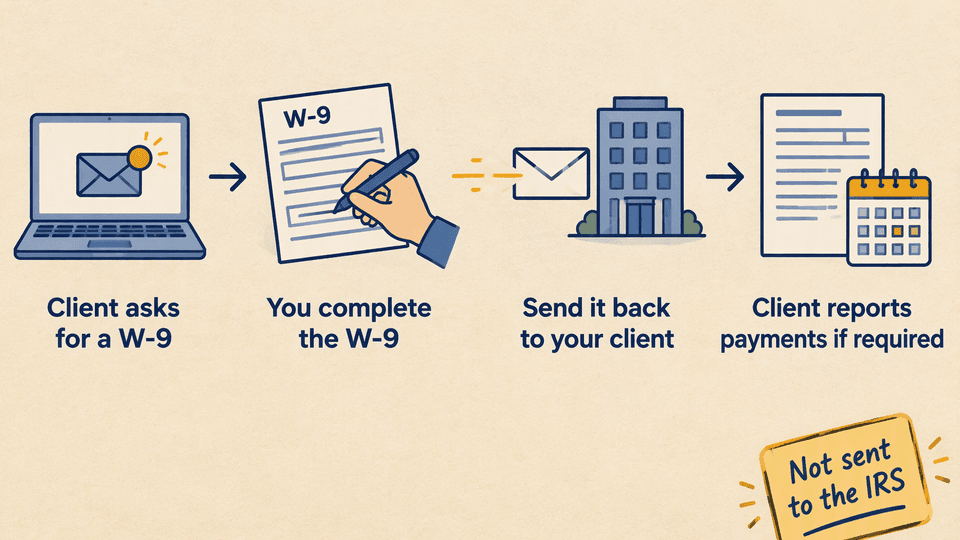
The completed W-9 returns to the requester through the channel your client accepts. The requester keeps it on file and uses the information for applicable information reporting when its payments and the reporting rules call for it. Return the W-9 to your requester; do not send it to the IRS as part of this client-onboarding process. The IRS does not send you a confirmation when the requester receives your form.
Receiving a W-9 request also does not mean every payment you receive will produce a Form 1099. The requester decides what it must report based on what it pays you and the applicable reporting rules. The W-9 is the identification step, not the report itself.
W-9 vs 1099 in one paragraph
A W-9 collects your TIN; a 1099 reports payments to the IRS and to you. Your client uses the W-9 you return to know whose payments it is tracking, and later it may file a form such as a 1099-NEC with the IRS and send you a copy. If you never return a W-9, the requester may be required to apply backup withholding on reportable payments, which means it withholds a flat percentage before paying you.
Sending it safely
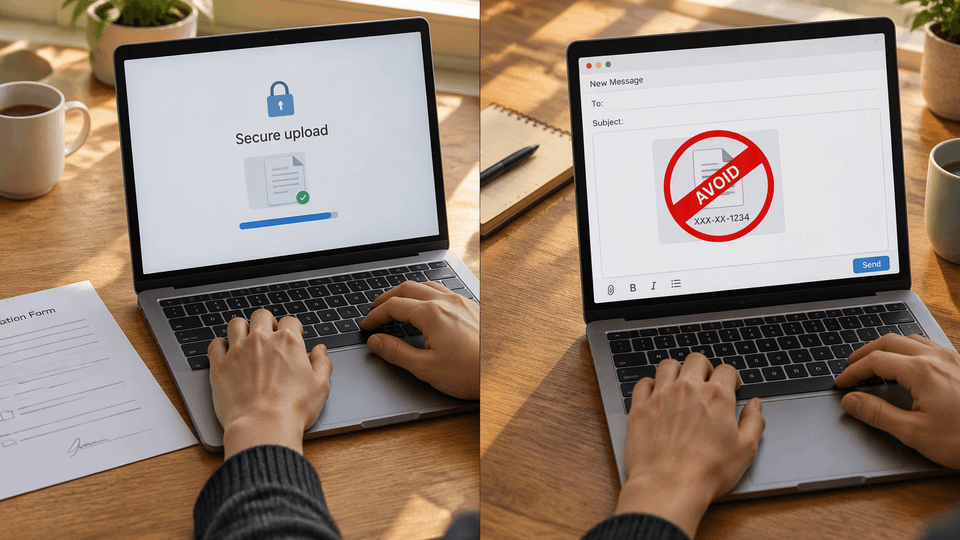
A completed W-9 carries your full TIN, whether that is an SSN, an ITIN, or an EIN, so treat the return trip like the sensitive document it is:
- Use the client's secure portal, vendor onboarding system, or accounts payable upload tool when one exists. This is the channel their records and security controls are built around.
- If the client accepts email only, ask whether they accept a secure link or an encrypted attachment before sending the completed PDF.
- Never paste an unredacted TIN into an email body, a chat message, or a shared folder open to the whole company.
- Keep your own copy of the completed form in your records so you can confirm what you sent if a question comes up later.
The IRS publishes identity theft guidance for taxpayers, including Publication 5027, Identity Theft Information for Taxpayers, if you want a deeper reference on protecting your SSN. None of these steps replaces any specific delivery requirement your client imposes; when the two differ, ask the requester which channel they require.
Fill and export your W-9 with Fylune
Use the Fylune W-9 tool to prepare a PDF, then return it to your requester. Fylune does not submit it for you.
FAQ
What is the most recent version of the W-9 form?
The current revision is Rev. March 2024, available from the IRS Form W-9 page. Check the top-left corner of any PDF a client sends you; if it shows an older revision, pull the current edition from irs.gov instead of filling in the stale copy.
Who requires a W-9?
Any requester that needs your TIN for information reporting can ask for one: clients who pay freelancers and contractors, banks and brokers that report interest and dividends, parties to real estate transactions, and lenders or creditors that report cancelled debt. The request itself is routine; the W-9 tells the requester who you are for tax identification.
What happens if you do not send a W-9?
The requester may be required to treat the payment as subject to backup withholding and withhold a flat percentage of reportable payments before paying you. Your invoice can also stall in accounts payable while the compliance team waits for a complete form. If you have a concern about the form itself, raise it with the requester before the deadline they give you rather than sending an incomplete W-9.
Do I mail my W-9 to the IRS?
No. The W-9 goes back to the person or company that requested it. The IRS receives information returns like the 1099 from the requester later, using the details you supplied. The IRS can ask the requester to supply a copy of an electronically submitted form, which is one more reason the requester, not the IRS, is the destination.
Ready to complete yours? Use the Fylune W-9 tool to prepare a PDF to return to your client yourself.
Sources
- About Form W-9, IRS, purpose and current revision, retrieved 2026-10-18
- Form W-9 (Rev. March 2024), IRS, field-level payee instructions, classification checkboxes, TIN rules, and Part II certification instructions, retrieved 2026-10-18
- Instructions for the Requester of Form W-9, IRS, requester obligations and reporting context, retrieved 2026-10-18
- About Publication 5027, Identity Theft Information for Taxpayers, IRS, retrieved 2026-10-18
This article gives general form-filling guidance for a common situation and is not tax or legal advice for your specific case. The example data is fictional. Fylune is not affiliated with the IRS. Fylune prepares PDFs and does not submit forms to any government agency or requester.