

By Orion Wells, Founder of Aurcue
A lender, a college financial aid office, or a loan underwriter asks for your "IRS tax transcript," and the paperwork they hand you is Form 4506-T. It looks dense, but most of it does not apply to any single request. The real task is small: tell the IRS who you are, pick the one transcript you actually need, name the tax years, and sign.
This guide walks the current form line by line using a clearly fictional filer, flags the two mistakes that get requests rejected, and ends with a short review you can run on the filled PDF before you mail or fax it. Everything here is checked against the IRS form and its instructions. It is general information, not tax or legal advice.

What Form 4506-T actually does
Form 4506-T is the IRS "Request for Transcript of Tax Return." You use it to ask the IRS for a free transcript of your tax return, tax account, wage and income data, record of account, or verification that you did not file. The official page states it plainly: "Use Form 4506-T to request any of the transcripts: tax return, tax account, wage and income, record of account and verification of non-filing." (IRS, About Form 4506-T)
Two things worth knowing before you start:
- A transcript is not a photocopy of your return. It is a line-item or summary record. If you need an exact copy of a filed return with all attachments, that is a different form, Form 4506. (IRS Form 4506-T, page 2, "Tip")
- There is often a faster route. Many individuals can view, print, or download the same transcripts through the IRS Get Transcript tool without mailing anything. (IRS Form 4506-T, page 1, "Tip: Get faster service") Use the paper form when a third party specifically asks for it or when the online tool will not work for your situation.
Make sure you are working from the current edition. The version covered here is Form 4506-T (Rev. 4-2025), OMB No. 1545-1872, which is the revision the IRS publishes at the official link above. Older copies floating around the web have different line layouts, so download a fresh one.
Step 1: Pick the one transcript you need
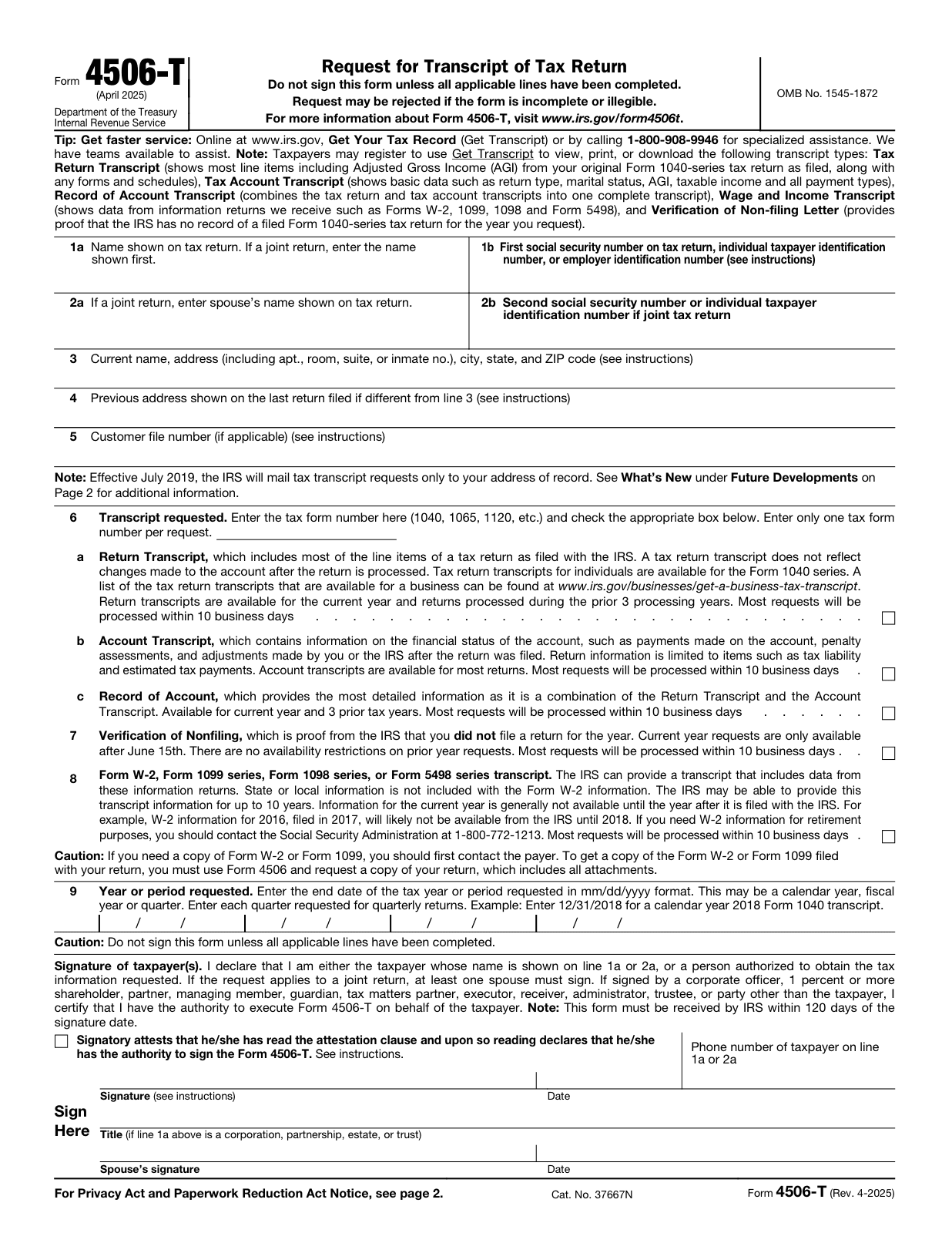
This is the decision that makes the rest of the form easy. On line 6 you enter a single tax form number (such as 1040) and then check one box for the transcript type. Line 6 says it directly: "Enter only one tax form number per request." Lines 7 and 8 are separate transcript types with their own boxes. Choose the one that matches what the requester asked for.
| Line | Transcript type | What it shows | Common reason it is requested |
|---|---|---|---|
| 6a | Return Transcript | Most line items from your return as originally filed. Does not reflect later changes. For individuals, the Form 1040 series. Current year plus the prior 3 processing years. | Mortgage and loan income verification, student aid |
| 6b | Account Transcript | Account financial status: payments, penalty assessments, and adjustments made after filing. | Confirming payments or post-filing changes |
| 6c | Record of Account | A combination of the Return Transcript and the Account Transcript, so the most detailed single option. Current year plus 3 prior tax years. | When you need both the original figures and later activity |
| 7 | Verification of Nonfiling | Proof the IRS has no record of a filed return for that year. Current-year requests are available only after June 15. | Student aid and some benefit applications |
| 8 | Wage and Income | Data from information returns such as Forms W-2, 1099, 1098, and 5498. Can go back up to 10 years. Current-year data is generally not available until the following year. | Reconstructing income, catching up on old filings |
Source for every row above: IRS Form 4506-T (Rev. 4-2025), page 1.
Two practical notes. If you are unsure which one to request, the instructions themselves suggest the Record of Account, because it is the most detailed. (IRS Form 4506-T, page 2, "Note") And resist the urge to check several boxes "to be safe." Each request is built around a single tax form number, and an over-filled or inconsistent form is harder to process cleanly. Pick the one line that answers the question in front of you.
Here is the official page so you can see where each line sits before you fill it in:
Step 2: Enter who the transcript is for (lines 1a to 2b)
Fill the identity lines exactly as they appear on the return you are asking about, not necessarily how you write your name today.
- Line 1a: The name shown on the tax return. On a joint return, enter the name shown first.
- Line 1b: The first Social Security number, individual taxpayer identification number (ITIN), or employer identification number (EIN) on that return. Enter an EIN only if the request relates to a business return; otherwise use the SSN or ITIN. (IRS Form 4506-T, page 2, "Line 1b")
- Lines 2a and 2b: The spouse's name and second SSN or ITIN, but only if the request is for a joint return.
Fictional example (not a real person). Dana Rivera filed a single Form 1040 for tax year 2024 and needs a Return Transcript for a mortgage. Dana writes "Dana Rivera" on line 1a, the SSN on line 1b (shown here as the placeholder XXX-XX-1234, never a real number in a draft), and leaves lines 2a and 2b blank because there is no joint filer.
Step 3: Get the address right (lines 3 and 4)
Address mismatch is one of the most common reasons a request stalls, so slow down here.
- Line 3: Your current name and address, including apartment, room, suite, or inmate number, plus city, state, and ZIP.
- Line 4: The previous address shown on the last return you filed, only if it is different from line 3.
There is a reason this matters more than it looks. Since July 2019 the IRS mails transcripts only to your address of record, not to a third party. (IRS Form 4506-T, page 1 Note and page 2 "What's New") If your current address does not match what the IRS has on file, the delivery can fail. If lines 3 and 4 differ and you have not updated your address with the IRS, the instructions point you to Form 8822 (Change of Address) first. (IRS Form 4506-T, page 2, "Line 4" Note)
Step 4: Customer file number and tax years (lines 5 and 9)
If you have seen an older 4506-T that let you send the transcript to a bank or a lender directly, that option is gone. The current form has no third-party recipient line. The IRS stopped third-party transcript mailings in July 2019; masked transcripts now go to the taxpayer's address of record. (IRS Form 4506-T, page 2, "What's New") What line 5 offers instead is a tracking aid:
- Line 5, Customer file number (optional): Up to 10 numeric characters that will print on the transcript so a requester can match it to your file. It must not contain an SSN. If you enter an SSN, a name, or a mix, the IRS will not use it and the field shows a generic "9999999999" instead. Completing this line is not required. (IRS Form 4506-T, page 2, "Line 5")
For the years, use line 9.
- Line 9, Year or period requested: Enter the end date of each tax year or period in mm/dd/yyyy format. The form's own example is 12/31/2018 for a calendar-year 2018 Form 1040 transcript. There are four date slots, so you can request more than one period on a single form.
Fictional example, continued. Dana needs two years of returns for the mortgage file, so Dana writes 12/31/2023 in the first slot and 12/31/2024 in the second, matching the calendar years filed.
Step 5: Sign, date, and send it to the right place
This is where good forms still get rejected, so read the small print.
- Check the attestation box. Just above the signature line there is a box stating that the signer has read the attestation clause and has the authority to sign. The instructions are blunt: "The form will not be processed and returned to you if the box is unchecked." (IRS Form 4506-T, page 2, "Caution" signature note)
- Sign and date. The taxpayer on line 1a or 2a must sign. On a jointly filed return, either spouse can request it, and only one signature is required. Sign the form exactly as your name appeared on the original return. (IRS Form 4506-T, page 2, "Individuals")
- Mind the 120-day clock. The IRS must receive the form within 120 days of the signature date, or it is rejected. (IRS Form 4506-T, page 1 signature block and page 2 "Signature and date") Do not sign months in advance.
Where to send it. Mail or fax the form to the address for the state where you lived when that return was filed. Page 2 has two charts: one for individual transcripts (Form 1040 series, Form W-2, and Form 1099) and one for all other transcripts. Use the correct chart, then find your state's group. For individual transcripts the routing is:
| If you filed an individual return and lived in | Mail or fax to |
|---|---|
| AL, AZ, AR, FL, GA, LA, MS, NM, NC, OK, SC, TN, TX, a foreign country, American Samoa, Puerto Rico, Guam, CNMI, USVI, or an APO/FPO address | Internal Revenue Service, RAIVS Team, Stop 6716 AUSC, Austin, TX 73301 - Fax 855-587-9604 |
| CT, DE, DC, IL, IN, IA, KY, ME, MD, MA, MN, MO, NH, NJ, NY, PA, RI, VT, VA, WV, WI | Internal Revenue Service, RAIVS Team, Stop 6705 S-2, Kansas City, MO 64999 - Fax 855-821-0094 |
| AK, CA, CO, HI, ID, KS, MI, MT, NE, NV, ND, OH, OR, SD, UT, WA, WY | Internal Revenue Service, RAIVS Team, P.O. Box 9941, Mail Stop 6734, Ogden, UT 84409 - Fax 855-298-1145 |
Source: IRS Form 4506-T (Rev. 4-2025), page 2, "Chart for individual transcripts". Business and other transcripts use the separate "Chart for all other transcripts" on the same page, which groups states differently, so check it if your request is not an individual 1040-series or wage-and-income transcript. Because the IRS changes these filing locations, confirm the chart on your downloaded copy before you send.
One boundary to set clearly: filling the PDF does not submit it. You still mail or fax the finished form to the IRS yourself.
A quick review before you send
Run this short checklist against your filled PDF:
- One transcript line is checked, and it is the one the requester asked for.
- Line 6 has a single tax form number (for most individuals, 1040).
- The name and address match the return you are asking about, and your current address matches your IRS address of record.
- Line 9 lists the right end dates in mm/dd/yyyy format.
- The attestation box is checked, and the form is signed and dated within the last 120 days.
If anything fails the checklist, fix it before the form leaves your hands. A draft on your screen is not a request the IRS has received.
Fill and review Form 4506-T in Fylune
Fylune is a document editor for web and desktop. You can open the official 4506-T PDF in the Fylune editor, fill the supported fields, add your own typed or handwritten visible signature where supported, and review every entry at full size before you download or print. You supply and check your own facts; Fylune does not file with the IRS, does not certify your identity, and does not decide which transcript you need.
A few things to expect. On the web, your work saves automatically to an account-owned cloud snapshot; on the desktop app, files stay in your local folder, and cloud sync is an explicit, encrypted opt-in. Core editing is free. Free PDF exports include a watermark, and clean exports have paid options. When the form is ready, send it to the IRS address or fax number from the chart above yourself.
A good workflow: download the current form from the IRS, open it in Fylune, walk the five steps above, run the review checklist, then export and send.
Frequently asked questions
Does Form 4506-T have a fee? The form itself carries no payment or fee line: it requests a transcript, not a paid copy of a return. If you need a full copy of a filed return with its attachments instead, that is a separate form, Form 4506. (IRS Form 4506-T (Rev. 4-2025))
What is the difference between Form 4506-T and Form 4506? Form 4506-T gives you a transcript, a line-item or summary record. Form 4506 gives you an actual copy of your filed return with attachments. If a requester wants the full return, you need Form 4506, not 4506-T. (IRS Form 4506-T, page 2, "Tip")
Can I request more than one year on a single form? Yes. Line 9 has four date slots, so you can list several periods. Each request still uses a single tax form number and one transcript type. (IRS Form 4506-T, page 1, "Line 9")
Can the IRS send the transcript straight to my lender? No. Since July 2019 the IRS mails transcripts only to the taxpayer's address of record, not to a third party. You receive it and then share it. (IRS Form 4506-T, page 2, "What's New")
Is there a faster alternative to mailing the form? Often, yes. The IRS Get Transcript service lets many individuals view, print, or download transcripts online. (IRS Form 4506-T, page 1, "Tip: Get faster service")
Sources
- IRS, Form 4506-T, Request for Transcript of Tax Return (Rev. 4-2025), OMB No. 1545-1872: https://www.irs.gov/pub/irs-pdf/f4506t.pdf (retrieved 2026-10-31)
- IRS, About Form 4506-T: https://www.irs.gov/forms-pubs/about-form-4506-t (retrieved 2026-10-31; page last reviewed 25-Oct-2026)
- Fylune product site and editor: https://www.fylune.com/ and https://www.fylune.com/editor
All names, numbers, and situations in the examples are fictional and used only to illustrate how the fields relate. They are not advice about any real person, tax matter, or outcome. Confirm current form requirements, routing, and signature rules on the IRS copy you download before you file.
About the author: Orion Wells is the Founder of Aurcue and writes about AI products, personal style systems, and the decisions behind useful photo-based guidance. More at medium.com/@orionwells.