

If you just bought or sold a vehicle in Texas, Form 130-U is the paperwork that moves the title and sets up registration in the new owner's name. Its official name is the Application for Texas Title and/or Registration, and the current edition is Form 130-U Rev 05/26, published by the Texas Department of Motor Vehicles (TxDMV). If you have been searching for a Texas title application, this single form is almost always what you need.
Here is the short version before the field-by-field walkthrough: you do not file Form 130-U online with TxDMV. You complete it, sign it, and submit it, along with the properly assigned title and proof of insurance, to a county tax assessor-collector's office, then pay the title, registration, and any sales tax due. This guide maps your situation to the exact fields, uses a clearly made-up example so nothing looks like real personal data, and ends with a review you can run before you drive to the county office.
Every example below is fictional and used only to show where information goes. This article is a practical walkthrough, not tax, legal, or DMV advice, and Fylune is not affiliated with TxDMV or any government agency. Always confirm your own details against the current official form and instructions, and ask your county tax assessor-collector when you are unsure.
First, confirm you have the current form and know where it goes
Download the form straight from the issuing authority so you are working from the current edition. Two official documents do the heavy lifting:
- The form itself: Application for Texas Title and/or Registration (Form 130-U), Rev 05/26.
- The companion instructions: Detailed Instructions for Application for Texas Title and/or Registration (Form VTR-130-UIF), Rev 05/26.
Both are available on the TxDMV site and print "Form available online at www.TxDMV.gov" in the footer. If your downloaded copy shows a different revision in the lower-left corner, replace it before you start, because field numbers and options can change between editions.
At the top of page 1 you pick what you are applying for by checking one box: Title & Registration, Title Only, Registration Purposes Only, or Nontitle Registration. For a standard purchase where you want both the title and plates set up, that is Title & Registration. The form's own instructions describe the narrower options (for example, Title Only surrenders plates in some cases, and Registration Purposes Only will not issue a Texas title), so read page 2 of the form if your situation is not a plain title transfer.
Where it is filed matters as much as how it is filled in. The official instructions state that the completed Form 130-U, the properly assigned title, and proof of insurance (when you are applying for registration) must be filed in the county where the sale occurred, where the lienholder is located, where the applicant resides, or any county willing to accept the application, within 30 days of the date of sale. The form's general instructions add that it "must be completed and submitted to a county tax assessor-collector's office" with the required fees. In other words, the county tax office is the destination, not a TxDMV mailbox.
Vehicle and identification fields (boxes 1 to 15)
Boxes 1 through 12 describe the vehicle, and boxes 13 through 15 identify who is applying. Copy the vehicle details from the ownership document the seller assigned to you (the title), not from memory.
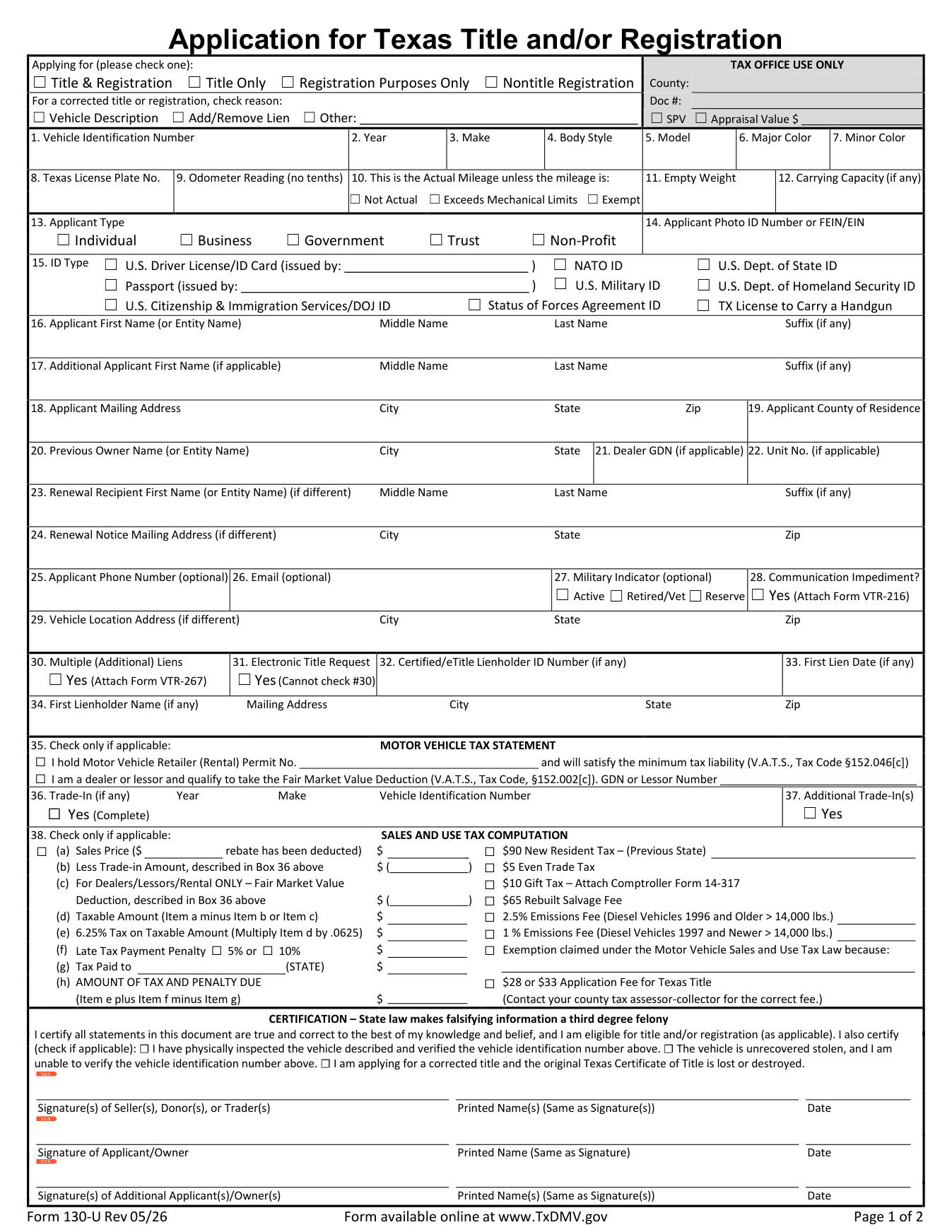
Here is how a few of the trickier boxes read on the current form and instructions:
- Box 1, Vehicle Identification Number (VIN): The VIN from the certificate of title (17 characters on modern vehicles). The instructions note it is also stamped or affixed on the vehicle (for example, on the driver-side door frame or the dashboard). The VIN on the form must match the title exactly; a single transposed character is enough to stall a transfer.
- Boxes 2 to 7, Year, Make, Body Style, Model, Major Color, Minor Color: The model year, brand, body style (the instructions use abbreviations such as "PK" for pickup), model, and color. Only fill in Minor Color if the vehicle actually has a second color.
- Box 8, Texas License Plate No.: The Texas plate number, if the vehicle already has one.
- Box 9, Odometer Reading (no tenths): The current mileage as a whole number, with no fraction. The instructions say that if the vehicle is subject to odometer disclosure, the seller or agent must disclose the reading at the time of sale.
- Box 10, actual mileage brand: Leave the three boxes unchecked when the reading in box 9 is the true mileage. Check "Not Actual," "Exceeds Mechanical Limits," or "Exempt" only when that applies. If the vehicle is exempt from odometer disclosure, select "Exempt" here.
- Boxes 13 to 15, Applicant Type and ID: Mark whether the applicant is an individual, business, government entity, trust, or non-profit; record the photo ID or FEIN/EIN; and in box 15 check your ID type (for example, a U.S. driver license). The form notes that all title applications must include one of the government-issued photo IDs listed in box 15.
A made-up example to anchor the vehicle fields
Imagine a fictional buyer, Jordan Rivera, who bought a used 2019 Honda Civic sedan. Reading from the assigned title, Jordan would enter a VIN such as the example string 1HGFC2F5XKH100000 in box 1, "2019" in box 2, "Honda" in box 3, a body-style abbreviation for a 4-door sedan in box 4, "Civic" in box 5, and the car's main color in box 6. If the odometer reads 54,320 miles and that is accurate, Jordan writes 54320 in box 9 and leaves box 10 unchecked. None of these values are real; they only show the pattern.
Owner, previous owner, and lienholder (boxes 16 to 34)
This block is where transfers most often get rejected, because the applicant and the person who sold the vehicle have to line up with the title.
- Boxes 16 to 19, Applicant: The new owner's legal name (First, Middle, Last, Suffix), mailing address, and county of residence. Box 17 is for an additional applicant if the vehicle will be in more than one name.
- Box 20, Previous Owner/Entity Name: The seller's name, city, and state exactly as they appear on the assigned title or other evidence of ownership you are surrendering with the form. This is the field that trips people up: if the previous-owner entry does not match the name on the surrendered title, the county office cannot connect your application to the ownership record, and the transfer can be sent back. Using our fictional sale, if Jordan bought the Civic from a made-up seller named Sam Delgado in Austin, Texas, then box 20 reads "Sam Delgado, Austin, TX," matching the signature and name on the title Sam assigned.
- Boxes 21 to 29: Dealer GDN and Unit No. apply to dealer and fleet transactions; a private buyer usually leaves them blank. Boxes 23 to 26 cover a different renewal recipient, phone, and email. Boxes 27 and 28 are the optional military indicator and the communication-impediment checkbox (which needs Form VTR-216 attached).
- Boxes 30 to 34, Liens: If someone financed the vehicle, the lienholder's details go here. Box 34 asks for the first lienholder's name and mailing address, and the instructions are explicit: if there is no lien, write "NONE" in box 34. Boxes 30 to 33 handle additional liens, electronic title requests, and the certified lienholder ID and first lien date. A cash purchase with no loan simply gets "NONE" in box 34.
If you bought from a private seller with no loan, your version of this block is short: your name and address in boxes 16 to 19, the seller's name and city/state in box 20, and "NONE" in box 34.
Sales price, tax, and exemptions (boxes 35 to 38)
Box 38 is the Sales and Use Tax Computation, and it is worth slowing down here because the amount is not always based on what you paid.
Conceptually, the computation flows down line (a) to line (h): you enter the vehicle's sales price on line (a), subtract a trade-in amount on line (b) if any, which leaves a taxable amount on line (d), and then the tax on line (e) is a percentage of that taxable amount. The current form shows a 6.25% motor vehicle sales and use tax on the taxable amount, with a late-payment penalty of 5% or 10% on line (f) if you pay late.
Two details catch many private buyers:
- Standard Presumptive Value (SPV). The form's notice section explains that for private-party sales of most used vehicles, the tax is computed on the greater of your sales price or 80% of the vehicle's Standard Presumptive Value on the day you apply for title. So a low sale price does not automatically mean low tax. The Texas Comptroller publishes SPV figures, and your county tax office can tell you the value used for your vehicle.
- Exemptions and special cases. The right side of box 38 lists checkboxes for situations such as a 5 even-trade tax, and a $10 gift tax (which requires the Comptroller's Affidavit of Motor Vehicle Gift Transfer, Form 14-317, signed by both parties). If you claim an exemption, the form asks for a brief explanation.
Because rates, the SPV value, and county fees change and depend on your exact situation, treat any dollar figure you calculate as a working estimate. Confirm the current rate and your amount with the official instructions, your county tax assessor-collector, or the Texas Comptroller's tax assistance line before you pay. The form itself notes that the title application fee is "33" depending on your county and tells applicants to contact their county tax assessor-collector for the correct fee, so even the base fee is not a single fixed number statewide.
A conceptual example, not a quote
If our fictional Jordan paid a sales price for the Civic and did not trade anything in, that price goes on line (a), it carries down as the taxable amount on line (d), and the tax on line (e) is the percentage of that amount, unless 80% of the SPV is higher, in which case the county uses the SPV figure instead. The point of the example is the structure, not a specific total; your real number comes from the current official instructions and your county office.
Signatures: who signs the form
The certification line reminds you that state law makes falsifying information on this form a third-degree felony, so sign only after the entries are correct. Form 130-U collects up to three signatures:
- Seller(s), Donor(s), or Trader(s): signed, printed, and dated by the seller shown on the title or ownership document.
- Applicant/Owner: signed, printed, and dated by the new owner.
- Additional Applicant(s)/Owner(s): for any second owner named in box 17.
One rule is easy to miss: the form's general instructions say a completed form "must contain the original signature of the buyer," while "the seller's signature may be reproduced or faxed." So the buyer's wet signature should be on the copy you submit.
Review before the county visit
A filled form is not a filed form. Run this quick check before you leave, ideally with the PDF open in front of you so you can scroll back through each box.

- VIN match: Box 1 matches the VIN on the title, character for character.
- Previous owner: Box 20 matches the seller name and city/state on the assigned title.
- Lien line: Box 34 shows the lienholder, or "NONE" if there is no loan.
- Odometer: Box 9 is a whole number, and box 10 is checked only if a brand applies.
- Sales price and tax: Line (a) reflects your price, and you have a plan to confirm the tax (including SPV) with your county office.
- Signatures and ID: The buyer's original signature is present, the seller has signed, and you are bringing a photo ID listed in box 15.
- Supporting documents: The properly assigned title and, if you are registering, proof of insurance are ready to go, within 30 days of the sale.
How Fylune fits in
Fylune is a document editor for the web and desktop, with PDF and Markdown editing and government-form templates among its features. It does not file anything with TxDMV or any agency, and it does not certify your identity; the county tax office decides what it accepts and how. What Fylune can do is make the review above easier: open the official Form 130-U PDF you downloaded from TxDMV in the editor, type your own facts into the fields, add your own visible signature where the form supports it, and read every box at full size before you commit.
You supply and check the facts yourself. On supported forms, AI assistance can help you fill from information you provide, but you review each answer, and AI never signs for you or submits the form. In the browser, your work saves automatically into account-owned cloud snapshots; on the desktop app, files stay on your computer, with optional, opt-in encrypted sync. Core editing is free, free PDF exports carry a watermark, and clean exports have paid options.
When you are ready, open the Fylune editor, load the official PDF, enter your own facts, and review every field before you download or print. Then take the signed form and your supporting documents to your county tax assessor-collector.
Frequently asked questions
Do I file Form 130-U online with TxDMV? No. The official instructions direct you to file the completed form, the assigned title, and proof of insurance with a county tax assessor-collector's office, within 30 days of the sale. Fylune helps you complete and review the PDF; it does not submit it.
What goes in box 34 if there is no loan on the car? Write "NONE." The instructions state that box 34 (first lienholder name and mailing address) should read "NONE" when there is no lien.
Why might the tax be more than I paid for the vehicle? For private-party sales of most used vehicles, the form's notice section says the tax is computed on the greater of your sales price or 80% of the vehicle's Standard Presumptive Value on the day you apply for title. Your county tax office or the Texas Comptroller can confirm the SPV used for your vehicle.
Whose signature has to be original? The form's general instructions say the completed form must contain the original signature of the buyer, while the seller's signature may be reproduced or faxed. Sign only after you have checked every entry.
How current is the form in this guide? This walkthrough was checked on 2026-10-31 against Form 130-U Rev 05/26 and its companion instructions VTR-130-UIF Rev 05/26 on the TxDMV site. Editions change, so confirm the revision in the lower-left corner of your own copy before you rely on any box number.
Sources
- Texas Department of Motor Vehicles, Application for Texas Title and/or Registration (Form 130-U), Rev 05/26: https://www.txdmv.gov/sites/default/files/form_files/Form-130-U.pdf (retrieved 2026-10-31)
- Texas Department of Motor Vehicles, Detailed Instructions for Application for Texas Title and/or Registration (Form VTR-130-UIF), Rev 05/26: https://www.txdmv.gov/sites/default/files/form_files/VTR-130-UIF.pdf (retrieved 2026-10-31)
- Texas Department of Motor Vehicles, Buying or Selling a Vehicle: https://www.txdmv.gov/motorists/buying-or-selling-a-vehicle (retrieved 2026-10-31)
- Fylune document editor and capabilities: https://www.fylune.com/ and https://www.fylune.com/editor (retrieved 2026-10-31)
About the author: Orion Wells is the Founder of Aurcue and the Founder of StarSeekAI, writing about AI products, personal style systems, and the decisions behind useful photo-based guidance. More at https://medium.com/@orionwells. Orion is not a tax, legal, or DMV professional, and this article is general information, not advice about a specific transaction.
<script type="application/ld+json">
{ "@context": "https://schema.org", "@type": "BlogPosting", "headline": "How to Fill Out Form 130-U: Texas Title and Registration Application", "description": "A practical, source-backed walkthrough of form 130-u with a fictional example and a pre-submission review in Fylune; no filing or tax/legal advice.", "inLanguage": "en", "mainEntityOfPage": { "@type": "WebPage", "@id": "https://www.fylune.com/blog/how-to-fill-out-form-130-u-texas-title-and-registration-application" }, "author": { "@type": "Person", "name": "Orion Wells", "jobTitle": "Founder of Aurcue", "url": "https://medium.com/@orionwells" }, "publisher": { "@type": "Organization", "name": "Fylune", "url": "https://www.fylune.com" }, "image": "https://www.fylune.com/blog/how-to-fill-out-form-130-u-texas-title-and-registration-application/assets/txdmv-form-130-u-page1-official.png" }
</script>