

By Orion Wells
To fill the amount columns on Form 1040-X, start with the original return as previously adjusted, if applicable, enter the new increase or decrease in column B, and put the corrected amount in column C. For a line with those three columns, the check is A + B = C. A prior IRS adjustment belongs in your baseline; adding it again would overstate the new change. See the IRS instructions for columns A through C.
The worked example below transfers already-recomputed figures into one line. It does not determine whether you should amend, which tax treatment applies, or whether you qualify for a refund. Before preparing an amendment, resolve those questions using the IRS instructions for the return year or an appropriate tax professional.
Identify the return year before entering amounts
Start at the IRS Form 1040-X page, which links the current blank and instructions. The blank checked for this guide is Form 1040-X, Rev. December 2025, with two pages. Its revision date identifies the document edition. The calendar or fiscal year above your name identifies the return you are amending; it does not identify the PDF edition. Use the forms, schedules and substantive tax instructions for that return year alongside the current instructions for Form 1040-X.
Confirm that an original return was filed. The declaration you sign on page 2 includes that statement. Use Form 1040-X to correct the filed return. The current official PDF also requires you to select an amended-return filing status even when the status is unchanged. This guide does not recommend a status change.
Build a three-record baseline before typing
Put the filed return beside any later adjustment and the completed corrected return. Identify what has already changed before measuring the new correction.
EXAMPLE only: Avery Chen is fictional. Every amount in the following worksheet and arithmetic example is illustrative. Assume the records already establish these three AGI figures; this guide does not calculate them or interpret an actual IRS notice.
| Record to reconcile | EXAMPLE line-1 AGI | Its role in this amendment |
|---|---|---|
| Return as originally filed | $45,000 | Keep it as the original record. It has been superseded for this baseline. |
| Return after a prior, already-effective IRS adjustment | $45,500 | Use this adjusted figure in column A. The earlier $500 increase is already included. |
| Separately recomputed corrected return and supporting workpapers | $46,200 | Use this corrected figure in column C and reconcile the difference in B. |
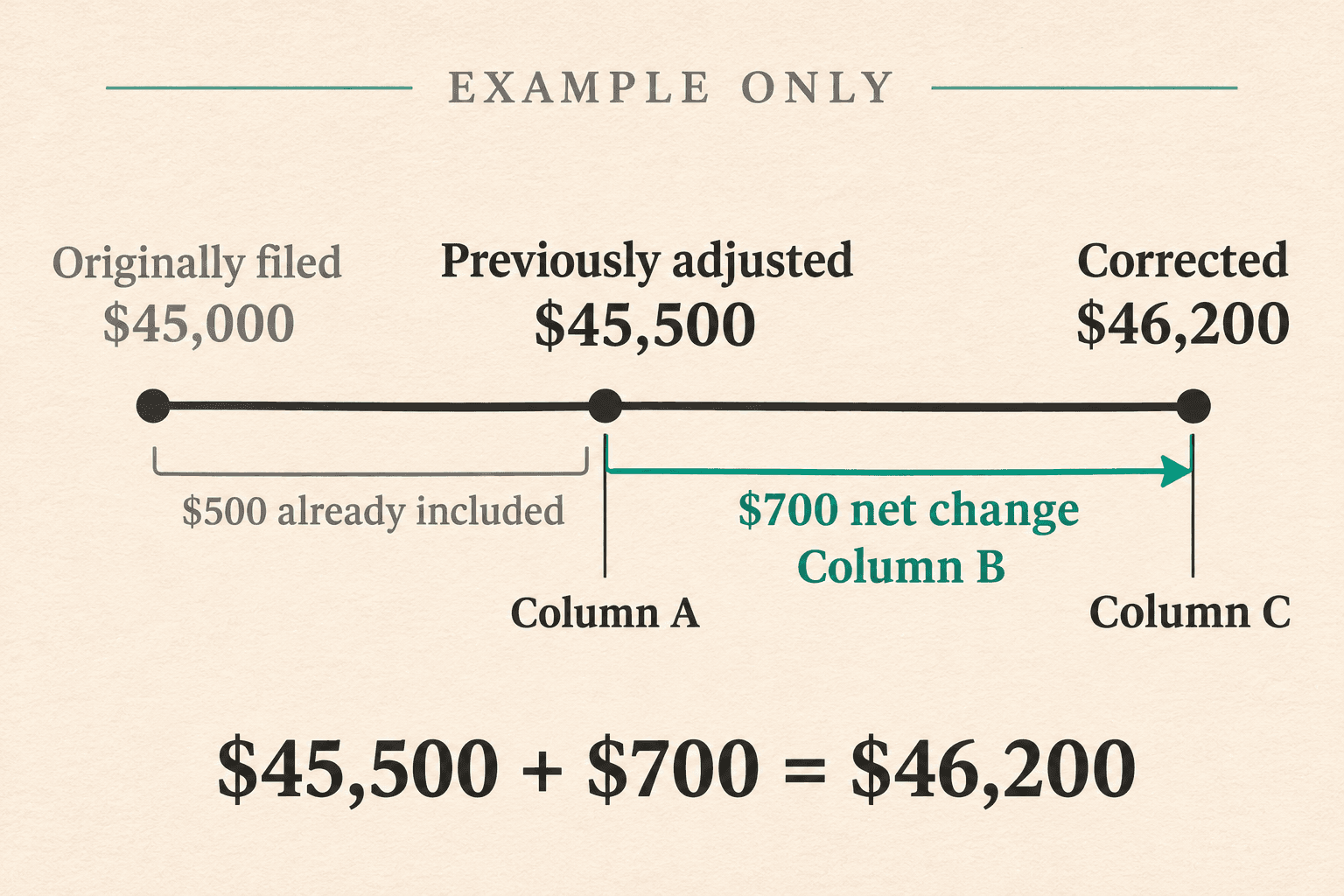
AI-generated editorial illustration of the fictional baseline. It is not an IRS form or notice.
The IRS says column A must reflect the adjusted amount when there was a previous amendment, an audit that changed the return, or an IRS notice advising of changes. If you cannot reconcile the latest adjustment to your records, resolve that discrepancy before transferring figures. Do not ignore a notice, assume that a proposed amount has taken effect, or add the same adjustment twice. See Columns A Through C in the IRS instructions.
Use your own taxpayer records for your name and identifier, and your current address. For an amended joint return, the IRS instructions say to retain the original order of the spouses' names and SSNs. Spouse and dependent entries depend on your actual return. No SSN, account number or other personal identifier is needed to follow this example. If you make a practice copy, use masked identifiers; “SAMPLE ADDRESS” and masks are editorial placeholders, never values to submit. See the name and address instructions.
Fill columns A, B and C: the limited correction example
For the EXAMPLE records above, line 1, adjusted gross income, would show:
| Form 1040-X line | A: original amount or as previously adjusted | B: net change | C: correct amount |
|---|---|---|---|
| 1: Adjusted gross income, EXAMPLE only | $45,500 | $700 increase | $46,200 |
**EXAMPLE arithmetic: 700 = 700 increase from the adjusted baseline. It is not 45,000 filed figure. That 500 adjustment a second time.
An increase is added to A; a decrease is subtracted. The IRS directs you to put negative numbers, including decreases, in parentheses. For an unchanged item in a line you must complete, carry the amount in A to C. Do not turn every box into a zero: use the IRS chart specifying which lines to complete for your type of change, and follow any more specific rule. See Columns A Through C and the line-completion chart.
This is a line-1 excerpt, not a completed amended return. An AGI correction can affect deductions, credits and other amounts. Recompute the applicable items using the return-year instructions before entering the rest of Form 1040-X; the single $700 change does not establish additional tax or a refund. See the IRS instructions under Line 1, Adjusted Gross Income.
Once your corrected figures and required documents are ready, download the current IRS blank PDF. To prepare a PDF copy in Fylune, open the document editor and select Choose a File. This guide uses the upload route; it does not rely on a built-in 1040-X template or verified form-specific AI assistance. Check supported fields and the exported copy before deciding that the file is ready for the next step.
Review income, tax, payments and earlier overpayments separately
Check the applicable lines against the corrected return. The following is a review map for the December 2025 Form 1040-X, not a substitute for its line instructions.
| Area on page 1 | What to reconcile |
|---|---|
| Income and deductions, lines 1 through 5 | Corrected AGI, applicable deductions and taxable income for the return year. Recheck consequences of an AGI change. |
| Tax liability, lines 6 through 11 | Tax calculated using the appropriate return-year method, credits and other taxes. Line 9 is reserved for future use. |
| Payments, lines 12 through 17 | Withholding, estimated payments, applicable refundable credits and amounts paid with an extension, with the original return or after filing. |
| Refund or amount owed, lines 18 through 23 | The earlier overpayment, amounts available to cover corrected liability, and any resulting balance or overpayment allocation. |
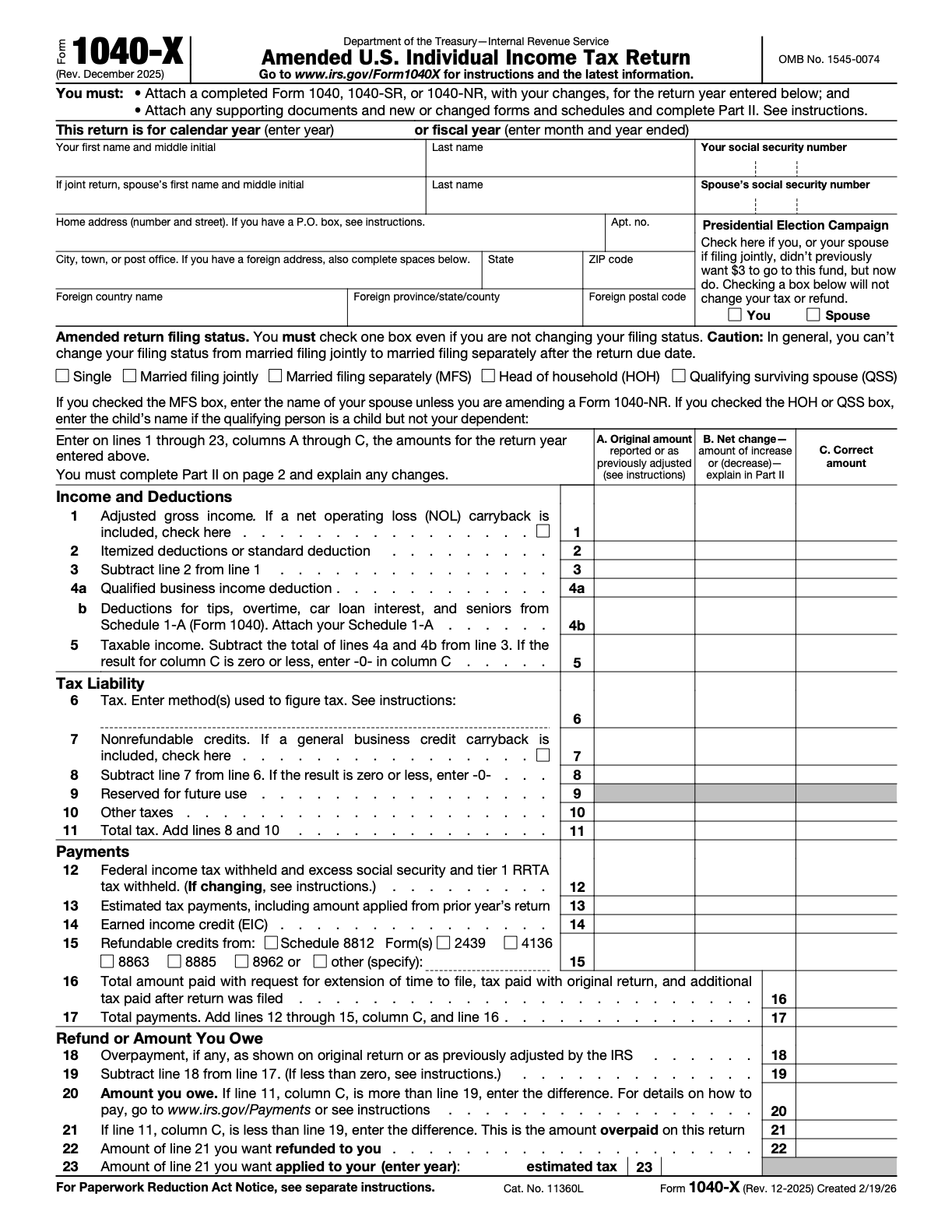
Page 1 of the current IRS blank, rendered without annotations. The example amounts above have not been entered on it.
Watch line 4b. The current form has a separate line for Schedule 1-A deductions for tips, overtime, car loan interest and seniors. The instructions state that Schedule 1-A and these deductions were introduced in 2025. A field appearing on a continuous-use form does not make that deduction available for an earlier return year or establish your eligibility. Follow the line-4b instructions for the year and deduction involved.
Keep corrected liability, payments already made and the earlier overpayment distinct. In particular, line 18 concerns an overpayment on the original return or as adjusted by the IRS; it is not a place to enter the refund you hope this amendment will produce. Use the IRS payment and overpayment line instructions for the actual records. Do not infer a refund from a change to AGI alone.
Complete Part I when applicable and explain the changes in Part II
On page 2 of the current paper form, Part I is Dependents and Part II is Explanation of Changes. If you are changing dependent information, complete Part I as directed. Line 30 calls for all dependents claimed on the amended return, including those still claimed from the original return and those being added. Lines 24, 26, 28 and 29 are reserved; the instructions say not to enter amounts there. Use the return-year dependent instructions for the actual facts. See the official form, page 2 and Part I instructions.
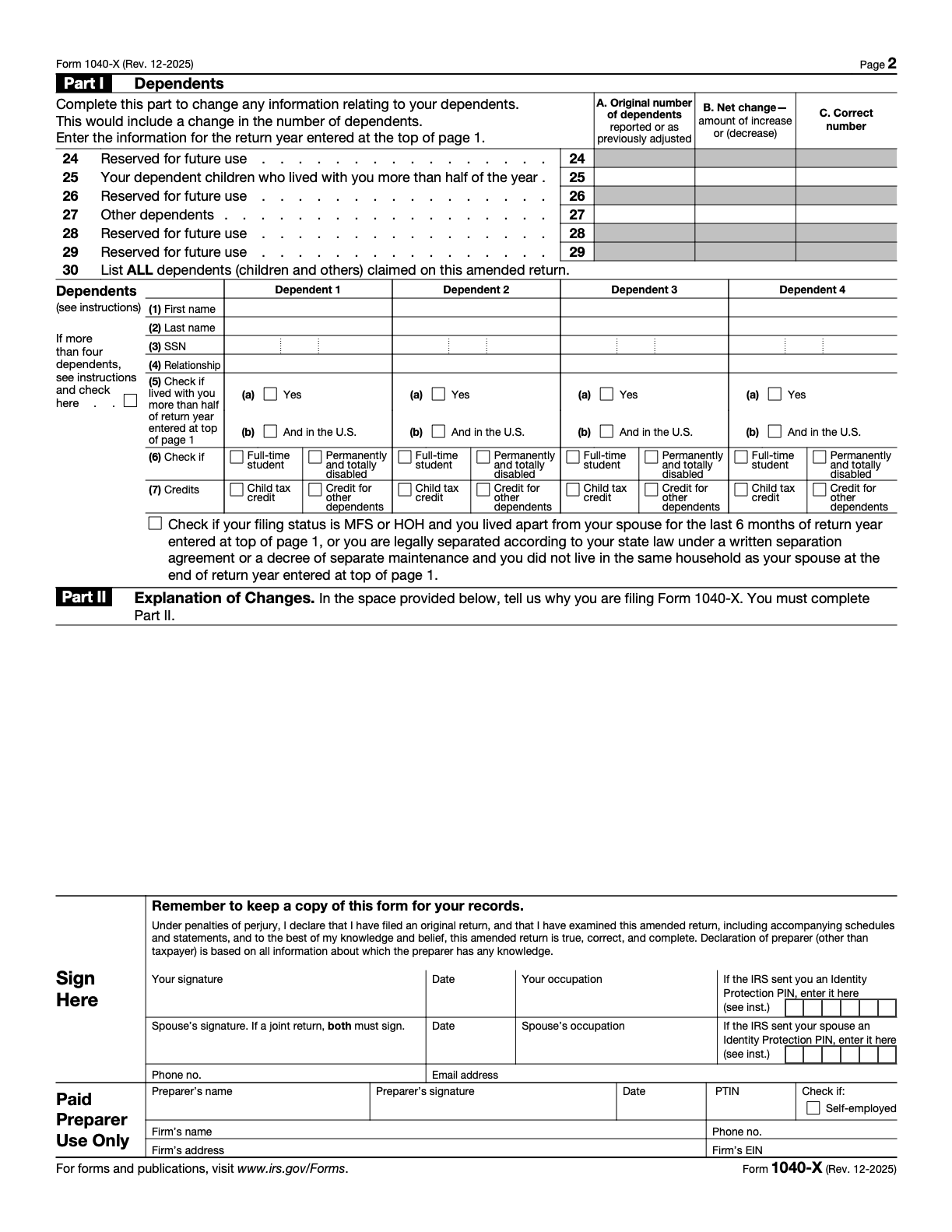
Page 2 of the IRS blank. Part II sits above the actual signature area; this is not a completed or signed example.
Part II must be completed. Explain each change and why you are making it. The following is a fictional fact-reconciliation sentence, not a legal reason to amend or a complete explanation for a real return:
EXAMPLE ONLY: For line 1, Avery Chen's corrected return and supporting workpapers show AGI of 45,500 column-A baseline. This amendment reports the remaining 46,200 in column C.
In your own explanation, identify the actual reason the figure changed, the affected line and the supporting form or record. The example's figures do not supply that reason for you. If more space is needed, the IRS allows an attached statement; follow its instructions for required supporting forms. See Column B and Part II.
Assemble the amendment packet for the actual filing route
The two directions at the top of the current PDF require a completed Form 1040, 1040-SR or 1040-NR showing the changes for the selected year, supporting documents and new or changed forms and schedules, and completion of Part II. The Assembling Your Return instructions explain the paper packet: put the completed, updated return behind Form 1040-X; put new or changed schedules and forms behind that return in attachment-sequence order; and arrange supporting statements in the order of the forms they support, attaching them last.
Use a document worksheet to distinguish records you consult from documents the IRS requires you to send:
| Record or document | What it checks | Attachment review |
|---|---|---|
| Filed return and records of earlier adjustments | Correct return year and the latest appropriate column-A baseline | Keep for reconciliation. Do not attach the original return or correspondence unless required. |
| Completed, updated Form 1040, 1040-SR or 1040-NR | Corrected figures for the selected year | Include the changed return as directed; for paper filing it goes behind Form 1040-X. |
| New or changed forms and schedules | Each applicable changed line and downstream recomputation | Include the required forms and schedules in the prescribed order. |
| Supporting source documents | The actual reason and evidence for a change | Apply the specific attachment rules rather than sending every record. For example, a supporting Form W-2 or W-2c goes at the front of the paper Form 1040-X. |
| Part II and any continuation statement | Explanation linked to the affected lines | Complete Part II; attach an explanatory statement if more space is needed. |
Some attachment rules have conditions. For example, the paper instructions call for a Form W-2G or Form 1099-R supporting a change at the front only if tax was withheld. Read the complete assembly instructions for your documents instead of applying the W-2 rule to every information return. The line-6 instructions say not to attach the tax-calculation worksheets used there; check each line's directions for what to include.
For electronic filing, the IRS says the software selects the order. Its amended-return FAQ requires all necessary forms and schedules as if the amended Form 1040, 1040-SR or 1040-NR were an original submission, including necessary forms without adjustments, plus Form 1040-X. Follow the software's electronic-submission checklist for that route.
Prepare the uploaded PDF in Fylune and inspect both exported pages
Fylune's PDF editor supports PDF fields, text and a user-added visible signature. Its editor entry offers Choose a File and says files are automatically saved to your cloud account. Treat this as a Web cloud-storage workflow when deciding where to put tax documents.
No built-in Form 1040-X template was identified in the checked catalog, and no form-specific AI filling behavior is verified for this guide. Use the official blank you downloaded and enter your reviewed facts manually in supported fields. Do not assume that every field imports or exports correctly just because the PDF opens.
- Open the current agency PDF through Choose a File. Check the year area and both pages before entering sensitive details.
- Test a supported field or text placement, save or export a practice copy, and reopen it. If values move, disappear or obscure official text, stop and use a workflow that preserves the form.
- Transfer the reviewed entries from your corrected return. Check every applicable A/B/C row, including parentheses for decreases.
- Download the completed copy and reopen that file outside the editing session. Check page count, year, names, amounts, dependent information, Part II and signature areas. Keep taxpayer signature areas distinct from Paid Preparer Use Only.
- Inspect export markings as well as entries. Fylune's documented free PDF exports include a watermark, with paid options for clean exports. Check the current export choice and pricing. Stop if a watermark or other output change compromises the intended official document. A paid download does not establish IRS acceptance.
For the general import and download check, see How to Fill Out a PDF Form Online and Check the Download. Use the current editor and feature information for product capabilities; older workflow descriptions can become stale. Form 1040-X import and export have not been tested for this guide. Review the actual downloaded copy before using it.
Obtain the actual signatures and choose the IRS submission route
For a paper-filed Form 1040-X, the current IRS instructions require a handwritten signature. Digital, electronic and typed-font signatures are not valid for that paper return. Print the reviewed packet and have the required person or people sign by hand in ink. For an amended joint return, both spouses must sign. Date the return and complete the occupation entries as directed. If someone cannot sign, or a representative or surviving spouse will sign, use the specific IRS rules for that situation rather than copying another person's mark. See Sign Your Return and Requirements for a Paper Return.
Electronic filing uses the IRS-prescribed PIN signature process through participating tax software. A visible mark added in a PDF editor is not that electronic signature, a certificate-based digital signature or an IRS submission. Fylune does not submit the form. See the electronic-return signature requirements.
The IRS currently describes electronic amendments through tax software for the current or two prior tax periods, subject to its eligibility rules. Its FAQ includes paper-only cases, such as an older return or a prior-year return originally filed on paper during the current processing year. Confirm your actual year's eligibility and the software provider's support using the current IRS amended-return FAQ.
For a paper return, check Where To File in the current instructions. A return filed in response to an IRS notice uses the notice's address; other special situations and residence-based destinations have their own directions. Private delivery services have separate street-address rules. Do not select a destination from the fictional example or assume one address fits every amendment.
Before sending, resolve any applicable filing deadline or refund-claim limitation with the IRS or an appropriate professional. This worksheet does not establish a personal deadline, refund entitlement, processing time or acceptance outcome.
Final example and packet review checklist
- Confirm the return year and the current form edition separately.
- Reconcile the originally filed return, any prior amendments or IRS adjustments, and the completed corrected return.
- For the EXAMPLE only, check line 1: A 700 = C 500 adjustment is already in A.
- Trace every other applicable entry to the recomputed return and return-year instructions. Check signs, parentheses and reserved lines.
- Complete Part I if dependent information is changing; complete Part II to explain the actual changes.
- Include the completed, updated return and the actual required forms, schedules and supporting documents for the chosen route.
- Reopen the exported PDF and inspect both pages, including the explanation, signature areas and any watermark.
- Obtain every required actual signature. For paper filing, use handwritten signatures; for electronic filing, follow the tax software and IRS PIN rules.
- Follow the current authorized IRS submission route and keep your own copy. Editing or downloading the PDF does not file it.
Sources
- IRS: About Form 1040-X and current developments
- IRS: Current Form 1040-X PDF, Rev. December 2025
- IRS: Instructions for Form 1040-X, December 2025
- IRS: Amended return frequently asked questions
- Fylune: Document editor and PDF editor capabilities
Form edition and source pages checked November 19, 2026. This is general document-preparation guidance with a fictional example, not individualized tax or legal advice.