

By Orion Wells
To prepare Form 941, start with three separate records: the quarter's payroll totals, a tax-liability calendar, and a deposit-and-credit ledger. Map each record to its own part of the return. Line 12 reports taxes after adjustments and nonrefundable credits; line 13 reports deposits and applied overpayments; Part 2 reports liability under the employer's applicable reporting branch. Matching dollar totals do not make those records interchangeable. See the IRS instructions for Form 941, especially lines 12, 13 and 16.
This guide uses the 2026 Form 941, revised March 2026, checked against the IRS document on November 20, 2026. It explains a fictional original-quarter reconciliation. It does not determine your wage treatment, credits, deposit schedule or filing obligation. Use your own records and the current IRS instructions, with an appropriate tax professional where needed.
Confirm the year, quarter and return you need
Download the current official Form 941 PDF from the IRS and check the Form 941 page for developments. Use the edition for the period you are reporting. Enter the employer's actual EIN, legal name and address, and select one quarter. Repeat the name and EIN at the top of return page 2. Do not substitute an SSN or ITIN for the employer's EIN. These entries follow the IRS instructions under How Should You Complete Form 941?
If you are correcting a Form 941 already filed, the IRS directs you to Form 941-X, filed separately. Do not fold a prior-quarter correction into an original Form 941. Also confirm that your employer is required to file Form 941 rather than an applicable alternative, such as Form 944 following IRS notification. See Correcting a previously filed Form 941 and Who Must File Form 941? in the official instructions.
Check the filing channel as well as the form. The IRS encourages electronic filing, and some filers have requirements of their own: for example, CPEOs generally must file Form 941 and Schedule R electronically. Preparing a PDF in Fylune does not e-file a return. The IRS's Electronic filing and payment, Certification program for professional employer organizations, and Where Should You File? sections control that handoff.
Gather payroll, liability and deposit records separately
Build a worksheet with a source for every entry before typing into the PDF. The following map follows the fields on the official return and their line instructions.
| Record to gather | What you verify | Destination |
|---|---|---|
| Payroll register for the specified pay period | Employees included in the line-1 count | Part 1, line 1 |
| Quarter payroll summaries and supporting wage records | Compensation, federal withholding, and each taxable wage base | Part 1, lines 2, 3 and 5a through 5d |
| Adjustment and credit support | Whether an adjustment or credit applies, with any required attachment | Lines 7 through 12 |
| Tax-liability calendar | Liability assigned to the appropriate wage-payment dates or months under the applicable rules | Part 2, line 16, or Schedule B where required |
| Deposit confirmations and applied-overpayment records | Amounts credited to this quarter | Line 13 |
For monthly reporting, the IRS tells you to enter liabilities in the month corresponding to the dates wages were paid, rather than the dates liabilities were accrued or deposits were made. A bank debit date alone cannot supply Part 2. Nor can one quarter's deposit total establish whether you are a monthly or semiweekly depositor. See Determine if You're a Monthly or Semiweekly Schedule Depositor for the Quarter and the line-16 instructions.
EXAMPLE: Count the specified pay period, not everyone paid during Q3
Our fictional employer is North Pine Studio Inc. (EXAMPLE), with MASKED EIN: XX-XXXXXXX and SAMPLE ADDRESS (EXAMPLE). These are editorial placeholders, not entries to submit. Every identity, period and amount in the example below is fictional.
Use Q3 2026 (EXAMPLE), July through September, a closed quarter. This is a teaching exercise, not a recommendation to file a previous quarter late. A Q4 return cannot be finalized from partial November records: Q4 continues through December.
For Q3, line 1 uses the pay period that includes September 12, not a count of everyone who received wages at any point during July through September. The other reference dates are March 12 for Q1, June 12 for Q2 and December 12 for Q4. The IRS also lists exclusions, including employees in nonpay status for that pay period. See line 1 of the IRS instructions.
| EXAMPLE payroll fact | Included in this example's line-1 count? |
|---|---|
| Employee A received wages for the pay period including September 12 | Yes |
| Employee B received wages for that same pay period | Yes |
| Employee C received wages earlier in Q3, left before that period and was in nonpay status for it | No |
| EXAMPLE line 1 | 2 |
Employee C's exclusion from this count does not remove wages paid earlier in Q3 from the quarter's applicable wage totals. The employee-count question and the wage-total questions measure different things.
Map compensation and withholding without equating all wage bases
For this limited continental-U.S. employer example, assume the underlying payroll review has established each of these amounts separately:
| EXAMPLE input | Assumed amount |
|---|---|
| Compensation reportable on line 2 | $30,000.00 |
| Federal income tax withheld for line 3 | $2,400.00 |
| Taxable social security wages for line 5a | $30,000.00 |
| Taxable Medicare wages for line 5c | $30,000.00 |
The equal wage amounts are assumptions of this example. They are not a rule that line 2, social security wages and Medicare wages always match. Assume no tips, no wages subject to Additional Medicare Tax withholding, no section 3121(q) notice-and-demand tax, and no employee reaching the applicable annual social security wage cap. Real payroll may require different wage bases and additional entries; use the IRS instructions for lines 2 through 6.
Territory exception: Employers in American Samoa, Guam, the Commonwealth of the Northern Mariana Islands, the U.S. Virgin Islands and Puerto Rico must skip lines 2 and 3 unless they have employees subject to U.S. income tax withholding. That exception appears above Part 1 on the current form. Those employers should follow it rather than copy this example.
Using the combined rates printed on the 2026 form:
| Form destination | EXAMPLE calculation | EXAMPLE result |
|---|---|---|
| Line 5a, column 2 | $30,000.00 × 0.124 | $3,720.00 |
| Line 5c, column 2 | $30,000.00 × 0.029 | $870.00 |
| Line 5e | 870.00, with no tax from 5b or 5d | $4,590.00 |
| Line 6 | 4,590.00, with no line-5f amount | $6,990.00 |
Leave line 4 unchecked in this fully taxable example. It applies when no wages, tips or other compensation are subject to social security or Medicare tax; it is not a general shortcut to skip the calculation.
The tables use dollar signs and decimals for reading. When entering the actual form, follow Completing and Filing Form 941: put dollars and cents in their respective spaces, do not enter dollar signs or decimal points, and do not round to whole dollars. Leave zero-value data fields blank except lines 1, 2 and 12, as the instructions specify.
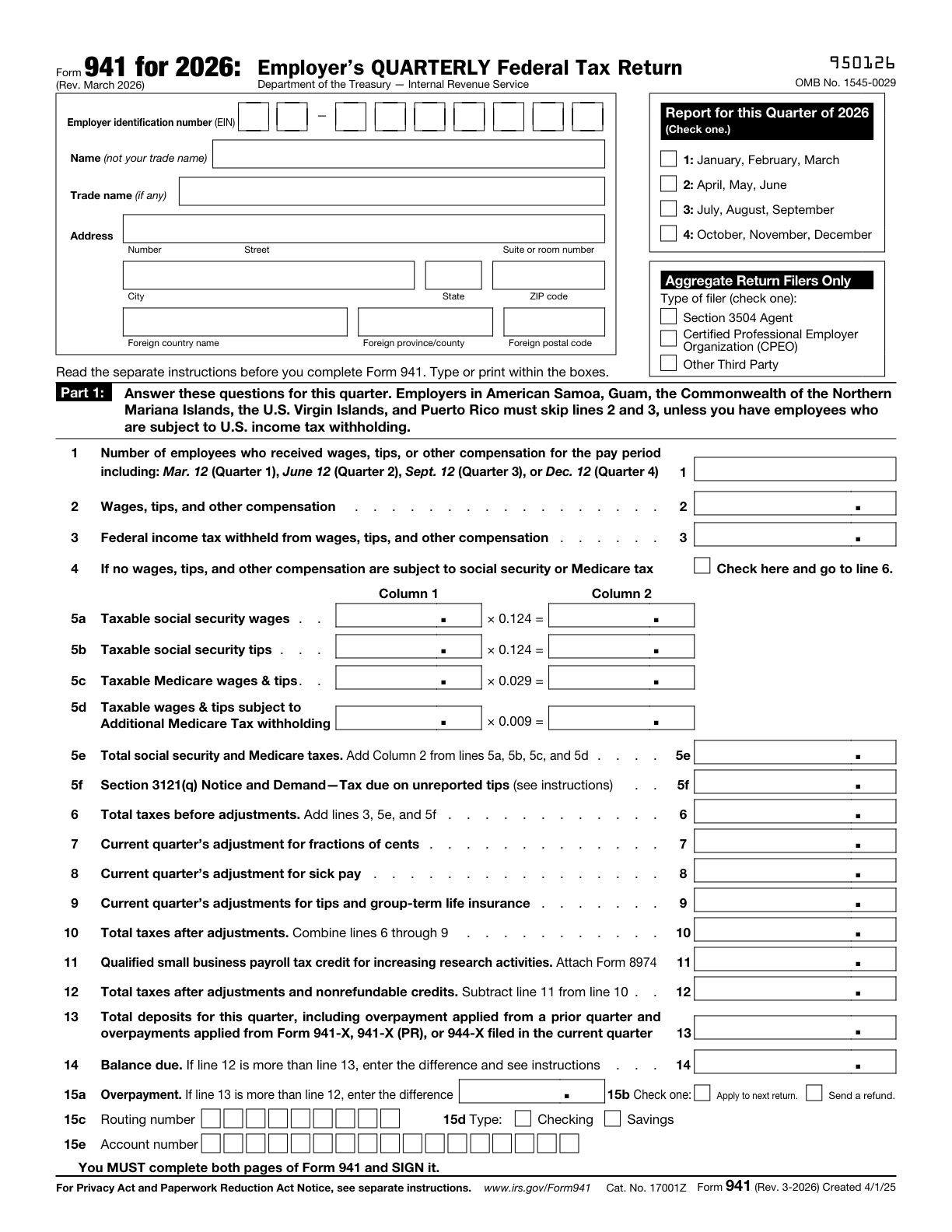
The actual blank IRS return, page 1, revised March 2026. The fictional worksheet above is not a completed or accepted return. Source: IRS Form 941.
Reconcile adjustments, taxes and deposits
Continue the EXAMPLE with no applicable adjustments on lines 7 through 9 and no research payroll tax credit on line 11. Line 10 therefore remains 6,990.00. Those are assumptions to isolate the arithmetic, not findings about a real employer's eligibility.
On an actual return, review each adjustment and credit before reaching line 12. For instance, the current instructions require Form 8974 when an amount is entered on line 11. Do not omit a real adjustment or attachment because the fictional example has none. See lines 7 through 12 of the official instructions.
Now open a separate EXAMPLE deposit ledger. Assume its confirmations establish 6,990.00. For a real return, line 13 also includes applicable overpayments applied from a prior quarter and from specified adjusted returns filed in the current quarter; check the line-13 instructions.
The example's line 12 and line 13 match, so there is no balance due or overpayment. This checks the totals. It does not prove that the deposits were made on time, and it does not supply the liability dates for Part 2.
If your actual line 12 exceeds line 13, review line 14. If line 13 exceeds line 12, review line 15a and the related overpayment choices. The IRS says not to enter amounts on both lines 14 and 15a. Follow the current balance-due and overpayment instructions, rather than treating any balance as permission to mail a check.
Complete Part 2 from an independently confirmed deposit schedule
For this EXAMPLE only, assume the employer's monthly-depositor status has already been confirmed under the IRS rules for the entire quarter. Also assume the prior quarter's line 12 was at least 100,000 next-day deposit obligation arose, and the first-box exception does not apply. The current quarter's $6,990 total did not establish that status.
Its independently reviewed EXAMPLE liability calendar contains:
| Part 2 monthly entry | EXAMPLE liability |
|---|---|
| Month 1: July | $2,330.00 |
| Month 2: August | $2,330.00 |
| Month 3: September | $2,330.00 |
| Total liability for quarter | $6,990.00 |
The monthly total equals line 12. These entries describe liability, not when money left a bank account. The line-16 instructions distinguish the two.
Use the branch that fits your own facts. The current form's first box generally requires line 12 for the current quarter OR the prior quarter to be below 100,000 next-day deposit obligation during the current quarter. There is a further reporting requirement when that exception is based on the prior quarter but current-quarter line 12 is $100,000 or more. A semiweekly depositor for any part of the quarter must complete and attach Schedule B. Read all applicable line-16 instructions; do not select a branch by copying the example or by how often you run payroll.
Review business questions, designee authority and the signer
Parts 3 through 5 answer different questions. Review each role on the actual second return page:
- Part 3: Answer only the business questions that apply. A final return involves line 17, the final wage-payment date and the required statement. Do not check the final-return or seasonal-employer box without a factual basis. See the IRS instructions for lines 17 and 18.
- Part 4: Decide whether to authorize a named third-party designee to discuss this return with the IRS. If you choose Yes, the form asks for that person's name, phone number and five-digit PIN. This limited discussion authority does not itself authorize representation or bind the employer to additional liability.
- Part 5: The actual authorized signer reviews and signs the return. For a corporation, the IRS identifies the president, vice president or another principal officer duly authorized to sign; other entity types have their own approved roles. Use the full Part 5: Sign Here (Approved Roles) instructions for your entity and any authorized-agent arrangement.
- Paid Preparer Use Only: Leave these entries to the actual preparer where applicable. The instructions generally require a person paid to prepare the form, who is not an employee of the filing entity, to complete and sign that section, subject to the stated rules and exceptions.
These rules are in Parts 3 through 5 of the IRS instructions. The article's author is not acting as your preparer, signer or certifier.
The Aggregate Return Filers Only box at the top of page 1 is a separate classification for an aggregate return combining multiple employers' amounts. It is not the Part 4 designee choice. Someone helping you type entries into a PDF is not, for that reason, an aggregate return filer. See Aggregate Return Filers Only in the official instructions.
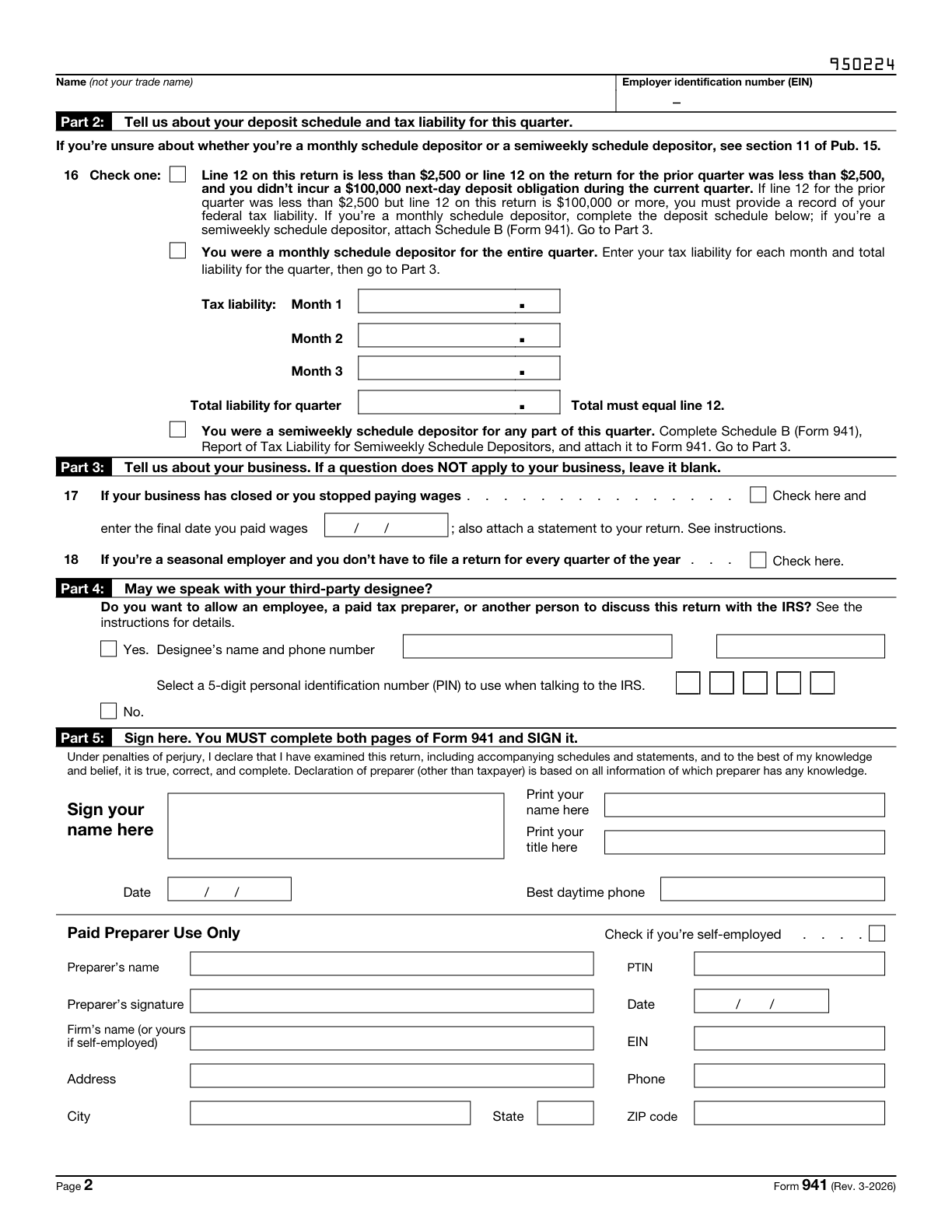
The actual blank IRS return, page 2. Complete both return pages and sign the return on page 2 using the applicable IRS rules. Source: IRS Form 941.
Prepare the PDF in Fylune, then inspect the download
After reconciling your worksheet, download the current blank from the IRS, open the Fylune editor, and select Choose a File to upload it. This is the upload workflow: the checked template catalog does not list a built-in Form 941 entry, and no Form 941-specific AI filling capability is verified here.
Fylune's PDF editor supports PDF fields, text and visible signature marks. Fill supported fields manually and review any annotation placement. A visible mark in an editor does not establish that the signature method meets the IRS requirements for your filing route; it is not a certificate-based digital signature or an acceptance guarantee. Leave the actual signing step to the correct person and process.
The Web editor states that files are automatically saved to your cloud account. Treat payroll documents accordingly; this workflow is not local-only or anonymous storage. Free PDF exports include a watermark, while clean exports have paid options. Check the export options and the downloaded file. A paid or watermarked export is not evidence of IRS acceptance.
Reopen the downloaded copy and inspect both return pages: name and EIN on each, the selected quarter, employee count, each wage base, taxes, deposits, Part 2 liabilities and the remaining choices. Verify that entries are complete and legible in the intended print or filing process. For the general file-route and export checks, see How to Fill Out a PDF Form Online and Check the Download.
Keep the two-page return separate from conditional Form 941-V
The official PDF includes two return pages followed by Form 941-V, Payment Voucher. Both return pages are required; sign on page 2. The voucher is not an automatic third return page and is not a federal tax deposit method. See the official PDF and voucher instructions.
The voucher's instructions permit payment with Form 941 only under the stated conditions: either current- or preceding-quarter line 12 is below 100,000 next-day deposit obligation arose during the current quarter, and payment is in full with a timely filed return; or the employer is a monthly depositor paying under the accuracy-of-deposits rule. Follow the current instructions to establish whether either condition applies. Use 941-V when making an allowed balance-due payment by check or money order. Do not use it for federal tax deposits; the IRS says not to file it when paying by EFT, credit card or debit card. See the line-14 instructions as well.
Fylune does not submit Form 941 or make federal tax deposits. Use the IRS-required filing and payment channels separately. If a paper return is appropriate, use the current Where Should You File? table for your location and payment situation, rather than an old address saved in your records.
Final example and review checklist
The EXAMPLE closes with line 1 at 2, line 5e at 6,990.00, line 13 at 6,990.00. The matching totals verify this fictional reconciliation only. They establish neither a real employer's tax treatment nor timely deposits.
Before handing over your own return:
- Confirm the year, quarter and original-return workflow; use the separate 941-X process for corrections to a filed return.
- Check the legal name and actual employer EIN on both return pages. Replace all EXAMPLE, SAMPLE ADDRESS and masked-identifier placeholders with your verified facts.
- Check line 1 against the specified pay period, not the quarter's cumulative employee count.
- Reconcile compensation, withholding and each wage base to payroll records. Recalculate tax amounts and review actual adjustments, credits and attachments.
- Keep liability dates and deposit records separate. Use the applicable Part 2 branch and match required liability totals to line 12.
- Review Part 3 facts, the Part 4 choice, the aggregate-filer classification and the actual signer's authority.
- Reopen the exported PDF, inspect both return pages, and complete the required signing process. Do not treat the voucher as a replacement for page 2.
- Use 941-V only when permitted, and complete the separate IRS filing and payment steps through the required channels.
Sources
- IRS Form 941 for 2026, revised March 2026, including Form 941-V: printed fields, rates, both return pages and voucher conditions.
- IRS instructions for Form 941, March 2026: filing scope, line-by-line entries, liability reporting, designee and signer roles, and filing/payment routes.
- IRS About Form 941: current revision and developments.
- Fylune editor, PDF editor and pricing: the upload entry and current product options. Product capabilities do not establish tax eligibility, signature compliance or filing acceptance.