

Form 2553 records an S corporation election that your entity has already decided to make. These instructions for Form 2553 treat preparation as a records-and-consent job: confirm the entity is eligible, confirm the filing window, copy the entity's facts into Part I, account for every shareholder who must consent, and have the proper people sign. The current IRS product page links to the December 2017 revision of Form 2553 and the December 2020 instructions written for that form.
This guide does not decide whether S corporation treatment is right for you. It also does not replace tax advice. It helps you assemble and review a PDF after that decision has been made. Fylune is not affiliated with the IRS, and a prepared PDF is not proof that the IRS accepted the election.

A review packet should keep source records, date decisions, and outstanding consents visibly separate. Editorial illustration; no taxpayer data or government document is shown.
Before you type: confirm the decision and the filing window
Start with the IRS sections called Who May Elect and When To Make the Election. The eligibility tests cover the entity, its shareholders, its stock, and its tax year. The instructions say the election is generally filed no more than 2 months and 15 days after the start of the tax year when it should take effect, or at any time during the preceding tax year. A first tax year can start on a date other than January 1, so a generic March 15 assumption can be wrong.
Do not use a form-filling guide to settle any of these questions:
- whether the entity qualifies under every IRS test;
- whether the intended effective date falls within the permitted filing period;
- whether a non-calendar tax year is available;
- whether late-election relief applies and what facts establish reasonable cause.
If any answer is unsettled, pause the PDF and resolve it from the current IRS instructions or with a qualified tax professional. Do not invent a reasonable-cause explanation to make a late filing look complete.
Build a source-record sheet first
Prepare a source-record sheet before opening the PDF. Keep copied facts separate from decisions that still need to be made, and mark unresolved items instead of guessing.
| Form area | Source record to have open | What to compare |
|---|---|---|
| Entity name and address | Formation document and current mailing record | Legal name, unit number, and any post-EIN name or address change |
| Item A | IRS EIN notice | EIN for this entity, not an owner's SSN |
| Items B and C | Formation document | Date incorporated or organized and jurisdiction |
| Item E | Approved election timeline | Intended effective tax-year start, checked against the IRS timing rules |
| Item F | Confirmed tax-year record | Calendar year, fiscal year, or applicable 52-53-week year |
| Items J through N | Stock ledger, operating records, ownership transfers, and tax-year records | Every required current or former shareholder, ownership amount, acquisition date, taxpayer ID, and tax-year end |
| Signatures | Officer authorization and consent list | Officer signature is separate from each required shareholder consent |
Keep one visible status beside every item: confirmed, missing, or needs advice. That status column should expose a missing fact before the form reaches a signer.
Keep three dates separate
Form 2553 places related dates close together, but they do different jobs.
- Item B is the date incorporated or organized from the entity's formation record.
- Item E is the beginning of the tax year for which the election is intended to take effect.
- Item F describes the selected tax year.
For an election effective in the entity's first tax year, the IRS instructions tell the filer to consider the earliest date the entity first had owners, first had assets, or began doing business. That date may produce a short first tax year. For an existing entity, item E can be the start of a later tax year. Neither case allows the formation date, effective date, and tax-year selection to be treated as interchangeable.
A simple timeline review catches common conflicts:
| Check | Pass condition | Stop condition |
|---|---|---|
| Formation to effective date | The dates follow the entity's actual history | Item E predates the relevant entity activity without a supported reason |
| Effective date to filing date | Filing fits the current IRS timing rule | The packet is late or timing is unclear |
| Effective date to shareholder list | The consent list covers the period required by the instructions | An ownership transfer falls inside the period but the former or new holder is missing |
| Item F to Part II | The selected tax-year box matches the records | Box (2) or (4) is checked but Part II has not been addressed |
Map Part I to the records
The official form's first page contains the entity fields, the intended effective date, the selected tax year, late-election explanation space, and the officer signature. Use the labels on the current form rather than a third-party screenshot.
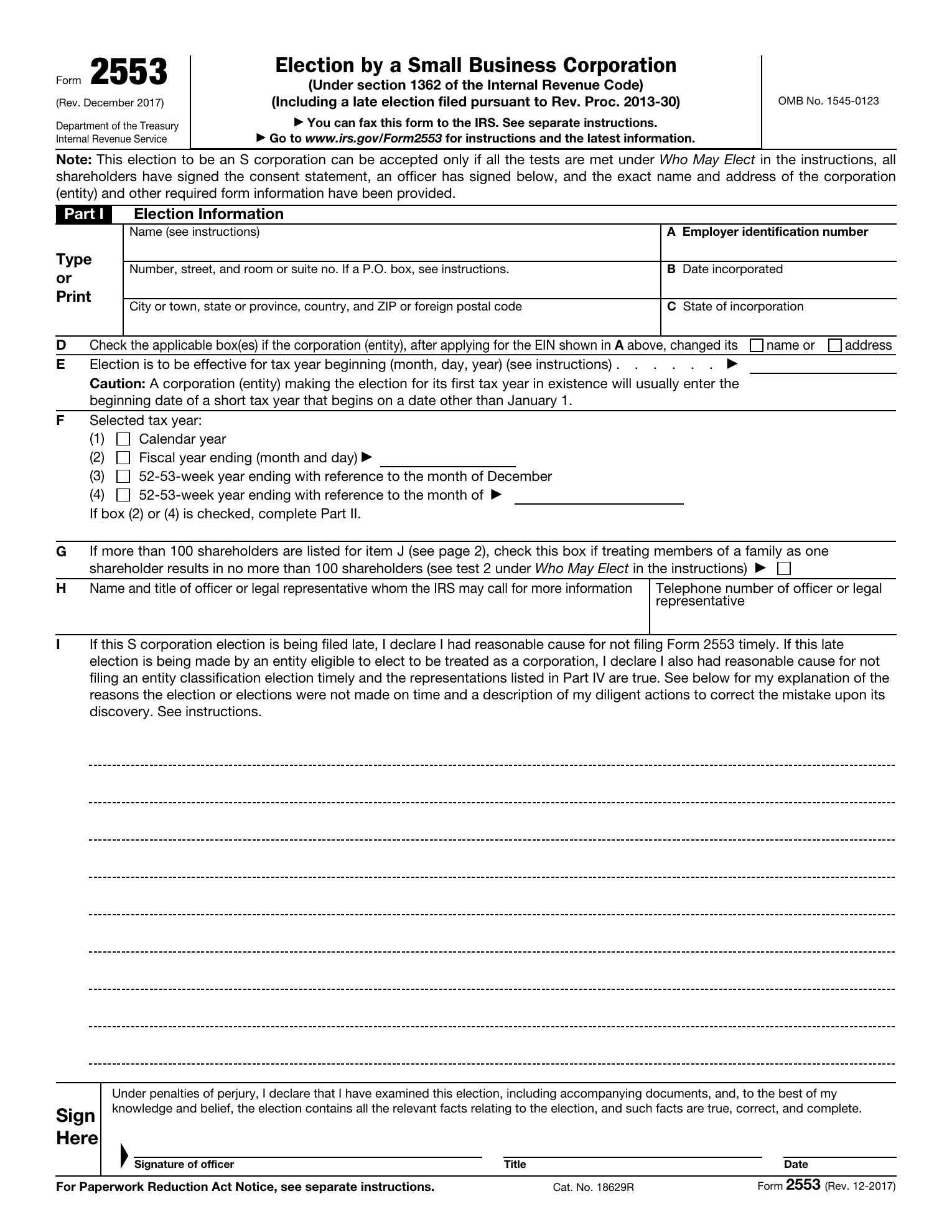
Official Form 2553, page 1, Rev. December 2017. Source: IRS. Shown blank so no taxpayer information is exposed.
Work down the page in this order:
- Copy the entity's true legal name and current mailing address. Item D asks whether the entity changed its name or address after applying for the EIN shown in item A.
- Enter the entity's EIN in item A. Use the matching IRS notice or another reliable entity record.
- Copy the formation date and jurisdiction into items B and C.
- Enter the confirmed intended effective date in item E. Recheck the timing rule after entering it because the date drives the filing window.
- Select the tax year in item F. If box (2) or (4) is selected, the instructions for item F direct the filer to complete Part II.
- Use item G only if the family-shareholder rule is relevant and has been checked against the eligibility instructions.
- Put the authorized IRS contact in item H.
- Use item I only for a supported late election. Leave it unresolved rather than writing a generic reasonable-cause story.
The officer signature at the bottom is its own requirement. The IRS instructions list the corporate officers who may sign and state that an unsigned Form 2553 is not considered timely filed. That signature does not replace shareholder consents.
Reconcile every shareholder with columns J through N
Page 2 is a consent table, not a general contact list. The IRS instructions for column J change the required consent period based on whether the election is filed before or on or after the item E effective date:
- If the form is filed before the item E date, the instructions call for consent from shareholders who own stock on the day the election is made.
- If the form is filed on or after the item E date, the instructions call for consent from every current or former shareholder who owned stock at any time from the item E date through the day the election is made.
The same instructions include special consent rules for community interests, joint ownership, minors, estates, and trusts. Do not reduce those rules to "one row per name" without checking which person must consent.
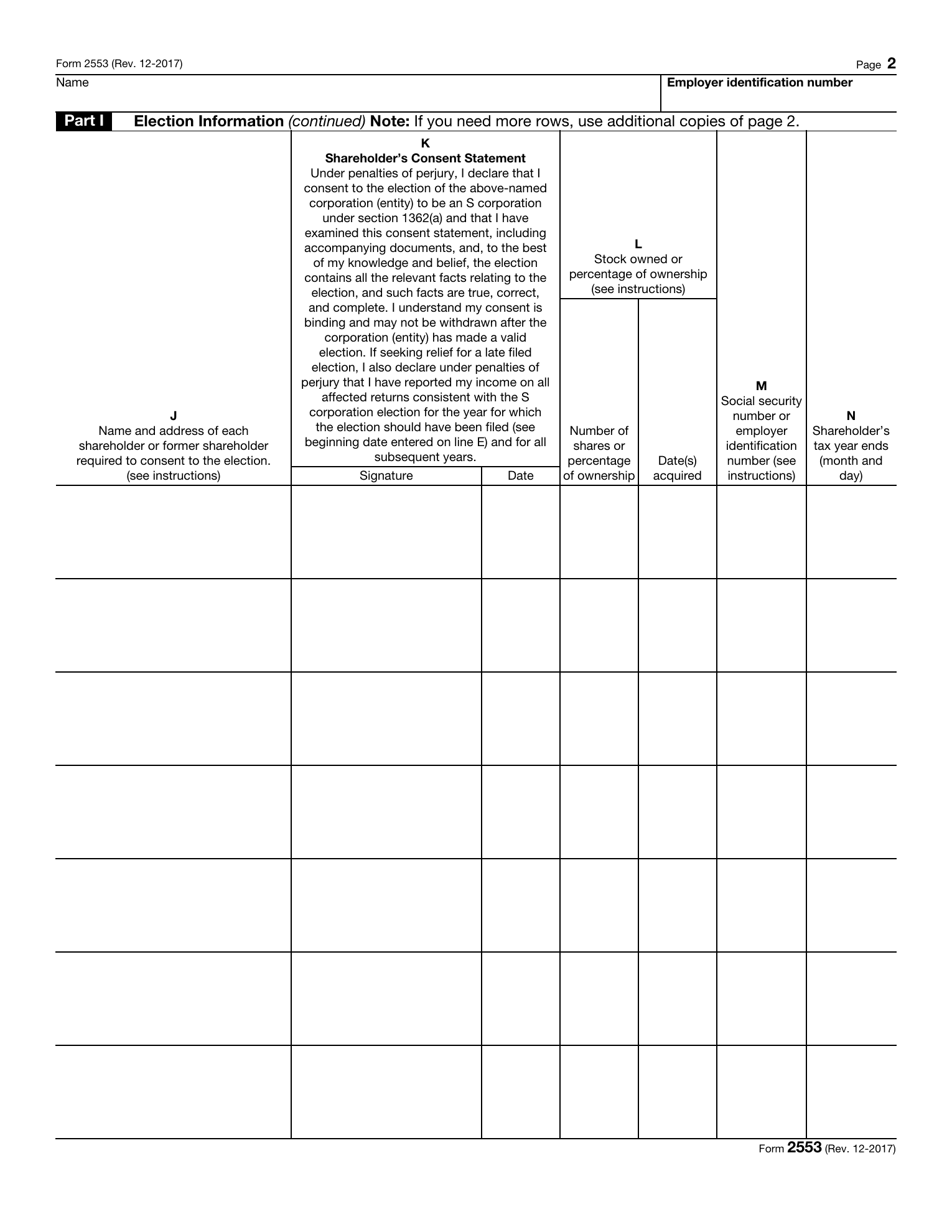
Official Form 2553, page 2, Rev. December 2017. Source: IRS. The blank page shows the actual consent columns without exposing taxpayer identifiers or signatures.
Use a completeness matrix before anyone signs:
| Shareholder record | Column J name and address | Column K consent | Column L ownership and acquired date | Column M taxpayer ID | Column N tax-year end |
|---|---|---|---|---|---|
| Current shareholder | Match the ownership record | Shareholder signs and dates | Current shares or percentage plus acquisition date | Copy from the shareholder's record | Month and day |
| Former shareholder in the required period | Include the former holder | Former holder signs and dates if required | Enter 0 current ownership plus the acquisition date | Copy from the former holder's record | Month and day |
| Ownership needing a special rule | Confirm who the instructions treat as the signer | Do not sign for that person | Use the supported ownership record | Use the identifier required by the instructions | Confirm the applicable tax-year end |
If the table needs more rows, the form says to use additional copies of page 2. The instructions also allow a separate consent statement, but it must carry the entity information and the information requested in columns J through N. A typed name is not a substitute for obtaining the required person's consent under the receiving agency's rules.
Complete later parts only when they apply
The later pages are conditional. Filling every blank can create contradictions.
- Part II applies when item F box (2) or (4) is checked. It handles the selected fiscal or 52-53-week tax year and can require supporting material. Follow the Part II instructions for the selected path rather than copying an example from another business.
- Part III is for a qualified subchapter S trust election in the circumstances described by the instructions. The IRS says Part III cannot be filed by itself and describes when a separate statement is needed.
- Part IV contains representations for a late corporate-classification election intended to take effect on the same date as a late S corporation election. It is not a general late-filing checkbox.
If a fiscal year, trust, late election, or entity-classification issue is present, flag the packet for specific review before signing. This guide does not determine whether the entity qualifies for those paths.
Fictional example: assemble the packet without guessing
This example is fictional and uses the current December 2017 form with its December 2020 instructions. It shows how records move into the PDF. It does not say the fictional entity qualifies, and it does not supply taxpayer identifiers or signatures.
Sample Harbor Studio, Inc. has records showing:
- formation in Oregon on May 8, 2024;
- an existing calendar tax year;
- a chosen S corporation effective date of January 1, 2027;
- a planned filing date of November 24, 2026, during the preceding tax year;
- Shareholder A with 60 shares acquired May 8, 2024;
- Shareholder B with 40 shares acquired October 1, 2025;
- both shareholders use a December 31 tax-year end.
The preparer would copy the legal name, address, EIN, formation date, and state from the entity records. Item E would show January 1, 2027 only after the entity confirms that date and filing window. Item F would select calendar year. The page 2 rows would carry each shareholder's name, address, ownership, acquisition date, taxpayer identifier from that person's record, and December 31 tax-year end.
The preparer would then mark both column K consents as pending until each shareholder signs and dates. The authorized officer's page 1 signature would remain a separate pending item. If a source record were missing, the field would stay unanswered rather than being completed with sample data.
Review the PDF in Fylune
Download the official Form 2553 PDF from the IRS, then choose the file in Fylune's browser editor to prepare and review your copy. This is a manual download-and-upload workflow. Fylune does not provide a verified built-in Form 2553 template, and this guide does not claim that AI fills the form.
In the Web editor, choose the PDF from your device, enter facts from your source records, and review the full document before downloading or printing. Web files save as account-owned cloud snapshots. Free PDF exports include a watermark; clean export options are paid. Add your own visible signature where supported, but check the IRS submission and signature rules before sending the packet.
Form 2553 makes an election. A Form W-9 reports an existing federal tax classification to a requester. Keep those jobs separate. More source-backed document guides are available on the Fylune Blog.
Export-review checklist
Before downloading the reviewed packet, check every page:
- The form is the current edition listed on the IRS Form 2553 product page, and the instructions match that edition.
- The legal name, address, EIN, formation date, and jurisdiction agree with source records.
- Item E is the intended tax-year start, not an automatically copied formation date.
- Item F agrees with the entity's confirmed tax year, and Part II is handled if box (2) or (4) is checked.
- Each required current or former shareholder appears once in the consent record, with supported ownership dates and identifiers.
- Every required shareholder has signed and dated the consent, and the authorized officer has signed and dated the form separately.
- Conditional Parts II, III, and IV are either supported or left alone.
- No sample identifier, placeholder, invented date, or unexplained late-election text remains.
- The complete packet has been reviewed after export, including continuation pages and attachments.
- The filer has rechecked the current IRS filing destinations and fax numbers immediately before submission.
The IRS instructions say to send the original election or fax it to the listed service center, with specific handling for some late elections. They also warn that filing information can change. Keep the original if faxing, retain proof of filing, and keep a complete copy of the submitted packet. The IRS, not Fylune, decides whether the election is accepted and when it takes effect.
Questions about preparing Form 2553
Is the December 2017 form still the current Form 2553?
The IRS Form 2553 product page currently links to the December 2017 form and to December 2020 instructions written for that form. Check that page again when you prepare and submit your packet because the IRS also posts later developments there.
Does every shareholder sign Form 2553?
Every shareholder whose consent is required under the column J and K instructions must consent. The required group depends in part on whether the election is filed before or on or after the item E effective date. Special ownership situations have additional rules.
Is the officer signature enough?
No. The officer signature on page 1 and the required shareholder consents on page 2 serve different purposes. The official form's note lists both as conditions for acceptance.
Does a completed PDF mean S corporation status was accepted?
No. The IRS acceptance section says the service center notifies the entity whether the election is accepted and when it takes effect. A saved, signed, downloaded, mailed, or faxed PDF is not that determination.
Sources
- IRS: About Form 2553
- IRS: Form 2553, Rev. December 2017
- IRS: Instructions for Form 2553, Rev. December 2020
- Fylune browser editor
About the author
Nina@Aurcue is Chief Marketing Officer at Aurcue. StarSeekAI CMO and personal style editor, sharing practical guidance on outfits, color, hair, glasses, and everyday style decisions.