


The short answer: use the current IRS Form 8832 PDF, confirm that the entity has already chosen a federal tax classification, then map that decision and the ownership records to Part I. The current IRS packet is Form 8832 (Rev. December 2013) with an added cover page that updates the mailing addresses. Keep that cover page with the form.
Form 8832 does not choose a classification for you. It records an election that can change federal filing and reporting requirements. Before entering anything, confirm eligibility, the intended classification, the effective date, who owned the entity during the relevant period, and who has authority to consent. If any of those facts are unsettled, stop and resolve them from the entity's records or with a qualified tax professional.
These instructions for Form 8832 cover preparation and review, not tax advice. Fylune is not affiliated with the IRS, does not file the form, and cannot promise that the IRS will accept an election or produce a particular tax result.
First confirm that Form 8832 fits the entity
The IRS says an eligible entity can use Form 8832 to elect classification as a corporation, partnership, or entity disregarded as separate from its owner. Limited liability companies and partnerships can be eligible entities, but the full definition and exclusions in the official instructions still control.
For a domestic eligible entity, the default classification is:
- A partnership when it has two or more members.
- Disregarded as separate from its owner when it has one owner.
A new eligible entity should not file Form 8832 if it wants its default classification. The foreign default rules are different and depend on owner count and whether members have limited liability, so do not reuse the domestic shortcut for a foreign entity.
The instructions also say not to file Form 8832 for an entity that is tax-exempt under section 501(a), a real estate investment trust under section 856, or making an S corporation election. An S corporation election uses Form 2553. If the task is to report a classification that is already in effect to a requester, see Fylune's guide to the LLC tax-classification box on Form W-9. That guide reports an existing classification; it does not make one.
Build a source record before touching the PDF
Use a fact-to-question map. Put the source document beside each answer, and mark unresolved decisions as unresolved. Do not fill a gap with the most likely answer.
| Source record | Facts to copy or verify | Form area | Stop if |
|---|---|---|---|
| EIN notice and formation record | Exact legal name, EIN, address, formation date, domestic or foreign organization | Header, line 1, line 7 | The name or EIN differs across records |
| Ownership ledger and organizational documents | Owner count, owner identities, identifying numbers, authority to make the election | Lines 3 through 5, consent | The ownership record does not cover the effective-date period |
| Prior Form 8832 filings and IRS correspondence | Current classification, prior election effective date, whether the prior election was an initial election effective on formation | Lines 1, 2a, 2b | A prior election may fall within 60 months |
| Written classification decision | Domestic or foreign classification selected from line 6 | Line 6 | The owners have not made the decision |
| Election approval record | Intended effective date and the filing plan | Line 8 | The date falls outside the ordinary timing window |
| Contact and mailing record | Contact name, title, phone, principal business location | Lines 9 and 10, cover-page destination | The contact lacks authority or the mailing location is uncertain |
Keep a copy of the source record with the draft. It gives the reviewer a way to trace every entry without treating the completed PDF as the only record.
Follow the Part I routing in order
Part I is a decision path. Work from line 1 through line 10 without skipping a condition just because the final classification is already known.
| Form step | What to review |
|---|---|
| Line 1, initial or change | Check line 1a only for an initial classification by a newly formed entity that does not want the applicable default. Check line 1b for a change in current classification. |
| Lines 2a and 2b, prior elections | If the entity is changing classification, answer whether a prior election had an effective date within the last 60 months. Line 2b addresses the exception for a prior initial election by a newly formed entity that was effective on the date of formation. Otherwise, a recent prior election can stop the ordinary route. |
| Line 3, owner count | More than one owner routes to partnership or association taxable as a corporation. One owner routes to association taxable as a corporation or disregarded entity and requires line 4. |
| Line 4, single-owner details | Enter the owner's name and identifying number. The instructions contain special routing for tiered disregarded entities and for a foreign owner without a U.S. identifying number. Read that rule before entering an upstream owner's information. |
| Line 5, consolidated-return parent | Complete this only when one or more affiliated corporations that file a consolidated return own the eligible entity. Enter the parent corporation's name and EIN. |
| Line 6, selected classification | Choose the domestic or foreign box that matches the supplied classification decision and owner count. Do not use line 6 to make the decision. |
| Line 7, foreign organization | A foreign-organized entity enters the country of organization, even if it is also organized under domestic law. |
| Line 8, effective date | The election normally takes effect on the date entered, or on the filing date if line 8 is blank. The ordinary window is no more than 75 days before filing and no later than 12 months after filing. |
| Lines 9 and 10, IRS contact | Enter the name and title of the person the IRS may call, plus that person's telephone number. |
The IRS form page below is a direct rendering of the current official PDF. Use the live PDF for preparation because the agency can update the cover sheet or replace the file.
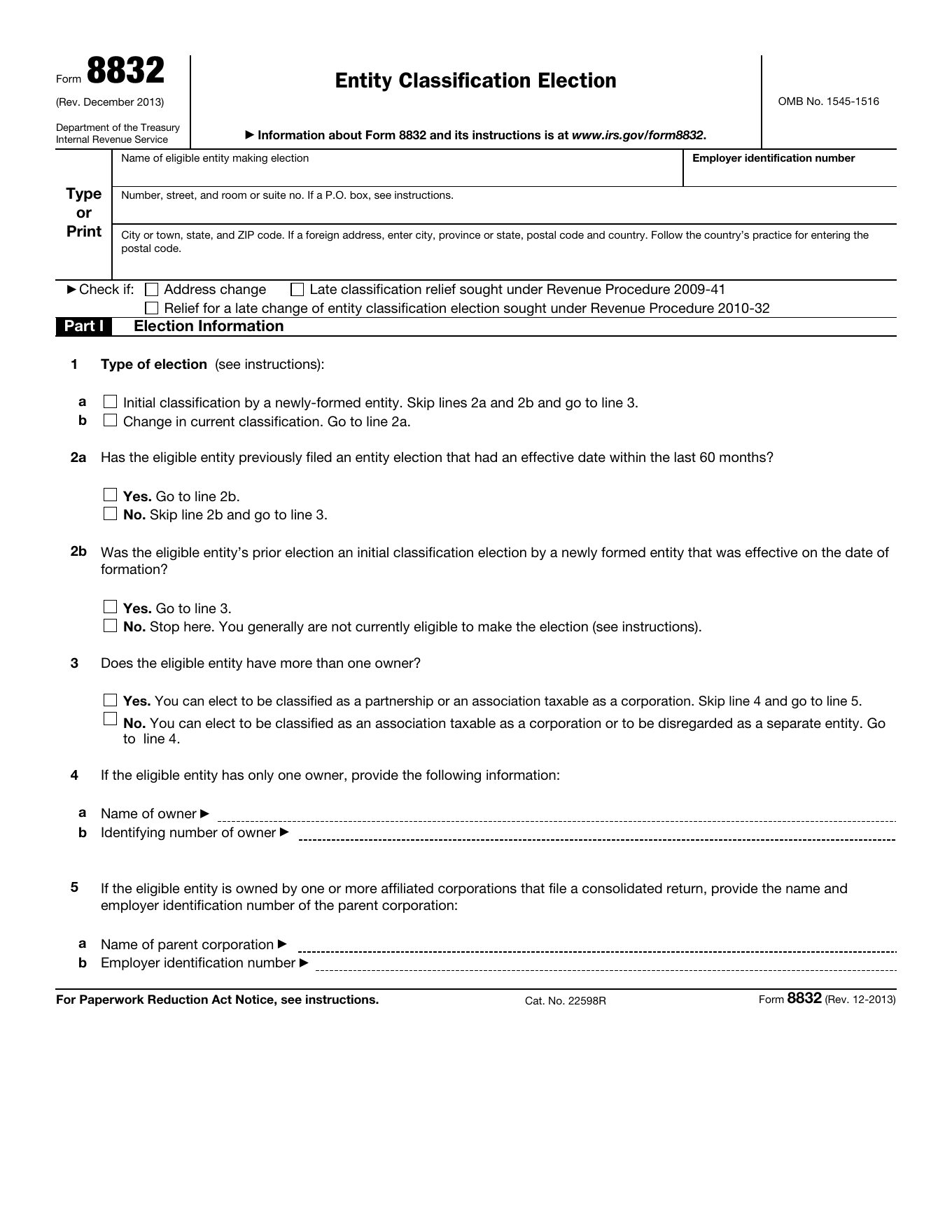
Official Form 8832 (Rev. December 2013), Part I page 1, retrieved from the IRS current PDF on November 25, 2026.
A fictional routing example with every input stated
This example is fictional. It is a routing exercise, not a recommendation. Assume the source record expressly supplies these facts:
- The entity is a newly formed domestic eligible entity.
- It has two owners.
- The owners have already chosen classification as an association taxable as a corporation.
- The entity has not made a prior classification election.
- The owners approved a specific effective date within the ordinary 12-month forward window.
- The organizational documents authorize the named manager to make the election.
With only those supplied facts, the draft can map line 1a, skip lines 2a and 2b as directed by the form, answer yes on line 3, skip line 4, review whether line 5 applies, select line 6a, and copy the approved date to line 8. The preparer must still obtain the legal name, EIN, address, line 5 facts, contact details, exact date, and required signatures from the records. Those missing inputs stay blank in the review copy. They are not safe to infer from the entity type.
Review consent and signatures as a separate task
The consent section has its own routing. The official 8832 instructions provide two ordinary signing routes: each member who owns the entity when the election is filed can sign, or an officer, manager, or member who is authorized under local law or the organizational documents can sign for the entity.
A retroactive effective period adds another check. If someone owned the entity between the requested effective date and the filing date but is no longer an owner when the form is filed, that person must also sign. A continuation sheet or separate consent statement must carry the same information as the form.
Do not type an absent owner's name and treat that mark as consent. Match every signer to the ownership period or authorization record, and have the signer add their own signature in the manner the receiving agency accepts. The instructions also say not to sign the copy attached to the tax return.
Use this handoff table before the form goes to the signers:
| Review question | Evidence to keep | Result |
|---|---|---|
| Who owned the entity on the filing date? | Current ownership ledger | Names matched to current-owner consent route |
| Is one person signing for the entity? | Local-law or organizational-document authority | Officer, manager, or member authority confirmed |
| Is the effective date before the filing date? | Approved effective date and ownership history | Former owners in the intervening period identified |
| Is a separate consent page needed? | Signer count and available form space | Same consent information carried to the attachment |
Treat late-election relief as a conditional branch
Part II is not a general explanation box. The December 2013 instructions say to complete it only when the entity is requesting late-election relief under Revenue Procedure 2009-41. All of the stated conditions must be checked:
- The entity missed its requested classification, or requested change in classification, solely because Form 8832 was not filed on time.
- Either the due date for the first affected federal return has not passed and the entity has not filed that return, or the required returns were filed on time (or within six months after the due date, excluding extensions), consistently with the requested classification, with no inconsistent returns. When the entity does not have a return-filing requirement, the affected persons must meet the instructions' return condition.
- The entity has reasonable cause for failing to make the election on time.
- Three years and 75 days have not passed since the requested effective date.
Line 11 asks for the reason the election was late. Use the entity's actual facts and records. Do not invent a reasonable-cause statement or copy one from another filer. Part II must be signed by an authorized representative of the eligible entity and by each affected person, and the signers must have personal knowledge of the facts and circumstances.
If any condition is uncertain, leave Part II unresolved and get qualified advice. Relief outside the stated procedure can involve a private letter ruling and a user fee. That is outside this preparation guide.
Keep the mailing update with the reviewed packet
The first page of the current IRS PDF says the mailing address changed after the form was last published. Its table routes the filing by the location of the entity's principal business, office, or agency, with a separate row for a foreign country or U.S. possession. Use that current cover-page table when the packet is ready. Do not copy an address from an older article or rely on the service-center table later in the 2013 instructions without checking the update.
The instructions also discuss attaching a copy of Form 8832 to the federal tax or information return for the election year, with a separate rule when the entity is not required to file a return. Keep the filed copy and proof of delivery with the entity's election record so the return preparer can review that requirement.
Review the PDF in Fylune before export
Download the official PDF first. Then open the Fylune browser editor, choose the file from your device, and review every relevant page against the source record. This is a manual download and upload path. No built-in Form 8832 template or AI filling support is promised for this form.
Before downloading or printing the review copy, check:
- The legal name, EIN, and address use the same source record.
- Lines 1 through 8 follow one consistent ownership and classification story.
- Lines 9 and 10 identify a reachable contact with the correct title and phone number.
- Every required owner or authorized person is accounted for in the consent handoff.
- Part II is blank unless every relief condition has been checked against records.
- The updated mailing cover page is still in the packet.
- No blank field was filled with a guess, placeholder, or another entity's data.
Fylune's Web editor saves account-owned cloud snapshots. Users remain responsible for reviewing the document and adding their own signatures. Free PDF exports include a watermark; paid options are available for a clean export.
Questions about preparing Form 8832
Does a new domestic LLC always file Form 8832?
No. The official instructions say a new eligible entity should not file Form 8832 when it will use its default classification. A domestic eligible entity with two or more members defaults to partnership classification; one with a single owner defaults to disregarded status. Confirm that the entity is eligible and that no election already changes the result.
What date can go on line 8?
The ordinary window runs from 75 days before the filing date through 12 months after it. If line 8 is blank, the instructions say the election generally takes effect on the filing date. A requested date outside the ordinary window requires a separate review of the official relief rules.
Who signs when the effective date is before the filing date?
Use the ordinary current-owner or authorized-person signing route, then check the ownership history. A person who owned the entity between the effective date and filing date, but no longer owns it on the filing date, must also sign.
Where should Form 8832 be mailed?
Use the updated table on the cover page of the current IRS PDF. It routes the form from the entity's principal business, office, or agency location and includes a separate destination for a foreign country or U.S. possession. Recheck the live PDF before mailing.