
Markdown Line Breaks: New Lines, Hard Breaks, and Blank Lines
You pressed Enter once, looked at the preview, and the two lines joined into one paragraph. That is not a bug. In Markdown, a single Enter starts a soft break, which many renderers collapse back into one line of running text. A blank line starts a new paragraph, and a hard break needs one of three explicit marks: two trailing spaces, a backslash, or a <br> tag.
Here is the whole rule set in one paragraph:
- A single Enter usually keeps both lines in the same paragraph.
- A blank line splits text into two paragraphs.
- Two trailing spaces, a backslash, or a
<br>tag creates a line break without starting a new paragraph.
The rest of this guide explains when each behavior applies, which method is the most portable, and what to do inside lists, tables, and code fences, where the normal rules stop working.
The one-Enter mistake: why a single newline disappears
Markdown was designed so that authors can wrap text at any width they like and still get clean HTML. To make that possible, consecutive lines without a blank line between them are treated as one paragraph. The CommonMark tutorial on paragraphs describes a paragraph as "consecutive lines of text" that sit between blank lines.
So this source text:
This is the first line
And this is the second line
renders as a single paragraph: "This is the first line And this is the second line."
What the renderer does with that single newline is a soft line break, and the renderer decides. The CommonMark spec permits rendering a soft break as a space or as a newline, so two compliant applications can disagree. GitHub is a concrete example: in rendered .md files a single newline collapses into a space, while in issues, pull requests, and comments GitHub renders it as a real line break. A GitHub staff member confirmed this in a public issue, noting that comments keep the older behavior for consistency. The marked.js maintainers documented the same split: comments break on a single newline, README files and gists do not.
This mismatch is why a fix that works in your issue tracker can look broken in your README, and vice versa.
Blank lines make paragraphs: the markdown blank line rule
A blank line is any line that contains nothing, or nothing but spaces and tabs, as the CommonMark tutorial defines it. One blank line separates two paragraphs:
This is the first paragraph.
This is the second paragraph.
Three details about blank lines cause the most confusion:
- One blank line is enough. Two or three blank lines produce the same two paragraphs. Markdown does not stack vertical space; the gap between paragraphs comes from CSS in the rendered page, not from extra Enter presses.
- A blank line inside a paragraph ends it. If you split one paragraph with a blank line, you get two paragraphs, not a tight line break inside one block.
- Blank lines also separate blocks. Headings, lists, and blockquotes behave predictably when blank lines surround them, which is why Markdown Guide's basic syntax recommends blank lines before and after headings, blockquotes, and horizontal rules for compatibility.
So when you want a new paragraph, press Enter twice. When you want a break inside one paragraph, use one of the three hard-break methods below.
Hard break methods: two spaces, backslash, and <br>
Three methods force a line break without starting a new paragraph. Each has a different compatibility tradeoff.
Trailing two spaces. End the line with two or more spaces, then press Enter:
This is the first line.
And this is the second line.
This is the original hard-break syntax, and Markdown Guide notes it works in nearly every Markdown application. The Stanford Open Graph Bundle cheat sheet lists it as the standard method. Its weakness is invisibility: you cannot see trailing spaces in most editors, and editors, formatters, or copy-paste operations can strip them.
Backslash at end of line. The CommonMark tutorial documents the backslash as an equivalent hard break:
This is the first line.
And this is the second line.
The backslash is visible and survives reformatting, which makes it popular in CommonMark-strict tools. The catch is compatibility: Markdown Guide lists it among "two other options I don't recommend using" because not every Markdown application supports it.
<br>** tag.** Where an application allows inline HTML, you can write:
This is the first line.<br>
And this is the second line.
Markdown Guide recommends <br> as the alternative when you do not want invisible trailing whitespace. The tradeoff runs the other way: in renderers that escape or disable HTML, the tag prints as literal text. The dev.to walkthrough of single-line breaks walks through this tension between HTML reliability and syntax portability, and a Reddit thread comparing the methods adds a fourth variant, the non-breaking-space entity , used by some writers to avoid both invisible spaces and raw tags.
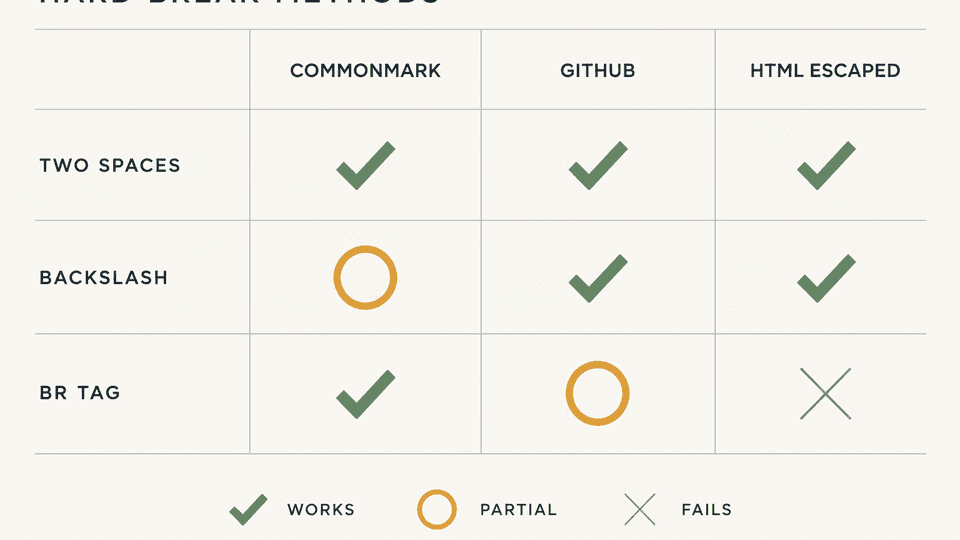
| Method | Works in CommonMark renderers | Works on GitHub .md files | Works when HTML is escaped | Main risk |
|---|---|---|---|---|
| Two trailing spaces | Yes | Yes | Yes | Invisible; can be stripped by editors and formatters |
| Backslash `` | Yes | Yes | Yes | Not supported by every application |
<br> | Yes | Yes | No | Prints literally where HTML is disabled |
For documents that must stay portable, two trailing spaces followed by the backslash as a visible fallback is a reasonable default pair. For a single document with a known renderer, pick the method that renderer handles and verify it in the preview.
Soft breaks and renderer differences
The soft-break disagreement is not an edge case. It is visible across mainstream tools:
- GitHub rendered files treat a single newline as a space; GitHub comments, issues, and pull requests treat it as a line break, as confirmed by GitHub staff and the community discussion on the inconsistency.
- Bitbucket renders line breaks only when a line ends with two spaces, following the strict specification, as reported in the Bitbucket community thread on paragraph wrapping.
- Strict CommonMark implementations may render a soft break as either a space or a newline, so even two spec-compliant tools can differ.
The practical consequence: never assume your Enter produced the break you intended. Check it in a preview that shows rendered output.
Line breaks inside lists, tables, and code fences
The same three methods behave differently once you leave ordinary paragraphs. These are the cases where the usual fix fails.
Inside list items. A single Enter inside a list item starts a new line of the same item only if it is treated as a continuation; otherwise the renderer may merge or break the list. To force a break within one item, use two trailing spaces at the end of the line. To start a second paragraph inside the same item, add a blank line and indent the continuation by four spaces or one tab, the pattern Markdown Guide shows under "Adding elements in lists". A blank line without indentation ends the list and starts an ordinary paragraph. For the full list-construction rules, see the sibling article on Markdown checkbox and task list syntax.
Inside table cells. A pipe table row is a single source line, so trailing spaces and backslashes have no cell-level meaning. The only method that breaks a line inside a cell is <br>. If your target renderer escapes HTML, restructure the table or shorten the cell text instead of fighting the renderer.
Inside code fences. Everything between the fence markers is literal text. Line-break syntax does not apply, and <br> prints as visible code. Code fences are the one block where you should never try to fix line wrapping.
Semantic line breaks: one sentence per line
There is a style of writing Markdown where Enter is pressed freely, and it changes nothing in the rendered output. Writers who use semantic line breaks end a source line at each sentence, so one paragraph in the file looks like:
Markdown lets you wrap text at any width.
The renderer joins those lines into one paragraph.
Nothing in the output changes.
The essay on semantic line breaks argues this practice keeps source files readable and makes edits reviewable, because a changed sentence occupies one line in a diff instead of one long wrapped paragraph. Because soft breaks join lines in the same paragraph, the rendered output is identical to a fully wrapped paragraph.
This habit matters most when files are shared. When humans and AI agents edit the same Markdown file, one-sentence-per-line diffs show exactly which sentence changed. That is one reason a local-first Markdown workspace pairs well with semantic line breaks: the file stays ordinary Markdown that Git, editors, and agents can all diff line by line.
Fix it in Fylune: check the preview before you trust the fix
Because renderer behavior varies, the fastest way to settle a line-break question is to look at rendered output while you edit. Fylune opens your Markdown file directly from the local project folder and renders rich Markdown, including tables, lists, and task lists, alongside the editor. Type the two trailing spaces, the backslash, or the <br>, and watch the preview: if the lines stay joined, the method did not take effect in that context.
The file never leaves the project folder in the process, so the fix you verify in Fylune's preview is the same file your other tools and agents read.
Open your real Markdown project and verify the fix in the live preview: Download Fylune.
FAQ
How do I force a line break in Markdown? End the line with two or more spaces and press Enter. If your tool strips trailing whitespace, use a backslash at the end of the line in CommonMark-based renderers, or a <br> tag where inline HTML is allowed.
Why did my Enter not create a new line? A single Enter starts a soft break, which many renderers collapse into a space inside one paragraph. Press Enter twice to create a blank line, which starts a new paragraph, or add two trailing spaces for a break inside the same paragraph.
Is <br> allowed in Markdown? Yes, in applications that permit inline HTML, and it is often the only method that works inside table cells. It prints as literal text in renderers that escape or disable HTML, so check the target renderer before relying on it.
Sources
- Markdown Guide, Basic Syntax: Line Breaks (trailing spaces, backslash compatibility,
<br>guidance) - CommonMark tutorial, lesson 3: Paragraphs (blank-line definition, backslash and two-space hard breaks)
- GitHub staff response on soft line breaks in comments vs files
- marked.js documentation of GitHub's comment-vs-file newline behavior
- GitHub community discussion on inconsistent linebreak handling
- Bitbucket community thread: paragraph wrapping and two-space breaks
- Stanford OGB Markdown cheat sheet (two-trailing-spaces confirmation)
- dev.to: making a single line break in Markdown
- Reddit: line break in Markdown without causing a paragraph
- Writing Slowly: semantic line breaks