
How to Comment in Markdown: Hidden Notes That Never Render
Markdown has no dedicated comment syntax, but you can still leave a note in a file that never appears in rendered output. Two methods cover almost every case: an HTML comment such as <!-- note -->, and the link-reference trick [comment]: # (text). This guide shows how to comment in Markdown with both methods, how to comment out a block temporarily, and what happens to hidden notes in Git diffs, exports, and renderers that restrict raw HTML.
One scope note first: this article is about non-rendering notes inside Markdown files, not about visitor comment systems on a website.
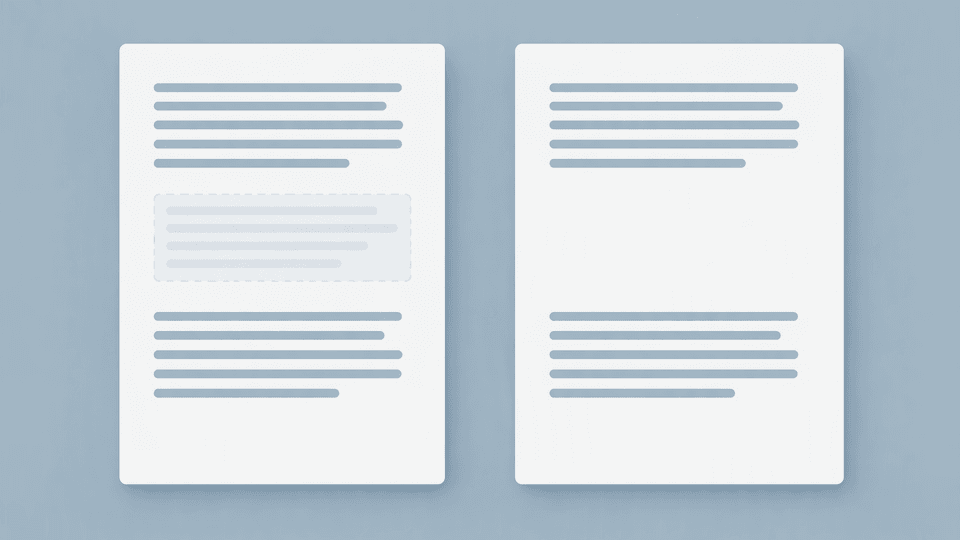
What a Markdown comment is (and is not)
A Markdown comment is text you write in the source file that renderers are supposed to hide. It is not the same as:
- A discussion comment on GitHub, in a review tool, or on a website.
- YAML front matter at the top of a file, which a site generator parses as metadata rather than skipping.
- A code comment inside a fenced code block, which stays visible as code.
The CommonMark specification does not define a comment construct, which is why the long-running Stack Overflow question on comments in Markdown begins by observing that the Markdown project itself offers nothing (stackoverflow.com). Everything below works because renderers pass HTML through or process link reference definitions, not because "comment" is a Markdown keyword.
Method 1: HTML comments
The most common answer to how to comment out in Markdown is the HTML comment syntax:
<!-- This note never renders -->
This paragraph renders normally.
Renderers that allow raw HTML treat the comment as HTML and hide it from the output. HTML comments also span multiple lines, which makes them useful for longer notes:
<!--
TODO: confirm the numbers before publishing.
Ask Dana to recheck the screenshot.
-->
This paragraph renders normally.
The behavior depends on the renderer's raw-HTML setting. When raw HTML is enabled, the note disappears. When a renderer disables raw HTML, it may print the <!-- --> markers as literal text instead of hiding your note, which is one of the caveats discussed in both the Stack Overflow thread and the CommonMark forum discussion on multiline comments (stackoverflow.com, talk.commonmark.org). If your pipeline runs a sanitizer that strips HTML entirely, the comment is removed too. The safe rule: verify in your target renderer before you rely on hidden notes.
Method 2: the [comment]: # (text) reference trick
The second method uses Markdown's own link reference syntax:
[comment]: # (This note never renders either)
This paragraph renders normally.
This line is a link reference definition named comment. Nothing in the document links to it, so it produces no output. The Markdown Guide documents this form: place the text in brackets, followed by a colon, a space, and a pound sign, and keep blank lines before and after it (markdownguide.org).
Two placement rules matter:
- Put a blank line before and after the definition. Directly attached to a paragraph, its behavior is renderer-dependent.
- Keep the note text on the definition line. For a longer note, use one definition line per note or fall back to an HTML comment.
Unlike the HTML method, this trick is pure Markdown. It keeps working even in renderers configured to disable raw HTML, because there is no HTML to disable.
Commenting out a block temporarily
If your real task is to disable a passage of text for a while (the "comment out" job), pick the method that matches the risk:
| Option | How | Tradeoff |
|---|---|---|
| HTML comment | Wrap the block in <!-- and --> | Hides any length of content, including lists and headings, but depends on raw HTML being enabled |
| Reference trick | Put [comment]: # above each paragraph you want hidden | Survives raw-HTML restrictions, but works per paragraph and is awkward for long blocks |
| Code fence | Wrap the block in triple backticks | Never hides anything; the text stays visible as code, so use it only when reviewers should see the disabled content |
The R Markdown Cookbook recommends the HTML comment approach for commenting out prose, along with editor shortcuts such as Ctrl + Shift + C in RStudio (pkg.yihui.org). For a long-term note that should stay out of the rendered page in every renderer, the reference trick is the most portable choice.
Multi-line notes and TODOs for humans and AI agents
Hidden notes become more useful when the file is a shared workspace. Many project folders now serve two audiences at once: people who open the file in an editor, and AI agents that read the same files from the folder. A comment line like <!-- TODO: agent, do not renumber the sections below --> is ordinary text, so both audiences can act on it while the rendered page stays clean.
This is also why comments are a decent contract between humans and machines: they live in the file itself, next to the content they describe, with no platform account required. If you want the broader argument for keeping documents as local files that people and AI tools share, see Why local files win when AI joins the team.
Portability caveats
Hidden does not mean invisible everywhere. The table below summarizes what happens to each method when the file moves:
| Where the file goes | HTML comment <!-- ... --> | Reference trick [comment]: # (text) |
|---|---|---|
| Git diff or history | Appears as plain text in diffs; fully reviewable | Appears as plain text in diffs; fully reviewable |
| Rendered HTML export | Usually kept in the HTML source but hidden in the browser | Removed by the converter; no trace in the output |
| Renderer with raw HTML disabled | May print the markers as literal text | Stays hidden |
| Code highlighting tools | Treated as markup, not code | Treated as markup, not code |
Two related pitfalls come from site generators. In Jekyll and similar tools, the YAML block at the top of a file is metadata, not comments, so hiding content there follows YAML rules instead, as the Jekyll forum thread on comments in Markdown files or front matter explains (talk.jekyllrb.com). And if a note ends up inside a fenced code block, it renders as code no matter which comment syntax you used. Blank-line rules also apply in both directions: a missing blank line can turn a hidden note into visible text, which is the same class of mistake covered in Markdown Line Breaks: New Lines, Hard Breaks, and Blank Lines.
GitHub's renderer supports both HTML comments and the reference trick in .md files, so notes written this way stay hidden in README files and issue bodies (docs.github.com).
Leave notes in Fylune
Fylune is a local-first document workspace: the project folder you select stays the source of truth, and the files remain ordinary Markdown and MDX that any other tool can open. Comments you write with either method above stay in the plain .md file, so teammates and AI agents reading the folder see them even when the rendered page does not.
Because the files are local, the workflow keeps its safety rails. External changes from other tools can be reviewed before they replace your current work, and local snapshots support recovery if an edit goes wrong. Core editing works offline and without an account, and images or other assets are stored in the project with portable relative references, so the document keeps working outside Fylune.
If you want to try leaving reviewable notes in your own project folder, download Fylune for macOS.
FAQ
How do I comment out multiple lines in Markdown?
Wrap the block in an opening <!-- and a closing -->. Everything between them stays out of the rendered output as long as the renderer allows raw HTML. For blocks that must also survive renderers with raw HTML disabled, put [comment]: # on its own line, with blank lines around it, above each paragraph you want hidden.
Why is my comment showing?
Check four things: the renderer may have raw HTML disabled, which can print HTML comments literally; the reference-style trick needs blank lines before and after it; the note may sit inside a fenced code block, where nothing is hidden; or the note may be inside YAML front matter, which follows YAML comment rules rather than Markdown ones.
Does Git keep Markdown comments?
Yes. Comments are ordinary text in the file, so Git stores them with the file, shows them in diffs, and keeps them in history. That visibility is a feature: reviewers can see and question hidden notes in a pull request even though the rendered page never shows them.