


If you are transferring or correcting a California vehicle title and the owner section is already full, or a name was written or crossed out by mistake, the DMV may point you to form REG 101. Before you fill in a single box, make sure you are on the right document. The search results for "reg 101" mix two unrelated forms: the California DMV REG 101, Statement to Record Ownership / Statement of Error or Erasure, and the California Department of Tax and Fee Administration's CDTFA-101-DMV, a claim-for-refund tax document. This guide covers the DMV ownership form only. If your task is about sales or use tax, the DMV REG 101 is not your form.
This walkthrough explains what the REG 101 form does, how to pick the correct section, what every field means against the current official version, the mistakes that get these forms rejected, and how to complete it in Fylune and download it to sign.
What REG 101 does
REG 101 is a California DMV form with two separate functions, printed as two sections on one document (edition REG 101, Rev. 3/2007):
- Statement to Record Ownership. Use this when the registered-owner spaces on the Certificate of Title are full or contain incorrect information, so the ownership cannot be recorded correctly from the title alone. You restate the vehicle or vessel and the true registered owners here.
- Statement of Error or Erasure. Use this to identify a name that was written on, or erased from, the Certificate of Title/Ownership in error. The form's own wording states that the name "was in error and has no bearing on the ownership of the vehicle/vessel" and "should not be a part of the ownership record."
Both sections are issued by the California DMV and are usually submitted together with your title transfer or registration application, not on their own. REG 101 records or clarifies who the owner is; it does not transfer the vehicle by itself.
A quick note on terms: "dmv reg 101" and "reg 101 form" are the same document described here. There is only one current ownership form, and it carries both statements.
Which section applies to you
Most people only need one of the two sections. Pick by your situation:
| Your situation | Section to use |
|---|---|
| The title's new-owner area is full, or an owner's name or ID is wrong, and you need the record to show the true owners | Statement to Record Ownership (top section) |
| A name was signed onto, or erased from, the title in error and should not be part of the ownership record | Statement of Error or Erasure (bottom section) |
If both apply, you can complete both sections on the same form. If you are unsure which one fits, follow the instructions the DMV gives for your specific transaction, or ask the DMV directly before you sign, because the Statement of Error or Erasure is signed under penalty of perjury.
Field by field: the official REG 101
The image below is the current official DMV form (REG 101, Rev. 3/2007) so you can match each field to the explanation. Fylune reproduces the same layout in its editor.
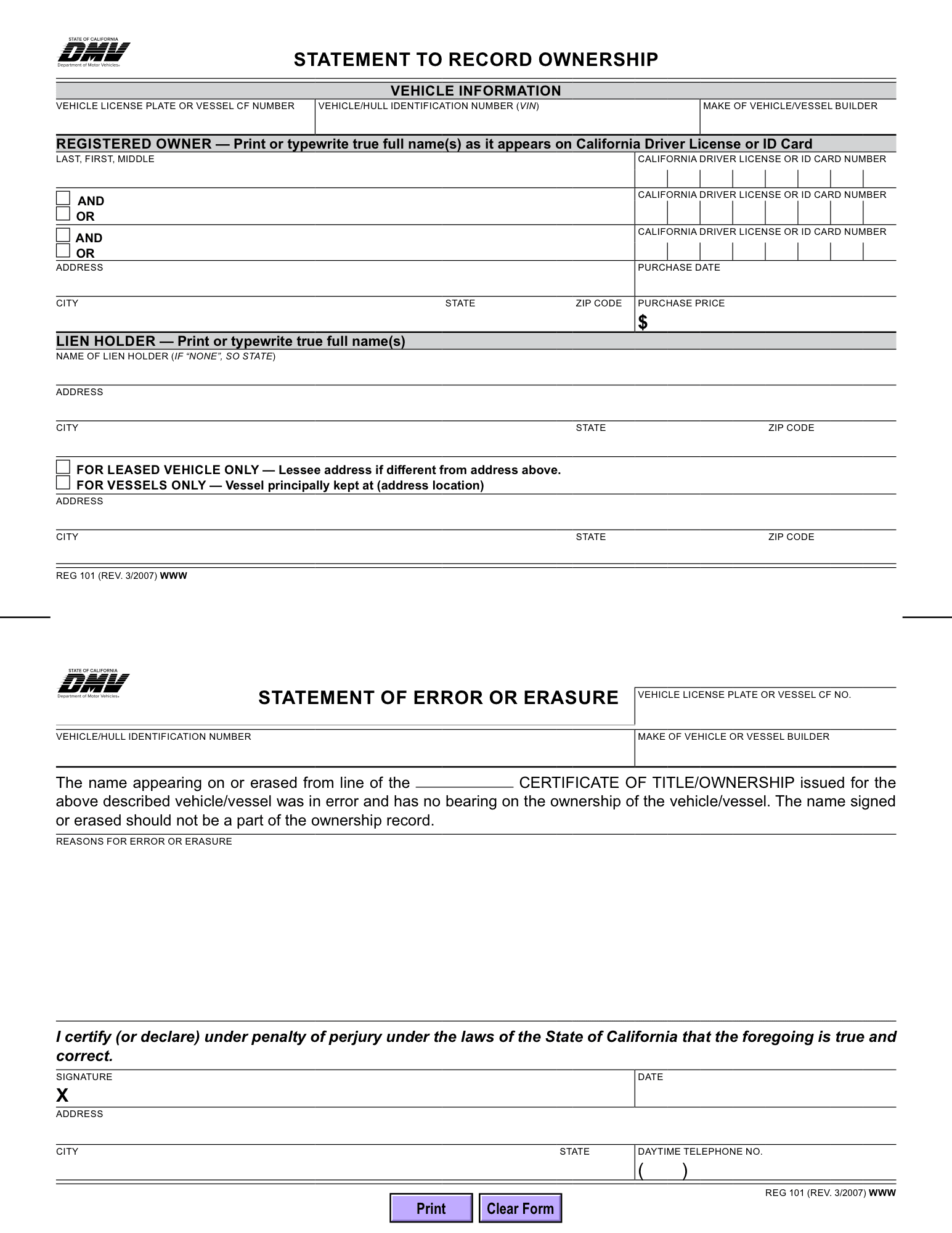
Statement to Record Ownership (top section)
Vehicle information
- Vehicle license plate or vessel CF number. The plate number for a vehicle, or the CF number for a vessel.
- Vehicle/hull identification number (VIN). The VIN for a vehicle, or the hull identification number for a vessel.
- Make of vehicle/vessel builder. The make for a vehicle, or the builder for a vessel.
Registered owner. Print or typewrite the true full name(s) exactly as they appear on the California Driver License or ID Card, in Last, First, Middle order. Each owner line has its own space for the California Driver License or ID Card Number.
- AND / OR connector. When there is more than one owner, the small AND / OR checkboxes between the name lines set how the owners are joined, and that choice carries real weight on any future transfer. Per the DMV's co-owner rule, when names are joined by "and," the signatures of all owners are required to transfer ownership later; when names are joined by "or" (or "and/or"), the signature of only one owner is required. The DMV also notes that if neither "and" nor "or" is indicated, the certificate shows "and," represented by a slash (/). All listed owners must still endorse the application to register the vehicle or vessel. Choose the connector that matches how you actually intend to hold ownership.
- Address, City, State, Zip Code. The registered owner's address.
- Purchase date and Purchase price ($). The date you acquired the vehicle or vessel and the price paid.
Lien holder. Print or typewrite the true full name of the lienholder (the lender with a security interest). If there is no lienholder, the form tells you to write "NONE" rather than leave it blank. Complete the lienholder Address, City, State, Zip Code when there is one.
Leased vehicle / vessel address block. Two checkboxes cover special cases: For leased vehicle only, give the lessee address if it differs from the address above; For vessels only, give the location where the vessel is principally kept. Fill the address line below only if one of these applies to you.
Statement of Error or Erasure (bottom section)
Vehicle information repeats here: vehicle license plate or vessel CF number, vehicle/hull identification number, and make of vehicle or vessel builder, so this section stands on its own.
The declaration sentence. The form reads that the name appearing on or erased from a specific line of the Certificate of Title/Ownership was in error. Enter the line reference where the form leaves a blank, then use Reasons for error or erasure to explain plainly what happened (for example, a name added to the wrong line, or an entry crossed out by mistake).
Certification and signature. This section ends with a sworn statement: "I certify (or declare) under penalty of perjury under the laws of the State of California that the foregoing is true and correct." Sign at the Signature line (marked with an X), add the Date, and complete Address, City, State, and Daytime Telephone No. Because you are signing under penalty of perjury, make sure every statement is accurate before you sign.
Common REG 101 mistakes
- Grabbing the CDTFA-101 by mistake. The tax refund document (CDTFA-101-DMV) is a different form from a different agency. If your job is to record or correct ownership, you want the DMV REG 101.
- Choosing the wrong AND/OR connector. "And" and "or" are not interchangeable. "And" means every owner must sign a future transfer; "or" lets one owner act alone. Set it to match how you want ownership held.
- Leaving the lienholder line blank. If there is no lender, write "NONE." A blank line can read as missing information.
- Thin error explanations. On the Statement of Error or Erasure, a vague reason slows review. Name the exact line and what was written or erased.
- Missing signature, date, or the perjury details. The error/erasure section is not valid without the signed, dated certification and the declarant's address and daytime phone number.
Fill, review, and download REG 101 in Fylune
Fylune is a document editor, not a government agency. It does not file your form with the DMV and it does not sign for you. What it does is give you the current REG 101 layout to complete, review, and export so you can sign and submit it yourself.
- Open the template. Go to the REG 101 template in Fylune and the form opens in the shared editor. Manual filling is free and does not require an account.
- Complete the section that applies. Type into the fields for the Statement to Record Ownership, the Statement of Error or Erasure, or both. You can enter everything yourself, or use Faye, the Fylune assistant, to place the facts you provide into the matching fields. Faye organizes details you supply; it does not invent names, numbers, or signatures.
- Review every field. Check each entry against the official form above and the DMV's instructions for your transaction. You are responsible for accuracy, especially on the section signed under penalty of perjury.
- Download or print, then sign. Export the completed PDF and add your own signature by hand or as a supported visible signature. Core editing and filling are free; free PDF exports include a watermark, and clean exports, Premium, and AI credits have paid options, so check current pricing before you choose one.
- Submit to the DMV. File REG 101 with your related title or registration paperwork following the DMV's instructions for your situation. Fylune's role ends when your signed document is ready.
If you are also handling the underlying transfer, these related Fylune guides may help: how to fill out REG 343 for an out-of-state vehicle, how to fill out REG 256 without completing the wrong sections, and the general guide to filling out a PDF form online.
Frequently asked questions
Is REG 101 the same as CDTFA-101? No. REG 101 is the California DMV's Statement to Record Ownership / Statement of Error or Erasure, used to record or correct vehicle or vessel ownership. CDTFA-101-DMV is a separate California Department of Tax and Fee Administration document used for a sales or use tax matter. They come from different agencies and do different jobs.
When do I use AND versus OR for co-owners? The connector sets how ownership is held. Under the DMV's co-owner rule, names joined by "and" require the signatures of all owners to transfer ownership later, while names joined by "or" (or "and/or") let a single owner sign. Choose the one that matches your intent, and follow the current DMV instructions for your situation if you are unsure.
Does Fylune submit REG 101 for me? No. Fylune helps you fill, review, and download or print the form. You sign it yourself and submit it to the DMV with your related paperwork. Fylune is not affiliated with the California DMV and does not provide legal advice.
Sources
- California DMV, REG 101 (Rev. 3/2007), Statement to Record Ownership / Statement of Error or Erasure (official form PDF): https://www.dmv.ca.gov/portal/uploads/2024/10/REG-101-R3-2007-ASB-WWW.pdf
- California DMV, Vehicle Industry Registration Procedures Manual, 1.035 Co-Owners (VC sections 4150.5 and 9852.5): https://www.dmv.ca.gov/portal/handbook/vehicle-industry-registration-procedures-manual-2/general-registration-information/co-owners/
- California DMV, Title Transfers and Changes: https://www.dmv.ca.gov/portal/vehicle-registration/titles/title-transfers-and-changes/
- California Department of Tax and Fee Administration, CDTFA-101-DMV (for disambiguation only): https://cdtfa.ca.gov/formspubs/cdtfa101dmv.pdf
- Fylune REG 101 template: https://www.fylune.com/tools/forms/ca-reg-101
<!-- Keyword evidence (DataForSEO, database us, language en): primary "reg 101" Volume 2400, KD 0, CPC 1.05, intent informational; sourceReport https://api.dataforseo.com/v3/dataforseo_labs/google/keyword_overview/live; taskId 10311407-2633-0607-0000-9d0d6a5aee90; collectedAt 2026-10-31T14:07:39Z. supporting "dmv reg 101" Volume 590, KD 0, intent informational; sourceReport https://api.dataforseo.com/v3/dataforseo_labs/google/keyword_suggestions/live; taskId 10311408-2633-0399-0000-7e76577473e5; collectedAt 2026-10-31T14:08:00Z. supporting "reg 101 form" Volume 50, KD 0, CPC 1.97, intent informational; sourceReport .../keyword_overview/live and keyword_suggestions; taskId 10311407-2633-0607-0000-9d0d6a5aee90 and 10311408-2633-0399-0000-7e76577473e5; collectedAt 2026-10-31T14:07:00Z-14:08:00Z. Live SERP "reg 101" US/en, DataForSEO organic_serp live, collectedAt 2026-10-31T15:31:48Z, taskId 10311531-2633-0139-0000-7898e435d8ce, costUsd 0.004 (receipt serp-reg-101-writetime.json). -->
<script type="application/ld+json">
{ "@context": "https://schema.org", "@graph": [ { "@type": "Article", "headline": "How to Fill Out REG 101: California Statement to Record Ownership", "description": "Fill California DMV REG 101 to record or clarify vehicle ownership, with AND/OR co-owner rules and the error or erasure statement, not the CDTFA-101 tax form.", "author": { "@type": "Person", "name": "Nina@Aurcue", "jobTitle": "Chief Marketing Officer at Aurcue", "url": "https://www.tiktok.com/@NinaAurcue" }, "publisher": { "@type": "Organization", "name": "Fylune", "url": "https://www.fylune.com" }, "datePublished": "2026-11-03T09:00:00+08:00", "mainEntityOfPage": "https://www.fylune.com/blog/how-to-fill-out-reg-101-california-statement-to-record-ownership" }, { "@type": "HowTo", "name": "Fill, review, and download REG 101 in Fylune", "step": [ { "@type": "HowToStep", "name": "Open the template", "text": "Open the REG 101 template in the Fylune editor. Manual filling is free and needs no account.", "url": "https://www.fylune.com/tools/forms/ca-reg-101" }, { "@type": "HowToStep", "name": "Complete the section that applies", "text": "Fill the Statement to Record Ownership, the Statement of Error or Erasure, or both, yourself or with the Faye assistant using facts you provide." }, { "@type": "HowToStep", "name": "Review every field", "text": "Check each entry against the official form and the DMV instructions for your transaction, especially the section signed under penalty of perjury." }, { "@type": "HowToStep", "name": "Download or print and sign", "text": "Export the PDF and add your own signature. Free exports include a watermark; clean exports have paid options." }, { "@type": "HowToStep", "name": "Submit to the DMV", "text": "File REG 101 with your related title or registration paperwork following the DMV instructions for your situation." } ] }, { "@type": "FAQPage", "mainEntity": [ { "@type": "Question", "name": "Is REG 101 the same as CDTFA-101?", "acceptedAnswer": { "@type": "Answer", "text": "No. REG 101 is the California DMV Statement to Record Ownership / Statement of Error or Erasure, used to record or correct vehicle or vessel ownership. CDTFA-101-DMV is a separate California Department of Tax and Fee Administration document for a tax matter." } }, { "@type": "Question", "name": "When do I use AND versus OR for co-owners?", "acceptedAnswer": { "@type": "Answer", "text": "Names joined by \"and\" require the signatures of all owners to transfer ownership later, while names joined by \"or\" or \"and/or\" let a single owner sign. Choose the one that matches your intent and follow the current DMV instructions." } }, { "@type": "Question", "name": "Does Fylune submit REG 101 for me?", "acceptedAnswer": { "@type": "Answer", "text": "No. Fylune helps you fill, review, and download or print the form. You sign it yourself and submit it to the DMV. Fylune is not affiliated with the California DMV and does not provide legal advice." } } ] } ] }
</script>